Sitemap Ping and FAQ Schema
The two Publishing toggles that change your live site: what a sitemap ping really does, the sc-domain trap, and why FAQ schema still earns its place.
Updated Sep 9, 2026 · 8 min read
The Publishing tab has exactly two switches, and they are the only settings in the whole app that change what appears on your live website rather than what happens inside RankSpiral.
Both are small. One of them is quietly more valuable than it was two years ago, and one is less. This page says which is which.
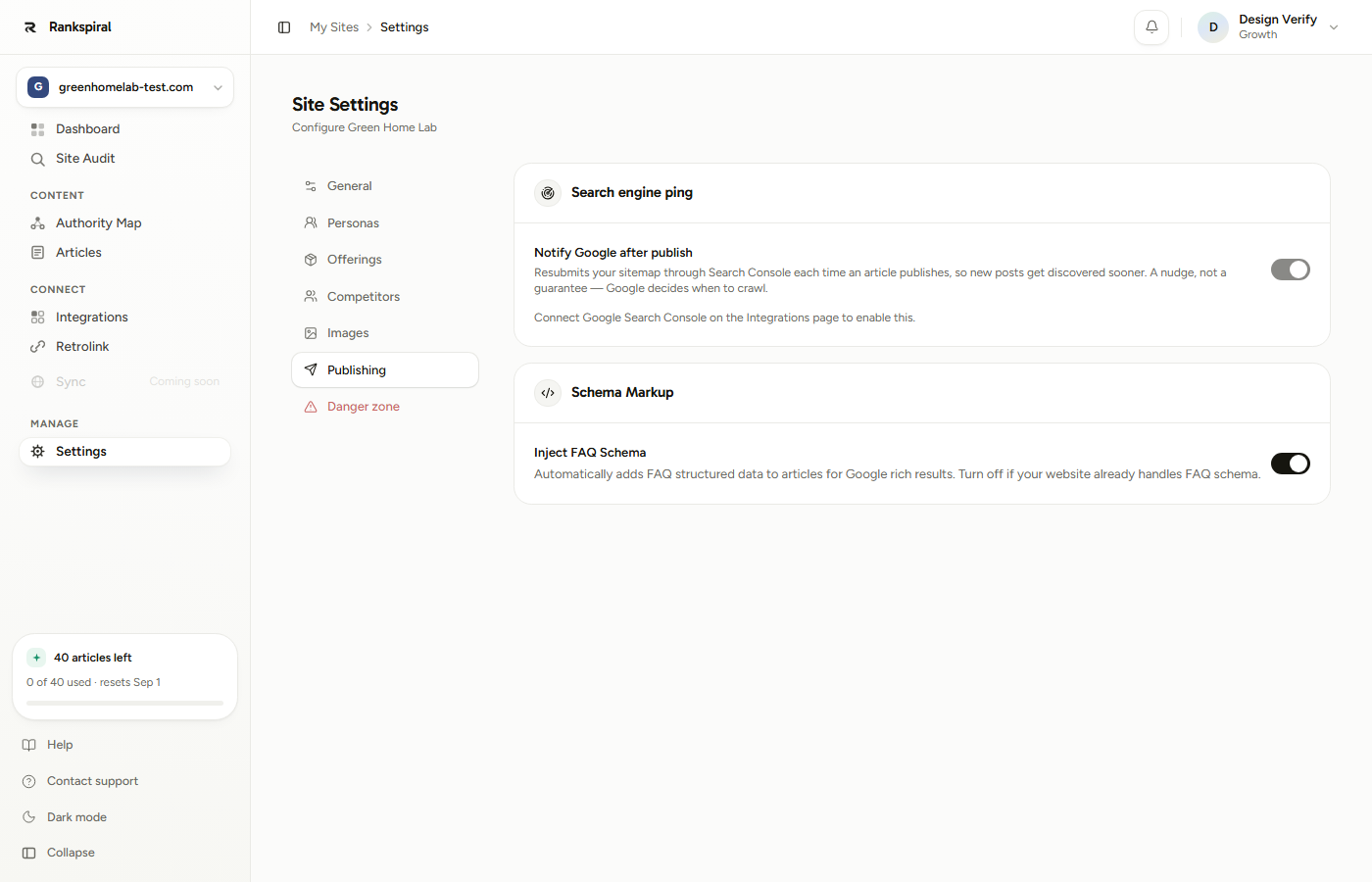
Search engine ping: a nudge, not a promise
Notify Google after publish resubmits your sitemap through the Search Console API every time an article publishes. The point is discovery speed. A brand new URL sitting in a sitemap that Google has not re-read in nine days is a URL Google does not know exists.
It is on by default, and completely inert until Search Console is connected.
What it does not do is make Google crawl.
The card says so in its own copy, and it is worth repeating here because the expectation gap causes real disappointment. Resubmission tells Google the file changed. Crawl scheduling stays entirely Google's decision, and on a young site that decision can take days.
Why it goes through Search Console at all: Google retired the open sitemap ping endpoint in 2023. The old "hit this URL to ping Google" trick does nothing now. The Search Console API is the sanctioned route, which is why this toggle needs a connected property.
It needs Search Console connected, full stop
Until you connect Google Search Console for the site, the toggle is disabled and the card says so. There is nothing to submit through.
The connection has one requirement people get wrong: the service account has to be a Full user on the property, not Restricted. Restricted can read your performance data, which is why the rest of the integration appears to work. Submitting a sitemap is a write, and a restricted account gets a permission error.
When that happens the card tells you exactly that, in amber, under the toggle.
Connecting Google Search Console→The domain-property trap
Here is the one genuinely non-obvious thing on this page.
Search Console properties come in two shapes. A URL-prefix property looks like https://yoursite.com/. A domain property looks like sc-domain:yoursite.com and covers every subdomain and protocol at once, which is why most people are told to prefer it.
But sc-domain:yoursite.com is not a web address. It has no protocol and no origin, so there is nowhere to go looking for /sitemap.xml. On a domain property, automatic sitemap detection cannot run, and the ping has nothing to submit until you tell it where the file is.
If you use a domain property, set the sitemap manually. Go to Settings → Offerings → Your Pages, choose Sitemap URL, paste the full address (https://yoursite.com/sitemap.xml) and press Import. That saves the URL the ping will use, and without it the card keeps reporting that no sitemap was found.
On a URL-prefix property none of this applies. The first publish probes /sitemap.xml, then /sitemap_index.xml, keeps whichever answers with real sitemap XML, and caches it so the check only happens once.
How you know it worked
After a publish, the card shows one line under the toggle:
Google notified · Mar 4, 2:15 PM
If it failed, you get the reason instead, in amber, and it will be one of three: no sitemap found, a Search Console permission problem, or a submit failure that will simply retry on your next publish.
The done state: a green "Google notified" line with a timestamp from your most recent publish, and a sitemap URL listed above it. Nothing else needs your attention. This runs on every publish from then on.
FAQ schema: structure for machines
Inject FAQ Schema is on by default for every site. When an article publishes, its HTML is scanned for an FAQ section, and if one is found, a block of JSON-LD structured data is appended to the body that goes to your CMS.
The detection is structural, not linguistic, and that matters if you write in anything other than English. A section counts as an FAQ when two or more of its sub-headings are phrased as questions, whatever the H2 above them says and in whatever language. "Gyakori kérdések" works exactly as well as "FAQ", because the heading text is never what decides.
A heading that literally names an FAQ (FAQ, frequently asked questions, common questions, questions and answers) lowers the bar to a single question. That is a bonus, not a requirement.
Inside the section, two patterns are recognised:
- H3 questions - each H3 becomes a question, everything until the next H3 becomes its answer. This is what RankSpiral's own articles produce, so it is the path you will normally be on.
- Bold paragraph questions - a paragraph that is nothing but a bolded question, followed by answer paragraphs. Useful when you have hand-edited an article or pasted one in.
A question mark is required either way, in your script's own form: the Latin ?, the full-width ?, the Arabic ؟, and the Greek question-semicolon all count. No question mark, no entry.
Now the honest part
You will read, on a lot of SEO blogs, that FAQ schema gets you rich results in Google. That advice is out of date.
Google narrowed FAQ rich results in 2023 to a small set of authoritative government and health sites. If you run a normal business blog, adding FAQ schema will not put an expandable accordion under your listing. It has not for years.
So why is it still on by default?
Because rich snippets stopped being the point. What structured data does now is hand a machine an unambiguous, pre-parsed pair: this exact string is a question, this exact string is its answer. AI answer engines, assistants, and anything that ingests your page without rendering it get a clean object instead of guessing from HTML.
Your FAQ section already answers the question. Schema is what makes the answer legible to something that never reads the page.
It costs you nothing, it cannot hurt rankings, and the moment your content is being quoted rather than clicked, the structure is what survives the trip.
How AI search reads your content→When to turn it off
One situation, really: your site already outputs FAQ schema itself. Plenty of WordPress SEO plugins and Shopify themes do. Two FAQPage blocks on one page is a duplicate-markup mess, and this toggle is the easier of the two to turn off.
Checking an article before you publish
Open any draft and look at the Schema Markup block in the right-hand SEO sidebar. It tells you one of three things:
- FAQ Schema ready (6 questions) in green, with "Injected automatically when published" underneath. You are done.
- No FAQ section found in amber, suggesting you add an FAQ heading with H3 questions. The article will publish fine, just without schema.
- FAQ Schema disabled in grey, when the toggle on this tab is off.
That middle state is the useful one. It is a live check on whether your article's FAQ section is shaped in a way machines can parse, and you can fix it in the editor before publishing rather than discovering it afterwards.
Getting the most out of both
Come back to this tab the day you connect Search Console. The ping is already on, so nothing needs switching, but the status line only starts meaning something once there is a property behind it. Checking once tells you whether the sitemap resolved.
Give every article a real FAQ section, four or five questions. Write the questions your buyers actually ask, as H3 headings, ending in question marks, each with a two-to-four-sentence answer. Direct question-and-answer pairs are the format that gets lifted into AI answers, and the schema then comes free.
Answer the question in the first sentence. The schema's answer field takes the text that follows the heading, so an answer that opens with a paragraph of throat-clearing produces a weak extracted answer. Verdict first, nuance second.
Check the sitemap line once, then forget it. After your first publish, look at the card. A green "Google notified" line means you never need to think about this again, and a "no sitemap found" line is a two-minute fix that would otherwise silently do nothing for months.
Troubleshooting
- The ping toggle is greyed out. Search Console is not connected for this site. There is nothing to submit through until it is.
- "No sitemap found" after several publishes. Almost always a
sc-domain:property, where automatic detection cannot run. Set the sitemap URL manually under Offerings. - "Search Console rejected the request". The service account has Restricted permission. Change it to Full in Search Console and republish anything to trigger a fresh attempt.
- New posts still take days to appear. That is normal and not a fault. The ping shortens the discovery step, not the crawl queue.
- The sidebar says no FAQ section found. The questions under your heading are probably not H3s, or fewer than two of them end in a question mark. Make each question an H3 ending in
?; the heading's wording does not matter (though naming it "FAQ" lets a single question qualify). - Schema appears on the article page but not on your CMS. The JSON-LD is appended at publish time, not written into the draft body, so it exists only in the published copy. Some CMS editors strip
scripttags from pasted content; check the live page source rather than the CMS editor.
Two toggles, ninety seconds of setup, and the rest of your publishing life is unbothered.
Auto scheduling and publishing→Was this page useful?
Tell us what was missing and we'll fix the page.