How RankSpiral Decides What to Write Next
The queue is not arbitrary: plan-derived batch sizes, value against difficulty, computed winnability, and how auto-assign groups keywords by real SERPs.
Updated Sep 9, 2026 · 9 min read
You build a map, you get two hundred keywords, and then you sit there wondering which one to write.
There is a button for that, and its answer is not arbitrary. It just never explains itself.
This page covers the two mechanisms behind the order: Queue the next batch, which decides what to write and how much, and Auto-assign, which decides what belongs together in the first place. Once you can see the logic, the queue stops looking like a slot machine.
Queue the next batch
The same action appears in three places, worded slightly differently.
- Value map tab - the Queue the next 4 button under the pace panel. Uses the global ranking.
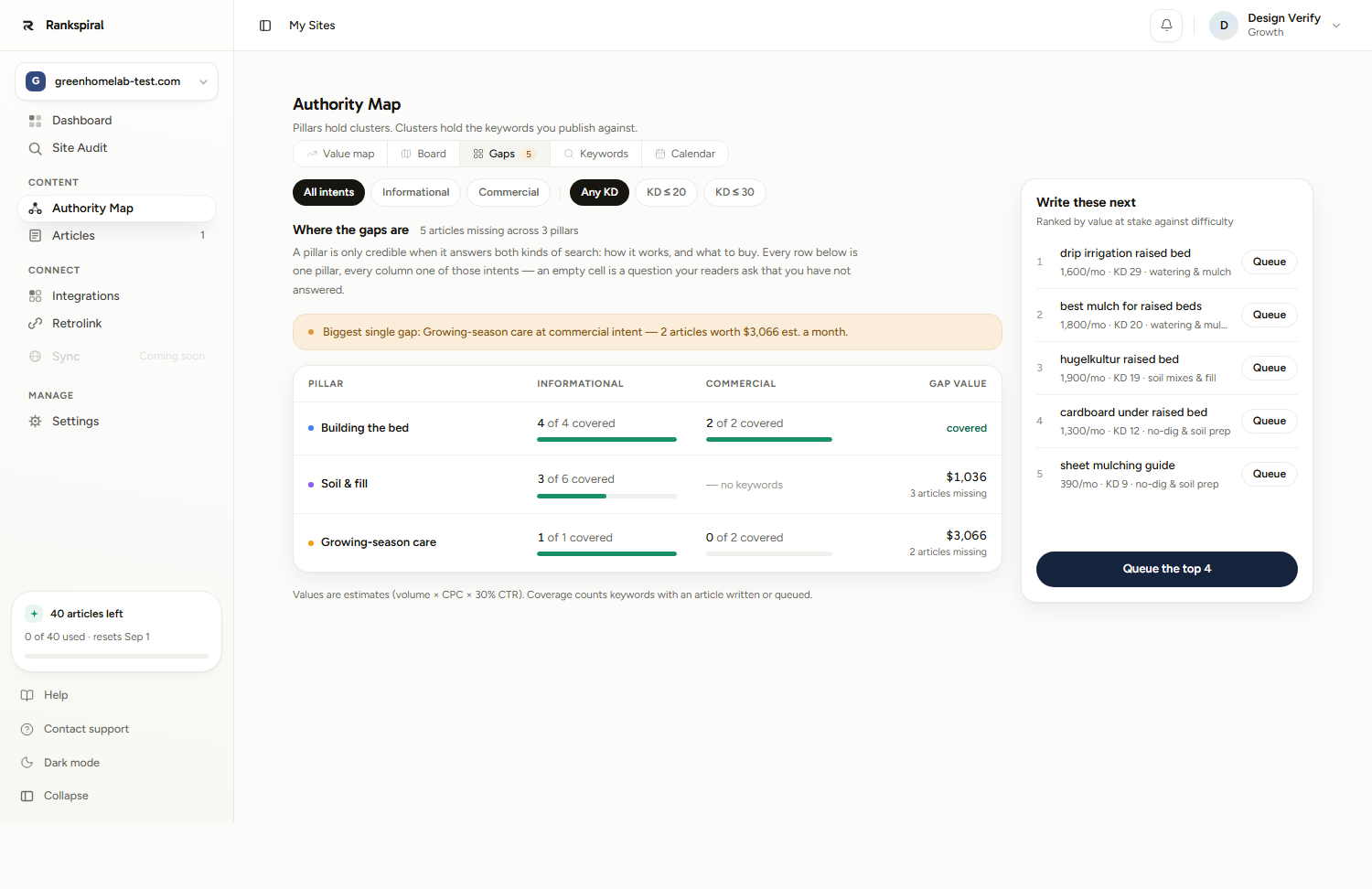
- Gaps tab - Queue the top 4 under the Write these next rail. Same ranking, but your intent and difficulty filters apply first.
- Any cluster's detail panel - Queue 3 articles, scoped to that one cluster. This is the finish-a-cluster path, and it is fixed at three regardless of plan.
Where the number comes from
The batch size is derived from your plan's monthly article allowance, not chosen by you. It is one tenth of your monthly quota, rounded up, then clamped between 1 and 10.
| Plan | Articles per month | Batch size |
|---|---|---|
| Trial | 2 (lifetime) | 1 |
| Starter | 30 | 3 |
| Growth | 50 | 5 |
| Portfolio | 100 | 10 |
| Agency | 220 | 10 |
The logic is a fortnight of work: enough to keep going, small enough that you can change your mind. The server re-applies this cap on every request, so the number on the button is the number you get.
What actually happens when you click
Not what most people assume. The batch does not all start at once.
The top keyword starts writing immediately. The rest are scheduled one per day, starting tomorrow, and appear on the Calendar tab.
The drip is deliberate. A steady cadence is a stronger signal than a burst, and it means a batch you regret is one article spent rather than ten.
Quota only debits when an article is actually written, so scheduled keywords cost nothing until their day arrives. If you are already at your monthly limit, everything including the first one gets scheduled instead, and the toast says so: Your article limit is reached, scheduled ones write when quota allows.
Keywords that already have an article, or are already queued, are skipped rather than duplicated.
The selection logic, in the order it applies
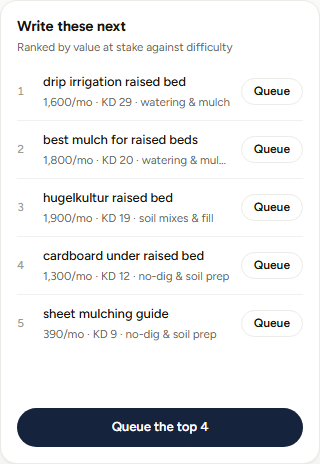
First, eligibility. Only keywords with no article and no queue entry are candidates. Written, queued, and generated keywords drop out entirely.
Second, value. Every keyword carries an estimated monthly value: search volume multiplied by cost-per-click, multiplied by a 30% click share. It is what buying that traffic would cost in ads, and it exists to rank your options rather than to predict your revenue.
Third, difficulty as the tie-break. Two keywords worth roughly the same, and the lower KD goes first. Keywords with no difficulty data sort last, on the assumption that unknown is not the same as easy.
The top 30 survive, and the Gaps rail shows the top seven of those after your filters.
Volume alone is not the ranking. A 400-a-month keyword with a $9 CPC outranks a 4,000-a-month keyword with no advertiser interest, because the first one is where buyers are. That is usually the ordering that looks wrong until you know this.
Winnability: what it does and does not decide
When the map is built, every keyword is scored for winnability from 1 to 5, using search-result evidence rather than a model's opinion:
- Difficulty bands set the baseline - under KD 15 scores 5, under 30 scores 4, under 50 scores 3, under 70 scores 2, above that scores 1. Unknown difficulty starts at 3.
- A weak page one adds a point - two or more forum or user-generated results in the top 10 means the incumbents are beatable.
- A zero-organic result page loses a point - if Google is filling the page with its own features, there is less to win.
- An AI Overview on an informational query loses a point - the answer is being given above your listing.
- Already ranking 11 to 30 forces a 5 - you are close, and the page is flagged as a quick win.
That score is combined with business relevance and a 1.3x weighting for commercial intent to produce a priority figure.
Priority orders keywords inside a cluster, not the queue. Open any cluster and the highest-priority keyword sits at the top, which is your "start here". The Queue button ranks by value against difficulty instead. They usually agree; when they do not, the cluster order is the one that knows about your own existing rankings.
Cluster completion, and when to override the queue
The global queue optimises for value across your whole map, which means it will happily take one keyword from each of four different clusters.
That is not always what you want. Six articles covering one subtopic completely beats twenty articles covering twenty subtopics halfway, because search rewards depth of coverage, not breadth of attempts.
The cluster panel is how you say so. Click any cluster on the Value map, read its keyword list, and use Queue 3 articles to work that cluster down instead. Do that when a cluster is already at 60 or 70% covered, because the last few articles in a nearly-finished cluster are worth more than the first article in a new one.
Auto-assign: deciding what belongs together
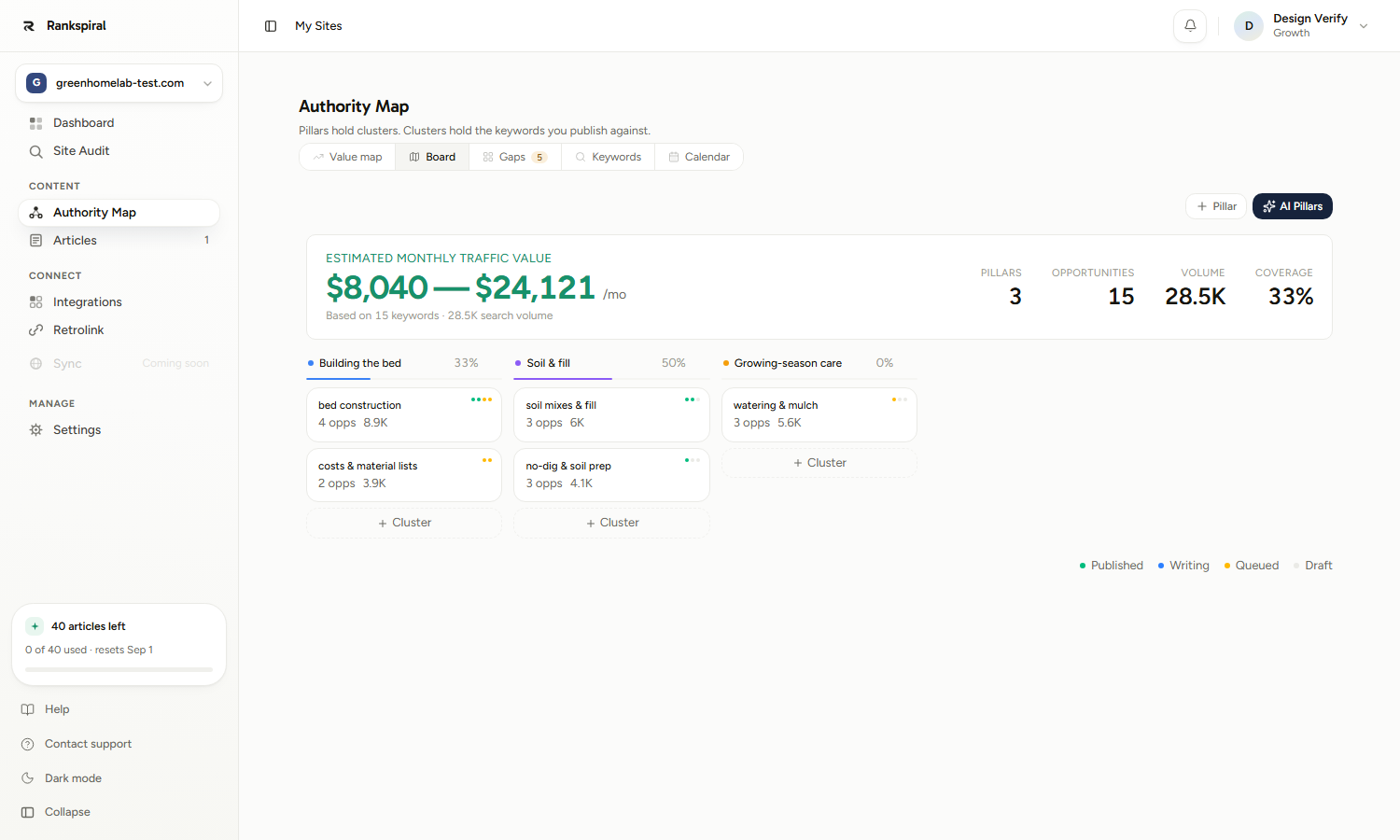
Keywords you imported, typed, or added later arrive with no cluster. An Unassigned Keywords section appears on the Board tab whenever you have any, with an Auto-assign button and a remaining-runs count.
It handles up to 50 unassigned keywords per run and takes 30 to 60 seconds, because it is fetching live Google result pages rather than reading your keyword text.
How it decides
The principle is the one the whole product runs on: two keywords belong together if Google already treats them as the same question.
- Fetch the evidence. A live top-10 for each unassigned keyword, reusing any snapshot taken in the last 30 days so a re-run after adding one keyword only pays for that keyword.
- Match into existing clusters. A keyword joins a cluster when it shares at least two of ten result URLs with one of that cluster's members. Best overlap wins.
- Group the leftovers with each other. Unmatched keywords whose results overlap mutually form new clusters, with at least two members each. A model is then asked to name them and pick a pillar, and nothing else.
- One AI pass for true singletons. Keywords with no result data and no overlap get a single model call with real cluster context. It is allowed to answer "none of these", and leaving a keyword unassigned is treated as the correct outcome.
The model never decides merges. It names groups and assigns leftovers, and that is the whole of its job. Letting it decide what belongs together is what produced near-identical clusters in earlier versions, so the decision was moved to shared search results and left there.
The cannibalisation guard
Keywords you already rank in the top 10 for are deliberately left out and reported back: 3 left out, you already rank top-10 for them.
That is not a bug to work around. Writing a second page for a keyword you already own makes two of your pages compete with each other, and the usual result is that both slip.
The allowance
You get four auto-assign runs per site per calendar month, resetting on the 1st, and the button shows how many are left. The toast repeats it after every run.
A failed run is refunded. A run that assigns nothing because nothing matched is not, so add keywords in batches rather than one at a time.
Getting the most out of both
Queue a batch rather than picking a keyword, for your first month at least. The calculation is the one you would be doing by eye, and worse. Come back to hand-picking once you have read four or five finished articles and know what you want more of.
Use the Gaps filters as a deliberate steer. Set Commercial and KD 20 or under, then queue. You now have a batch of low-difficulty buyer-intent articles, which is the fastest route to revenue rather than to traffic.
Alternate the two paths. One global batch for value, then one cluster batch to finish what you started. Pure value-chasing leaves you with a map full of half-covered clusters and no topical depth anywhere.
Import everything, then auto-assign once. Four runs a month is comfortable if you batch and frustrating if you run it every time you add three keywords.
Read the toast. It names how many were assigned by shared search results versus by the fallback, how many clusters were created, and how many stayed unassigned. A run that assigned mostly by the fallback is telling you the result pages disagreed with your structure.
When the order looks wrong
- A low-volume keyword is ranked first. It has a high CPC. Value beats volume here, and that is usually the right call.
- A keyword you care about is nowhere in the list. It has no volume or CPC data, so its estimated value is zero. Run a data refresh, or queue it by hand from its row.
- The queue button is greyed out. Every mapped keyword already has an article written or queued. Add keywords, or build out more clusters.
- The batch only started one article. That is the design. Check the Calendar tab for the rest, one per day.
- Auto-assign left keywords unassigned. Their result pages matched nothing in your map. That is an honest answer, and force-fitting them would pollute your internal linking. Drag them onto a cluster manually, or accept they are a different topic.
- No Unassigned Keywords section on the Board. Everything is already assigned. The section only renders when there is something in it.
Most people lose their first month choosing keywords instead of publishing them.
The order the queue picks will not be perfect. It will be better than yours, available instantly, and, crucially, already moving.
Was this page useful?
Tell us what was missing and we'll fix the page.