Why Isn't My Page in Google Yet?
Crawled, indexed and ranking are three different things. How to check which one you are stuck on, what actually speeds it up, and when to worry.
Updated Aug 26, 2026 · 10 min read
You published an article four days ago. You searched for its exact title in Google, in quotes, and got nothing. Somewhere between then and now you started wondering whether the whole thing is broken.
It almost certainly is not.
This page explains the three separate states a page moves through, how to find out which one yours is stuck in, the timelines that are actually normal, and the short list of things that speed it up. Most of the panic in this situation comes from not knowing which of the three you are looking at.
Crawled, indexed and ranking are three different things
People use these words as if they mean the same event. They are three separate steps, and a page can pass one and fail the next.
- Crawled - Googlebot fetched the URL and read the HTML. This is a visit, nothing more. A crawled page can sit in Google's systems for weeks without ever entering the index.
- Indexed - Google decided the page was worth storing and it is now eligible to appear in results. This is the gate everyone means when they say "not in Google".
- Ranking - the page appears for actual queries at some position. Indexed at position 84 is completely normal for a new article and looks identical to "not indexed" if you only ever check page one.
The fastest sanity check: search site:yoursite.com/your-article-slug in Google. A result means the page is indexed and your problem is ranking, not indexing. No result means it is not indexed yet, and the rest of this page applies.
Those two outcomes lead to completely different afternoons. One of them is a content and links problem that takes months. The other is usually a matter of waiting, and occasionally a five-minute fix.
Check it properly with URL Inspection
The site: search is a smoke test. Search Console tells you the actual verdict.
Open Search Console, paste the full URL into the search bar at the top (the one labelled Inspect any URL in ...), and press enter. You get one of a handful of verdicts, and each one means something specific.
| What Search Console says | What it means | What to do |
|---|---|---|
| URL is on Google | Indexed. You are done here. | Nothing. Your issue is ranking. |
| Discovered - currently not indexed | Google knows the URL exists but has not bothered to fetch it yet. Almost always a crawl-budget or trust signal on a young site. | Add internal links to it. Wait. |
| Crawled - currently not indexed | Google read it and chose not to store it. This is a quality judgement, and it is the one worth acting on. | See the "real problem" section below. |
| Excluded by noindex tag | Your site is telling Google to stay away. | Fix the tag. This is a five-minute fix. |
| Alternate page with proper canonical tag | Google folded this URL into another one it considers the original. | Check the canonical. Often correct, occasionally your CMS being clever. |
| Page with redirect | The URL redirects somewhere, so it is not the page being indexed. | Inspect the destination instead. |
If the verdict is anything other than URL is on Google, click Request Indexing once. Once is the operative word, and the next section explains why.
Honest limit: RankSpiral does not read index status. The Search Console integration pulls clicks, impressions, CTR and position for the last 30 days, broken down by date and by page, and nothing else. There is no URL Inspection call anywhere in the product, so this check has to happen in Search Console itself.
What normal actually looks like
The single biggest reason people think something is broken is that they are holding a new domain to an established site's timeline.
Those two situations differ by roughly an order of magnitude, and neither one is unusual.
| Brand-new domain | Established site (crawled weekly or better) | |
|---|---|---|
| First page ever indexed | 3 days to 4 weeks | Same day to 3 days |
| A typical new article | 1 to 3 weeks | Hours to 3 days |
| Worth investigating at | Day 28 | Day 7 |
| Genuinely wrong at | Week 8 with zero pages indexed | Week 2 for a single page |
Set two reminders and stop checking in between. Day 3 for a site with history, day 21 for a domain registered this quarter. Checking daily changes nothing except your mood.
One thing that genuinely does accelerate a new domain: having more than one page. A site with a single article and no internal structure gives Googlebot nothing to follow and no reason to come back.
What actually helps, in order of payoff
Four things move the needle. They are unglamorous and they work.
- Point internal links at the page. This is the biggest lever and the one people skip. Two or three links from articles you already have gives Googlebot a path to the new URL and tells it the page matters to you. RankSpiral's Retrolink scan does this across your back catalogue, and the writing pipeline adds forward links as articles are generated.
- Have a sitemap, and make sure the new URL is in it. A sitemap is a hint, not an instruction, but a missing sitemap on a young site is a genuine handicap. Set yours under Settings, Offerings, Sitemap if it is not at the obvious location.
- Get linked from somewhere already crawled. One link from any page Google visits regularly (a partner site, a directory, a newsletter archive, your own other site) beats fifty submissions. Discovery is a graph problem.
- Publish more than once. A site that publishes weekly gets crawled more often than a site that published five posts in March and went quiet. Crawl frequency is earned behaviour, not a setting.
The sitemap ping, and what it really does
When an article publishes successfully, RankSpiral resubmits your sitemap to Google through the Search Console API. It is on by default and lives in Settings, Publishing as a card called Search engine ping with a toggle labelled Notify Google after publish.
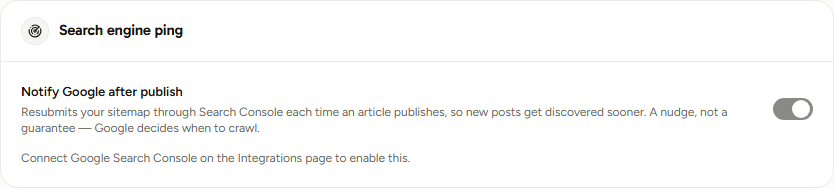
Three things are worth knowing about it. It only pings Google, because the old open ping endpoint that hit several engines was retired in 2023 and the Search Console API is the sanctioned route.
It also does nothing at all if Search Console is not connected, which is why the toggle is greyed out until it is. And the service account needs Full permission on the property, not Restricted, or the submission is rejected.
The product's own wording for this is the honest one: a nudge, not a guarantee. Google still decides when to crawl.
What does not help
Named plainly, because each of these wastes an afternoon that a single internal link would have fixed.
- Requesting indexing repeatedly. The queue does not care how many times you join it. One request per URL, then leave it alone.
- Resubmitting the sitemap by hand every day. Same queue, same answer.
- Third-party indexing services. The ones that work are just building links, and the ones that promise instant indexing are usually pinging endpoints that no longer exist.
- Editing the article to "refresh" it. A page that was never indexed has no freshness signal to refresh. Editing before it has been crawled once accomplishes nothing.
- Adding the keyword five more times. Google is not withholding indexing over keyword density. It has not worked that way in a very long time.
When "not indexed" is a real problem
Three causes account for nearly every case that is not simply early. All three show up as Crawled - currently not indexed, which is the verdict to take seriously.
A stray noindex tag, which is the cheapest and most embarrassing cause. Staging sites ship with it, SEO plugins add it to categories and archives, and some themes apply it to custom post types. RankSpiral's site audit has a check called Noindex misuse under its Indexability category for exactly this, alongside Robots.txt blocking, Sitemap exists, Sitemap validity, Sitemap coverage, Indexable page ratio and Crawl depth.
Duplicate or near-duplicate content. If your page says roughly what another page already says, Google stores one of them. That other page can be a competitor's, or it can be yours, which is the awkward version.
Thin content with no reason to exist. A 400-word post that answers a question three sentences deep, on a domain with no track record, is a page Google can safely skip. This is the one nobody wants to hear and it is the most common of the three.
The mistake almost everyone makes first: assuming a technical cause. Run the audit, confirm nothing is blocked, and if the answer is "nothing is blocked", accept that the page is either early or thin. Those are the only two remaining options and one of them is fixable today.
A worked example
A New Zealand hiking-gear review site, domain registered in February, first article published on 4 March.
By 18 March the owner had published six articles and none of them appeared for their own titles in quotes. The site: search returned the homepage and nothing else.
URL Inspection told the real story. Five of the six read Discovered - currently not indexed, and one read Crawled - currently not indexed.
Five pages Google had never fetched, and one it had fetched and rejected. Two different problems on the same site, on the same day.
The five discovered-not-crawled pages had no internal links at all. Every article linked out to gear manufacturers and none of them linked to each other, so the site was six islands with a homepage floating nearby.
The fix took forty minutes. Three internal links added to each article pointing at siblings in the same topic, the sitemap URL confirmed in settings, and one link earned from a tramping forum thread the owner was already active in.
| Date | Indexed pages | Note |
|---|---|---|
| 18 March | 1 | Homepage only. Internal links added this day. |
| 25 March | 4 | Forum link crawled on 21 March. |
| 8 April | 7 | All six articles plus the homepage. |
The one page that had been Crawled - currently not indexed was the shortest on the site, at 520 words about a single water filter. It got indexed too, but only after it was rewritten to cover the four filters people actually compare.
The pattern to take from this: the two verdicts needed opposite responses. Discovered-not-crawled was solved with links, and crawled-not-indexed was solved with a better page. Reading the verdict first is what saved the owner from rewriting five articles that were fine.
What to do this week
Three moves, in this order, and none of them take long.
Inspect one URL rather than worrying about all of them. Pick your most recent article, get the verdict, and let it tell you which of the two problems you have. Guessing costs more than the ninety seconds this takes.
Count the internal links pointing at your five newest pages. If the answer is zero for any of them, that is your entire to-do list this week. Aim for at least two inbound internal links per article before you write anything new.
Set a reminder for day 21 and then stop looking. Write the date down. New domains index on Google's schedule, and the only thing that changes that schedule is the work in the previous paragraph.
Sitemap ping: what fires on publish, and when it does not→ Connecting Google Search Console→ Smart internal linking and the Retrolink scan→ Site audit: the seven Indexability checks explained→ How long until SEO works: a realistic timeline→Being indexed is not an achievement. It is the starting line, and the race is the part that takes months.
Was this page useful?
Tell us what was missing and we'll fix the page.