Buyer-Intent Content for Ecommerce
How commercial-intent articles differ from informational ones, what the catalogue sync feeds them, and how to link to products without sounding like an ad.
Updated Sep 9, 2026 · 8 min read
Most store blogs are written as if the reader wandered in by accident. Seasonal tips, a listicle about productivity, a post about the team's favourite mugs.
Meanwhile the searches that decide whether anyone buys anything are sitting untouched: standing desk vs treadmill desk, best ergonomic chair for lower back pain, are mesh chairs worth it.
Those are buyer-intent queries, and they are a different kind of article with a different job. This page covers the three formats worth writing, what your catalogue actually gives the writer, and how to link to products without the whole thing reading like a brochure.
Commercial intent is a different article, not a different tone
An informational article's job is to answer a question completely. A buyer-intent article's job is to help someone decide, which means it needs comparisons, prices, trade-offs, and a recommendation it is willing to make.
RankSpiral treats them as separate pipelines. Research, outline, and writing each run on different instructions depending on the intent, and there are three article shapes rather than two.
| Shape | What triggers it | What you get |
|---|---|---|
| Guide / How-to | how to, what is, guide to, and anything unmatched | Explanation, depth, no product push |
| Listicle / Best-of | best, top 10, alternatives to, cheapest | A ranked roundup with a table |
| Comparison / X vs Y | vs, versus, compared to, which is better | Head-to-head, criteria by criteria |
The important part is how the shape gets chosen.
The keyword phrase decides the article type, before any model reads anything. It is a pattern match on the words in your keyword, so ergonomic chair buying guide produces a guide and best ergonomic chairs produces a roundup, from the same underlying topic.
Use that on purpose. If a keyword is returning the wrong article shape, the fix is to rename the keyword rather than to fight the draft. Add vs and you get a comparison. Add best and you get a ranked list. One word in the Keywords tab is cheaper than a regeneration.
One deliberate exception is built in, so you do not get a product roundup for best time to water tomatoes. Where best is followed by something that is clearly not a product, the article stays informational.
The three formats, and which to write first
You need all three eventually. The order matters more than people expect, because they rank at different speeds and convert at different rates.
- Comparisons - the fastest to rank and the closest to a decision. Somebody searching mesh vs foam office chair has narrowed the field to two and wants permission. Write these first.
- Buying guides - how to choose an ergonomic chair. They rank more slowly, they earn the internal links, and they are the natural pillar page for the cluster underneath.
- Roundups - best standing desks under 800 dollars. Highest competition, highest commercial value, and the most credible only once the other two exist around them.
Favourite of the three for a young store: comparisons. They are usually lower difficulty, they name your product against a real alternative rather than against nine, and they read as useful rather than as a catalogue.
Where commercial gaps show up
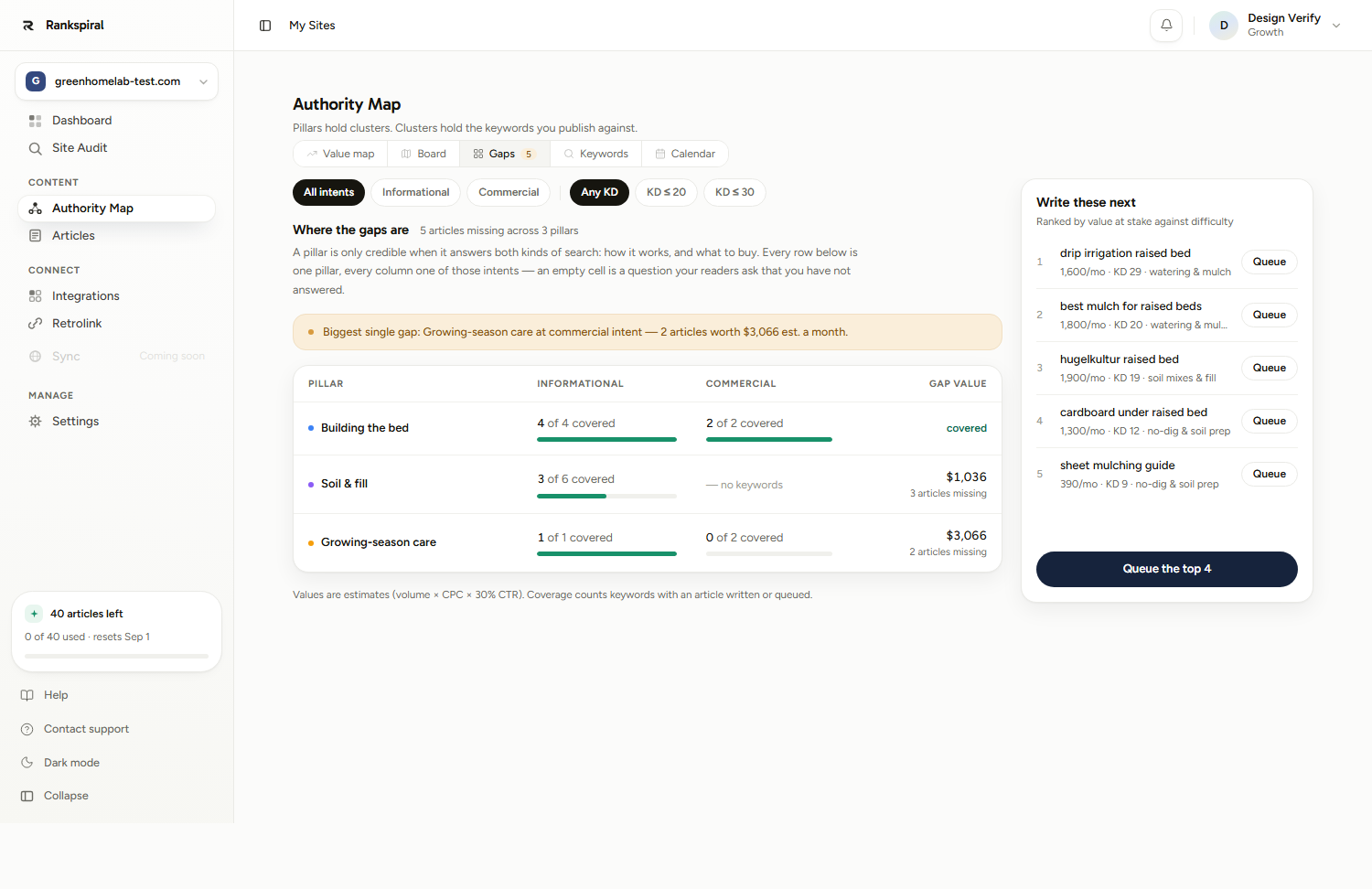
The Gaps tab on your Authority Map splits every pillar into Informational and Commercial. An empty Commercial cell in a pillar you have already covered informationally is the highest-return article available to you.
Filter the tab to Commercial and read the Write these next rail on the right. It ranks what is left by value at stake against difficulty.
Transactional keywords also carry more weight in the queue's own ordering, which is why they surface earlier than their raw volume would suggest.
Feed it a real catalogue, or it will write around your products
This is where store blogs are won, and it is mostly a data problem rather than a writing one.
Connecting Shopify syncs your catalogue into RankSpiral: title, handle, product type, live URL, a trimmed description, current price, compare-at price, variant names, and the first image. Not on Shopify? A CSV import under Settings → Offerings → Store products feeds the writer the same way, Amazon and WooCommerce exports included. Either way, the writer reads the catalogue while it works, which is how an article ends up saying the product, at the price, linked.
Three numbers to plan around.
- 250 products per sync. One page, no pagination, no error if you have more. Large catalogues are silently truncated.
- 50 products reach the article - the 50 most relevant to its keyword and title, not the first 50 synced, so a big catalogue still puts the right gear in front of each piece.
- Prices refresh daily. The catalogue re-syncs automatically once a day; press Sync Products yourself when a sale launches and 24 hours is too slow.
The instructions the writer receives are specific, and worth knowing because they explain what you will see in the drafts. The outline stage must include at least one section that showcases your own products, and is explicitly forbidden from inventing any product that is not in the synced list. The transactional writer is told to place at least two or three different product links across the article, preferring product pages over your homepage.
It is also told to prefer real figures over adjectives, in almost those words: never write affordable pricing when you can write the actual number.
Do not skip Offerings because the catalogue is synced. The sync tells the writer what you sell. Settings → Offerings tells it what you want pushed, and it feeds keyword research directly. Sites with a thin offering get research scoped to 100 percent informational keywords and no branded terms at all, which is the correct default and probably not what an ecommerce site wants. Note that it holds exactly one product or service per site, so fill the What does it do, Who is it for, Key features and What makes you different fields properly rather than adding a second entry.
Linking to products without sounding like an ad
The difference between a useful commercial article and an advertorial is not how many products it mentions. It is whether the reader can tell why one is being recommended.
Four rules, all of which you can check on a finished draft in about a minute.
- Every product mention carries a specific. A price, a dimension, a material, a weight limit. "Our Ridge Task Chair, 320 dollars, rated to 130kg" earns the link. "Check out our chairs" does not.
- Name at least one thing yours is not good at. A roundup where your product wins every category is the most obvious tell there is, and it is the one readers punish.
- Link the product where the decision happens, not in the intro. A link in the first paragraph is a banner. A link inside the paragraph explaining lumbar adjustment is an answer.
- Two or three product links per article, not eight. That is the target the writer already aims for, and it is the right band. Past that, each link is worth less and the article starts reading as a catalogue.
Be aware of what the writer is instructed to do. On transactional articles, your product is positioned as the top recommendation, placed first in roundup tables, and given the overall verdict even where it loses individual categories. That is a deliberate content-marketing stance, not a neutral review. RankSpiral does not add any sponsorship or ownership disclosure for you, so if your market expects one, add it yourself in the editor. One honest sentence near the top costs nothing and is the difference between a trusted comparison and a suspicious one.
A worked example
An ergonomic office furniture store on Shopify. About 180 SKUs, chairs and sit-stand desks, selling to remote workers and small offices in the UK.
Their blog before: fourteen posts, all informational, all about posture and productivity, and one product link across the whole set.
The Gaps tab told the real story. Their seating pillar read 5 of 5 covered on Informational and 0 of 3 on Commercial, with the missing cell valued at about 1,900 pounds a month in equivalent ad spend.
What they changed, in one afternoon:
- Renamed two keywords. Mesh chair information became mesh vs foam office chair, and affordable ergonomic seating became best ergonomic chairs under 400. Same topics, two different article shapes, no regeneration needed because neither had been written yet.
- Rewrote 40 product descriptions. Only the first line of each, because that is the part the sync reads. "Premium comfort, free delivery" became "Mesh back, 4D armrests, rated to 130kg, seat height 45 to 55cm".
- Filled in Offerings properly, including the differentiator field, which had been empty.
- Re-ran Sync Products, then queued the three commercial keywords.
Ten weeks later the comparison article was at position 6, carried three product links, and was responsible for more revenue than the previous fourteen posts combined. The buying guide sat at 19 and was still climbing.
The product-description rewrite did most of that work, which is the unglamorous lesson. The writer can only be as specific as your catalogue lets it be.
You have this working when a finished draft names three of your products with real prices, admits one limitation, and you could hand it to a customer without editing the recommendation out.
The one to write first
Open Gaps, filter to Commercial, and look for a pillar where the Informational column is already covered.
Write the comparison in that pillar. Not the roundup, not the guide, and not the highest-volume thing on the list.
Shopify: the catalogue sync and its limits→ Search intent: the four types→ The Authority Map: finding your commercial gaps→ Internal linking: where product links fit→ Article Generation: the three article shapes, stage by stage→A store blog that answers questions is a nice thing to have.
A store blog that helps people choose is the only kind that ever pays for itself.
Was this page useful?
Tell us what was missing and we'll fix the page.