Reading Your Dashboard
Every card on your site Overview, what each number counts, the exact authority-score formula, and what to do when one of them looks wrong.
Updated Sep 11, 2026 · 9 min read
Your site Overview is the first screen you see after logging in, and it opens with about a dozen cards and forty numbers on it.
Most of them are answering questions you have not asked yet.
This page goes card by card: what each number is counting, what a healthy value looks like, and what to actually do when one of them looks wrong. Read it once and the page stops being wallpaper.
The page has three versions, and it picks one for you
Before anything else: the Overview is not the same layout for every site. It swaps between three states based on real data, so if a card you read about here is missing, that is usually why.
- Nothing published yet - you get a three-step setup panel instead (connect your CMS, build your authority map, approve the first brief). No metrics, because there is nothing to measure.
- Published but nothing ranking - the full set of cards, plus a Where this site is in its run-up panel with four milestones: 20 articles published, every cluster seeded, 90 days of consistent cadence, first top-100 keyword.
- At least one keyword in the top 100 - the complete dashboard described below.
The middle state is where most sites live for their first few months, and the run-up milestones exist precisely because the metric cards are all still zero. That is normal. New domains routinely publish for four to six months before anything appears in the top 100.
The top strip: six numbers in one line

Left to right, and each caption matters as much as the number above it:
- Published - live articles on this site. The caption tells you how many of them are in Google's top 100, and the spark is your cumulative total over the last eight weeks.
- Queued - keywords with a brief and a date, not yet written. Reads briefed, not written.
- Generating - articles the pipeline is actively researching, outlining, or writing right now. Turns amber while it works, says idle otherwise.
- Keywords - every keyword on this site, with the number that has no schedule underneath. Unscheduled keywords never write themselves.
- Words live - total published word count, plus the average per article. Useful mainly as a thinness check.
- Next article - the date of the next scheduled write, and whether that is today, tomorrow, or further out.
The one people misread is Keywords. Fifteen keywords with eleven unscheduled is not a queue, it is a shopping list.
Schedule: what writes next, down to the minute
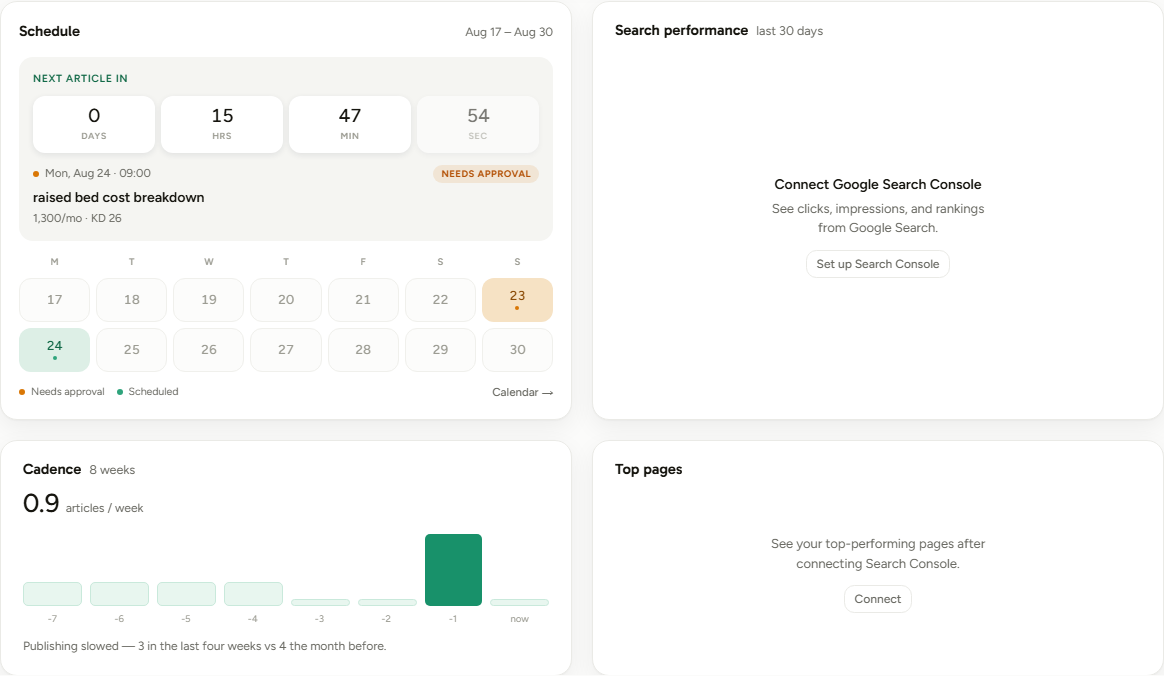
The countdown is real, not decorative. It ticks down to the daily writing cron, which runs at 08:00 UTC on the next day that has a queued keyword.
Underneath sits a two-week grid, Monday to Sunday, covering this week and next. Days carry dots for what is happening: published, generating now, waiting on your approval, or scheduled.
If the next write shows a NEEDS APPROVAL chip, that site has Auto-Write turned off, so the article will stop at the brief and wait for you. Turn it on in Settings, General if you would rather it run straight through.
Search performance and Top pages
Both of these cards need Google Search Console connected. Until then they show a setup prompt, which is the single most common "why is my dashboard empty" answer.
Once connected, Search performance plots the last 30 days with four clickable metric chips: Clicks, Impressions, CTR, and Avg pos. Clicks and impressions are selected by default, and you cannot deselect the last remaining one.
The chart has no shared y-axis on purpose. Impressions run roughly twenty-five times higher than clicks, and position is inverted, so each series is normalised to its own 30-day range. You are comparing shapes, not values. Hover for the real numbers, or select a single metric to get a true axis back.
Top pages lists your best URLs by clicks with their average position. Watch for a page with high impressions and few clicks, because that is a title and meta description problem rather than a ranking problem.
Connected but empty is a real and normal state. A young property genuinely returns zero rows for weeks, and the card says so rather than telling you to go set it up again.
Cadence: the least flattering card on the page
Eight weekly bars, oldest on the left, with your average articles per week above them. Only the two most recent weeks render solid mint, and only if something actually published in them.
The sentence underneath compares the last four weeks against the four before that, in plain counts. Publishing slowed, 3 in the last four weeks vs 4 the month before is the kind of thing that is easy to not notice for a month.
Cadence is the strongest signal you fully control, which is why this card refuses to make a dead stretch look busy.
Rankings: three cards that read together
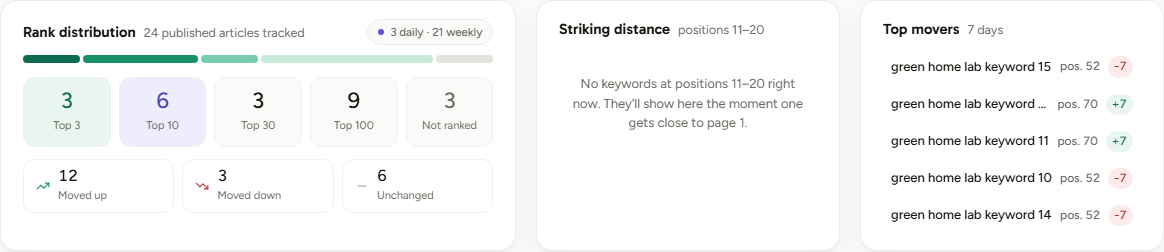
Rank distribution
Every published article's main keyword is checked against Google's top 50, and the result lands in exactly one of five boxes. The buckets are disjoint, so an article at position 3 sits in Top 3 and nowhere else.
| Box | Positions | What it means |
|---|---|---|
| Top 3 | 1 to 3 | The clicks live here. Most of them. |
| Top 10 | 4 to 10 | Page one. Real traffic, room to improve. |
| Top 30 | 11 to 30 | Google knows the page. Almost nobody sees it. |
| Top 100 | 31 to 100 | Indexed and competing, no more than that. |
| Not ranked | none found | Not found in the checked results at all. |
One depth note: checks read the top 50 results, so in practice the Top 100 box fills from positions 31 to 50, and anything deeper lands in Not ranked.
The chip in the header (something like 3 2-day · 21 weekly) is how often each article gets re-checked. New articles are checked every 2 days for their first two weeks, articles two weeks to six months old weekly, older ones monthly, and anything sitting between positions 5 and 20 stays on weekly because that is where movement matters.
Underneath, Moved up, Moved down, and Unchanged compare each article's latest check against its previous one.
Striking distance
Positions 11 to 20 only, best first, up to six of them.
This is the highest-leverage card on the entire page and it is also the smallest. An article at position 12 needs a refresh, not a rewrite, and page two to page one is the shortest distance between you and actual traffic.
Top movers
The five biggest position changes, up or down, with the change badge in mint or coral. Downward movers are the useful half: a keyword that slipped seven places is telling you a competitor published something better this month.
Top movers compares each article's two most recent rank checks. Because check frequency varies by article age, an older article's "move" can span a month even though the card is labelled 7 days.
Topic coverage, and what the authority score really measures
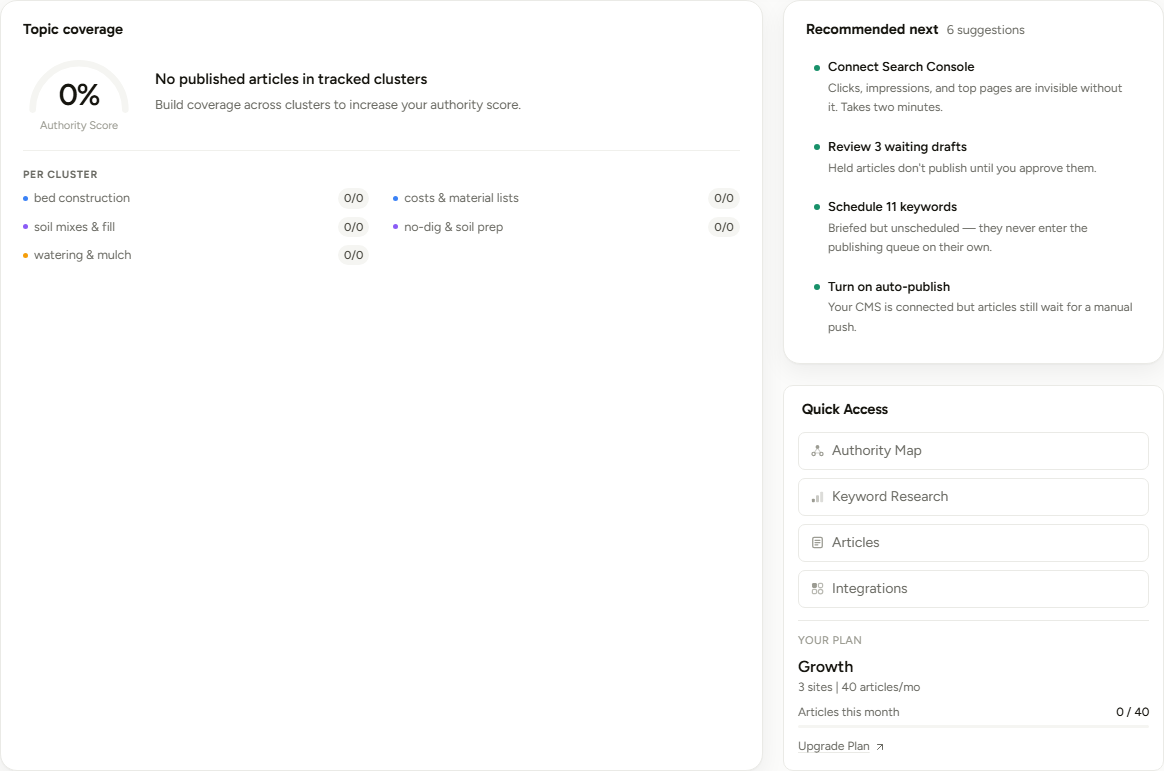
The gauge is one calculation, and it is worth knowing exactly:
Authority score = published articles in your tracked clusters that rank in Google's top 10, divided by all published articles in your tracked clusters.
An article only counts if its primary keyword exactly matches a keyword assigned to a cluster in your Authority Map. Articles written outside the map are invisible here, which is why a busy site can show 0%.
The gauge colour changes at two thresholds: 70 and above is mint, 40 to 69 is amber, and below 40 is coral.
This is a quality score, not a volume score. Publishing more articles without ranking them makes it go down, because they land in the denominator immediately and the numerator months later. A young site should expect it to fall before it rises, and that is the metric working correctly.
Below the gauge, each cluster shows a ranked / total chip. A cluster reading 0/6 is a real problem. A cluster reading 0/0 is simply unwritten and pulls the score neither way.
Recommended next, and the plan card
Recommended next is rule-based, never invented. It only fires on facts the page already knows: no CMS connected, no Search Console, keywords sitting on page two, drafts awaiting review, unscheduled keywords, auto-publish off, empty clusters, or no custom voice set.
It shows the top four of however many apply. When it says "Everything's wired up", that is a genuine all-clear.
The card below it holds Quick Access links and Your Plan. The usage bar is your article allowance, and one thing surprises nearly everyone:
The article count is pooled across every site on your account, not per site. Two sites publishing hard share one monthly number. The bar turns amber past 70% used and red at zero remaining. See Plans and Pricing for the per-tier allowances.
What to do when a number looks bad
| What you see | What it usually means | Do this |
|---|---|---|
| Cadence flat for weeks | The queue ran dry, or nothing was ever scheduled | Open the Authority Map and queue a batch. Unscheduled keywords never write themselves. |
| Everything in Not ranked | Young site, or articles outside your map | Under six months old, wait and keep publishing. Older, check your primary keywords match mapped ones. |
| Striking distance has entries | Genuinely good news | Refresh those articles first. Nothing else on this page pays back faster. |
| Authority score at 0% with articles live | Primary keywords do not match any mapped keyword | Assign those keywords to clusters, or accept the score only tracks mapped work. |
| Generating stuck above zero for hours | A stage failed mid-pipeline | Wait ten minutes. A recovery job sweeps stuck articles every five minutes and resumes them. |
| Search performance empty but connected | Google has no data for the property yet | Nothing to fix. First data usually lands within days to a few weeks. |
How to actually use this page
Give it ninety seconds, twice a week, in this order. Striking distance first (cheapest wins), then Top movers for anything that dropped, then Cadence to confirm you are still shipping. Everything else is context.
Treat Recommended next as a to-do list, not a nag. Every item there is a real gap the product found in your setup, and most take under five minutes.
Ignore the authority score entirely for your first three months. It is a ratio, and ratios need a denominator worth dividing. Watch the run-up milestones instead.
A healthy dashboard six months in: cadence bars mostly filled, something in Top 3, at least one entry in striking distance to work on, and Recommended next showing two items or fewer.
One last thing, because it saves people a lot of anxiety.
Nine of these cards are lagging indicators, and exactly two are things you control today: cadence, and whether anything is queued. Fix those and the rest catch up on their own schedule.
Was this page useful?
Tell us what was missing and we'll fix the page.