Managing Your Subscription
Upgrading, downgrading, what happens to your sites, yearly vs monthly, the billing portal, and how the cancellation and 50% offer really work.
Updated Sep 9, 2026 · 9 min read
Billing pages are usually written to be reassuring. This one is written to be accurate, which occasionally means telling you something you would rather not hear.
Everything below was checked against the live plan configuration and the pricing page on the day it was written.
Where your subscription lives
One place: Settings, in the Plan & Billing card.
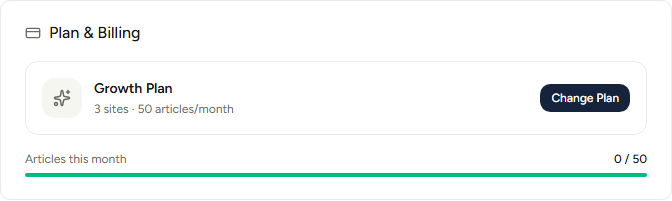
Up to three buttons appear on that card, and which ones you see depends on your state:
- Change Plan - always there. Reads Choose Plan if you are on the trial or your trial has expired.
- Billing - appears once you have paid for something. It opens the Stripe billing portal.
- Cancel - appears only while you have an active subscription that is not already set to cancel.
The meter underneath reads Articles this month and resets on the first. It is pooled across every site on the account, not divided between them.
The four plans
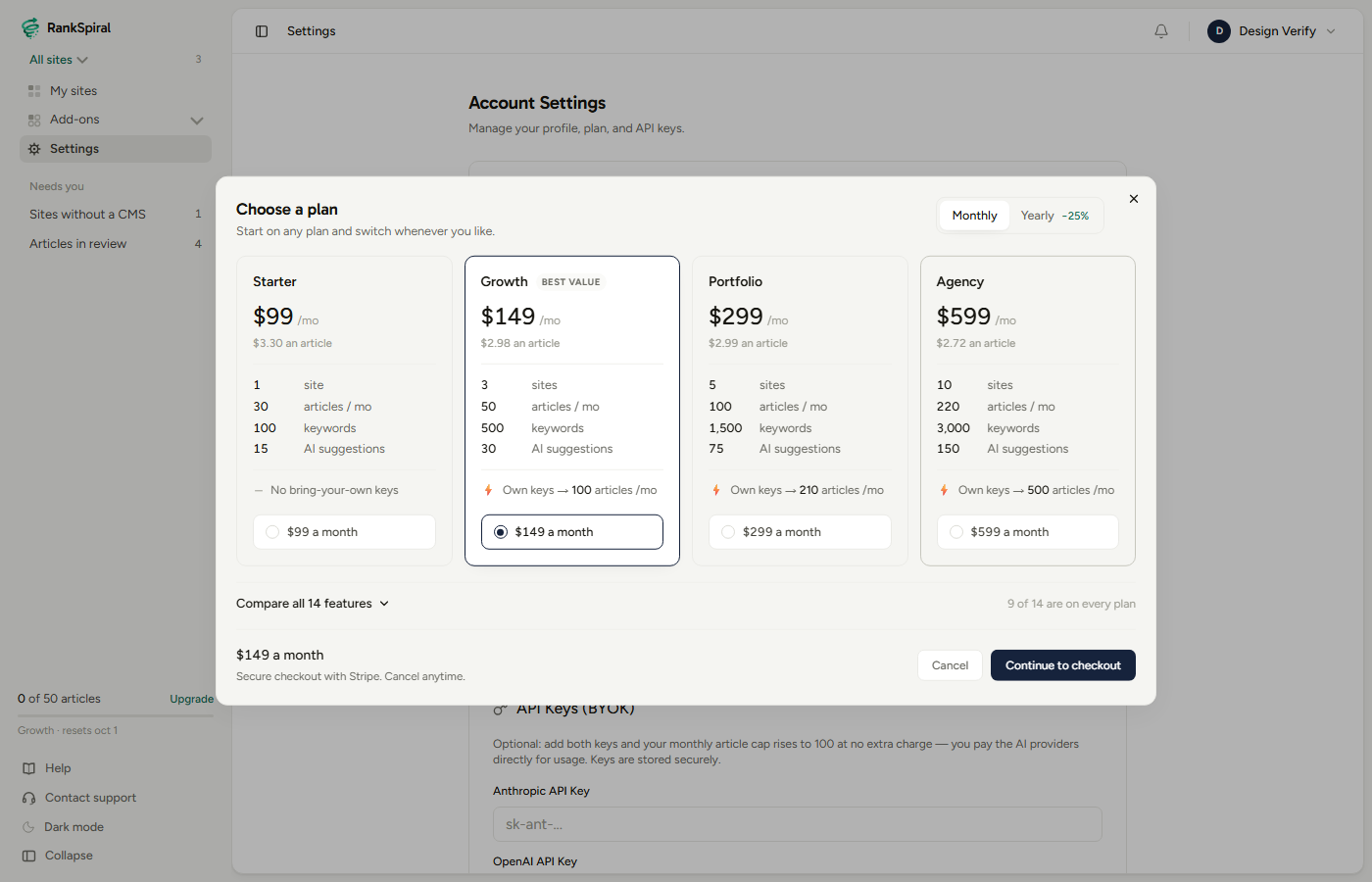
| Plan | Monthly | Yearly | Sites | Articles / month | Tracked keywords |
|---|---|---|---|---|---|
| Trial | Free | Free | 1 | 2 in total | 50 |
| Starter | $99 | $891 | 1 | 30 | 100 |
| Growth | $149 | $1,341 | 3 | 50 | 500 |
| Portfolio | $299 | $2,691 | 5 | 100 | 1,500 |
| Agency | $599 | $5,391 | 10 | 220 | 3,000 |
The trial's two articles are a lifetime allowance rather than a monthly one, and the trial itself runs for three days from the moment you finish onboarding.
The real line between Starter and everything above it is not volume, it is capability: custom brand voice, writer personas, the choice of AI model and webhook access all start at Growth. If you care about how your articles sound, that is the step that matters.
If your plan says Pro, you are on a retired tier from before the four-tier restructure. Nothing has been taken away: you keep your original price and you get Growth's limits, which is why the app shows you as Growth. There is nothing you need to do.
Monthly or yearly
The toggle at the top of the plan chooser switches between them, with the Yearly side marked −25%. Monthly is the default.
Twenty-five percent off works out at three months free, every year, on every tier:
- Starter - $891 a year instead of $1,188. Saves $297.
- Growth - $1,341 instead of $1,788. Saves $447.
- Portfolio - $2,691 instead of $3,588. Saves $897.
- Agency - $5,391 instead of $7,188. Saves $1,797.
Yearly cards show the effective monthly rate in the big number with the annual total underneath, so what you see as $112/mo on Growth is $1,341 charged once.
The honest test for whether yearly is right for you: content compounds over quarters, not weeks, and almost nobody sees meaningful ranking movement inside a single monthly cycle. If you are genuinely committing to publishing, yearly is money you were going to spend anyway. If you are still evaluating, stay monthly.
Starting a plan
Click Change Plan, pick a tier, and you land on Stripe Checkout. Cards, tax handling and promotion codes are all handled there.
The trial is free, but checkout is not a trial. The three-day trial runs inside RankSpiral and needs no card. When you subscribe, the first period is charged immediately at full price. There is no additional free window on the other side of checkout, and the pricing page says the same thing: paid plans bill when you subscribe.
Switching between paid plans
This is the part where the accuracy promise earns its keep.
If you already have a paid subscription, contact support before changing tiers in the app. The in-app plan chooser starts a fresh checkout rather than swapping the price on your existing subscription, so completing it can leave you paying for two plans at once. Support will move you across cleanly and sort out the billing. We would rather tell you that here than refund it later.
Moving from the trial to any paid plan is safe and works exactly as you would expect: there is no existing subscription to collide with.
Whatever plan you end up on, your limits update as soon as the subscription is active, and the app reflects it on the next page load.
What downgrading actually does to your sites
The question everyone asks, and the answer is calmer than the fear.
Nothing is deleted, archived, hidden or locked. If you have five sites and move to a plan that includes one, all five stay in your dashboard, all five keep publishing, and every article you have ever generated stays exactly where it is.
What changes is that you cannot create a new site until you are back under the limit. The sites list simply reads something like 5 of 1 sites on your plan, and the tile you would normally click to add a site turns into a link to the pricing options.
Two things do tighten immediately, because they are account-wide pools rather than per-site things:
- Articles per month drop to the new plan's number at once, and the meter is checked at generation time. Deleting an article never refunds quota, so the number you have used stays used.
- Tracked keyword slots drop too. Keywords already in your maps are never removed, you just cannot add more until you are under the new cap. Keywords the Authority Map built for you have never counted against this at all, only the ones you added or imported.
Plan-gated features behave the same way: a custom brand voice you wrote on Growth is still stored if you move to Starter, it just stops being editable and stops being applied.
The billing portal
The Billing button in Settings, and the matching item in the account menu at the top right, both open Stripe's hosted billing portal.
That is where you update a card, download invoices and see your payment history. It returns you to Settings when you close it.
If the button is not there, no payment has ever been taken on the account, so there is no billing record to open yet.
Cancelling
The Cancel button opens a four-step flow, and it is worth knowing what is in it before you start.
About that 50%
It is real, and it is narrower than it first appears.
- It applies to one invoice. On a monthly plan that is your next month. On a yearly plan it is your next year, which makes it a considerably better deal.
- Once per account, ever. Take it now and it will not be offered again.
- The offer expires 30 minutes after you open the flow. Walk away mid-cancellation, come back tomorrow, and you will need to start over.
- Accepting it does not change your plan or cancel anything. You stay exactly where you were, one invoice lighter.
What cancelling does
Cancellation always takes effect at the end of the period you have already paid for. It is never immediate, and there is no partial refund, because charges are final under the terms.
Until that date, nothing changes. After it, the account falls back to trial limits: your sites, articles, maps and rankings are all still there, you simply cannot generate new articles until you resubscribe.
Coming back is easy. Resubscribing restores your limits immediately and every site, map and article is exactly where you left it. Cancelling is a pause, not a deletion.
Getting the most out of it
Buy the tier that matches your publishing rate, not your ambition. Look at the pace panel on your Authority Map, which tells you how many articles a week you have actually published over the last eight weeks. Multiply by four. If that number is 12, Starter's 30 covers it twice over and Growth is $50 a month of headroom you are not using.
Upgrade for personas, not for volume. The single biggest quality jump between tiers is the jump to Growth, because that is where custom voice, four writer personas and model choice unlock. Fifty beige articles lose to thirty that sound like someone wrote them.
Add your own API keys before you buy the next tier up. Growth's 50 articles a month becomes 100 on your own keys at the same subscription price, Portfolio's 100 becomes 210, and Agency's 220 becomes 500. If you are hitting the ceiling on volume alone, that is a much cheaper answer than a bigger plan.
Do not cancel to get the discount. It only fires once per account, so spending it as a negotiating move means it is gone the day you genuinely need it. Save it for a real cash-flow month.
If a payment fails, do not panic and do not resubscribe. Stripe retries a failed card for a week or two and your access stays live throughout. Open the billing portal, update the card, and it resolves itself. Starting a second subscription to fix it creates the exact double-billing problem described above.
Troubleshooting
- I upgraded but my limits did not change. The plan updates when Stripe confirms the payment, which is usually seconds. Reload Settings. If it still shows the old plan after a few minutes, contact support with the date and the last four digits of the card.
- The Billing button is missing. No payment has ever been taken on this account, so there is no portal to open. Subscribe first.
- The Cancel button is missing. Either you are on the trial, or the subscription is already set to cancel at period end. Look for the red Cancels badge on the plan card.
- I took the 50% offer and my bill was not halved. The discount lands on the next invoice, not the current one, and it applies once. Check the upcoming invoice in the billing portal.
- It says I have reached my site limit but I am under it. Sites are counted across the whole account, including ones you no longer use. Delete the ones you have finished with, or move up a tier.
- My trial expired and the app still lets me in. That is intentional. An expired trial blocks article generation, not access, so you keep your maps, drafts and rankings while you decide.
The right plan is the one whose article limit you finish every month. Anything else is either a bottleneck or a donation.
Was this page useful?
Tell us what was missing and we'll fix the page.