BYOK (Bring Your Own Key)
Use your own API keys to unlock a much higher monthly article cap.
Updated Sep 9, 2026 · 4 min read
On Growth and up, you can connect your own Anthropic and OpenAI API keys. Your plan price stays the same, you pay the AI providers directly for usage, and your monthly article cap roughly doubles: Growth goes from 50 to 100, Portfolio from 100 to 210, Agency from 220 to 500.
What it does
BYOK (bring your own key) is a volume unlock. With your keys active, every article generates on your own API accounts, so the per-article AI cost moves from us to you, and in exchange your cap roughly doubles. Everything else about the product stays identical: same pipeline, same models, same quality.
The per-article retry caps loosen too, since the inference is on your bill: 15 retries per stage instead of 3, and 40 single-image redos instead of 8.
BYOK is not a discount. Your subscription price does not change, and the boosted caps are still caps. What you are buying is headroom: publishing volume your bundled quota cannot reach.
How to set it up
- Create both keys - an Anthropic key at console.anthropic.com (it starts with
sk-ant-) and an OpenAI key at platform.openai.com (it starts withsk-). Add billing credit to both provider accounts; a valid key with an empty balance will fail mid-generation. - Find the card - in RankSpiral, open Settings and find the API Keys (BYOK) card.
- Paste both keys - into Anthropic API Key and OpenAI API Key. The Save Both Keys button stays disabled until both fields are filled, because the pipeline needs both providers.
- Save - click Save Both Keys. You see a confirmation toast, and the card switches to its active state showing your boosted monthly cap.
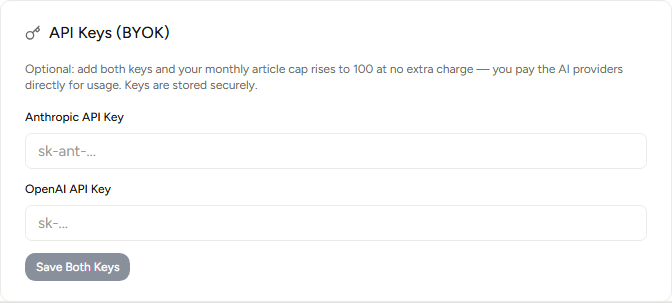
You are done when both fields show masked dots and the card confirms your keys are active with the boosted cap named. Generate one article end to end as a smoke test before queueing a batch.
Keys apply to all your sites, including sites you create later. They are encrypted at rest (AES-256-GCM), displayed only as masked dots after saving, and can be swapped anytime with Replace Keys.
What runs on which key
| Pipeline stage | Provider |
|---|---|
| Web-powered research | OpenAI |
| Image generation | OpenAI |
| Outline, writing, style pass | Anthropic |
| Link insertion and meta tags | Anthropic |
What articles cost on your keys
A full pipeline run (research, outline, writing, style pass, links, meta, and 3 images) costs approximately, at current list prices:
- Sonnet 5 - about $0.56 per article
- Sonnet 4.6 - about $0.62 per article
- Opus 5 - about $0.73 per article
Real costs vary with topic complexity and article length, and provider prices can change, so treat these as planning numbers, not invoices.
The math that matters: Growth at full BYOK volume is 100 Opus 5 articles for roughly $73 of inference plus the $149 plan, which lands around $2.22 per article all-in. The same plan without BYOK is $149 for 50 articles, about $2.98 each. So BYOK is double the volume and a lower per-article cost, provided you actually publish at that volume.
Getting the most out of it
- Set spend limits at both providers before you scale - Anthropic and OpenAI both support monthly budgets and alert emails. Set a budget slightly above your expected volume (for 100 articles a month on Opus 5, $100 is comfortable) so a runaway experiment pings you instead of surprising you.
- Do not switch to BYOK to save money at low volume - if you publish fewer articles than your bundled cap, BYOK only adds cost, because inference moves onto your bill. It pays off when you are hitting the cap and want more.
- Start on Sonnet 5, then A/B Opus 5 where it counts - on your keys the price gap is real but small (about 17 cents per article). Generate your next competitive cluster half on each model and compare which reads better in your niche before standardizing.
The most common BYOK failure we see is an OpenAI account with no credit: writing works, then research or images fail. Fund both provider accounts, not just Anthropic.
Limits by plan
| Plan | Articles / month included | With your own keys |
|---|---|---|
| Trial / Starter | 2 total / 30 | Not available |
| Growth | 50 | 100 |
| Portfolio | 100 | 210 |
| Agency | 220 | 500 |
BYOK does not change which models you can pick: the per-site choice stays Sonnet 5, Sonnet 4.6, or Opus 5.
Troubleshooting
- Save Both Keys is greyed out - both fields must be filled. Keys are only ever saved as a pair, so pasting just one does nothing yet.
- Generation fails right after enabling BYOK - almost always a key problem: the key was truncated when pasting, or the provider account has no billing credit. Fix the key or top up, then use Replace Keys and generate one article as a test before queueing a batch.
- The card shows a lock instead of key fields - BYOK starts at Growth. On trial and Starter the card explains the upgrade path instead of accepting keys.
- Your article counter did not reset after adding keys - the boost raises this month's cap; it does not refund articles already generated. The higher ceiling applies from the moment keys are active.
Was this page useful?
Tell us what was missing and we'll fix the page.