Introduction
What RankSpiral is: it maps your niche, queues the writing order, publishes to your CMS, and tracks whether any of it moved.
Updated Aug 26, 2026 · 5 min read
Most content tools give you a blank editor and wish you luck. The hard part was never the typing.
The hard part is knowing what to write, in what order, so that thirty articles add up to something instead of sitting there as thirty unrelated posts.
That is the job RankSpiral takes.
What it actually does
RankSpiral turns a website URL into a working SEO operation. It researches your niche, maps it into a structure Google recognizes as expertise, writes the articles in your voice, publishes them to your CMS, and then tracks whether any of it worked.
The loop has four moves, and they run in this order for a reason.
Everything else in the product is one of those four steps with more control attached.
The one idea underneath all of it
Search engines do not rank pages so much as they rank demonstrated coverage of a subject. Answer one question about raised garden beds and you are a page. Answer all of them, linked together, and you are the place people get sent.
That is why RankSpiral does not start with an article. It starts with a map.
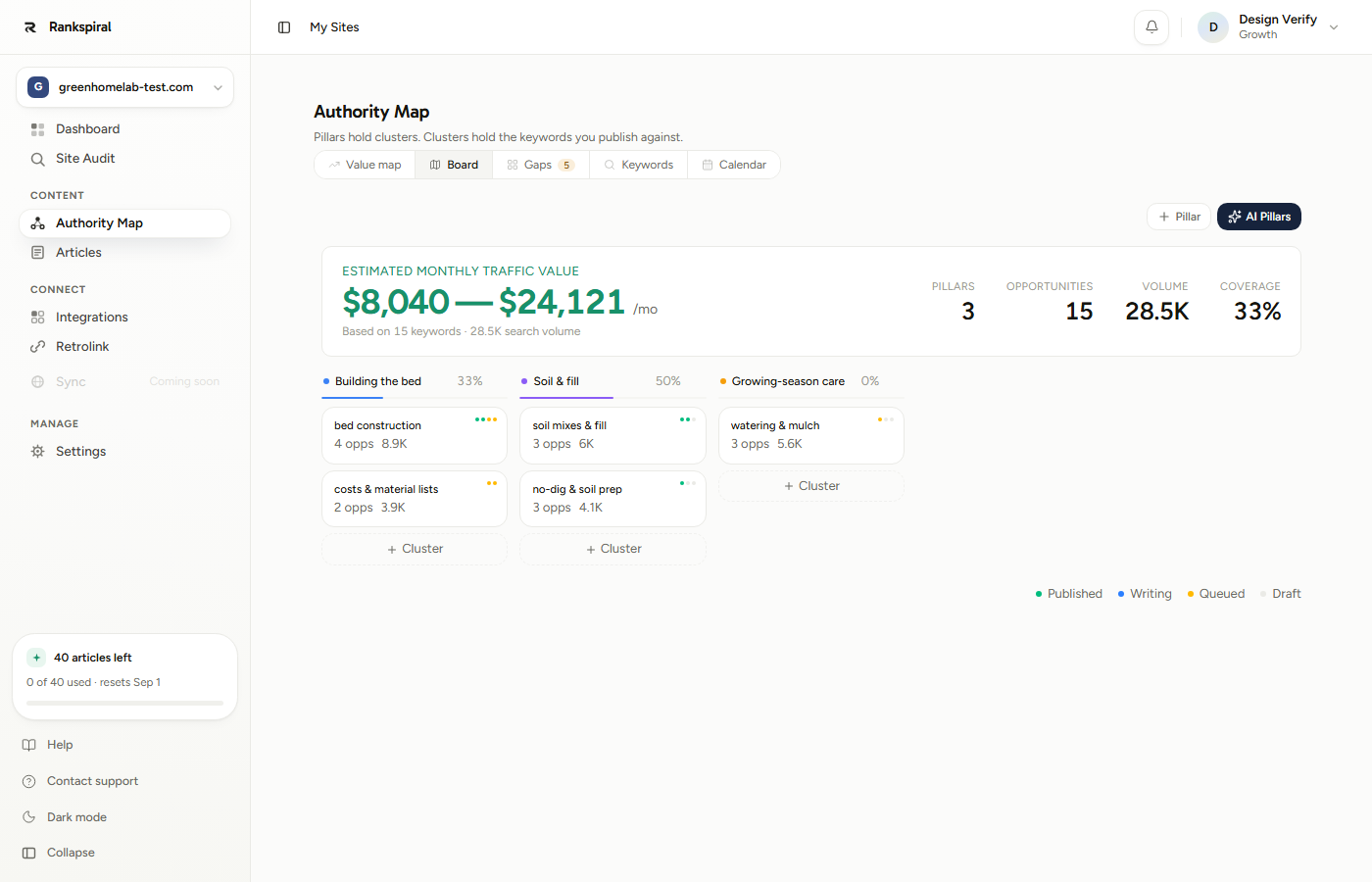
Notice the percentage next to each pillar. That number is the whole product in one figure: how much of a topic you have actually covered.
Coverage is what the map is for, and the queue exists to raise it in the cheapest possible order.
What you get, in the reader's terms
- An authority map built from data, not vibes - pillars, clusters, and keywords derived from live SERP evidence, with volume, difficulty, and CPC on every row. See Authority Map.
- Articles that sound like a person - six tone presets, or a custom voice, or up to four named writers who each own their own topics. See Brand Voice.
- A publishing cadence you set once - the calendar picks the days, the queue runs each morning, and articles land in your CMS. See Auto Scheduling.
- Internal links that keep growing - new articles link out during writing, and Retrolink goes back through older ones to link forward. See Smart Internal Linking.
- Honest feedback - a position and a change number on every published article, so a piece that is not moving is visible rather than assumed. See Rank Tracking.
Research runs across 55 target markets and articles can be written in 32 languages, and the two are set separately, because plenty of businesses sell to Germany in English.
Who this is built for
Anyone whose growth depends on being found, and who does not have a content team.
In practice that has been ecommerce stores wanting traffic to product pages, SaaS companies capturing demand before the buying moment, local service businesses covering their area, agencies running several client blogs with different voices, and affiliate sites building comparison content at volume.
The common thread is not industry. It is that publishing consistently for six months is the plan, and nobody has six months of free evenings.
The trial is genuinely a trial. Three days, two articles, one site, no credit card. Those two articles are the full pipeline, images and links included, so you are judging the real output rather than a stripped-down preview. Onboarding spends one of them automatically on your first keyword.
What it does not do
Worth saying up front, because finding out later is worse.
- It does not guarantee rankings. Nothing does. The estimated traffic values shown throughout the app are ads-cost estimates, labelled as estimates, and they are a way to prioritise, not a forecast.
- It does not fix a broken site. If your pages are not indexable, no amount of publishing helps. Run Site Audit first.
- It does not publish without a CMS connection. Articles generate happily on their own, but they stay inside RankSpiral until you connect WordPress, Shopify, Webflow, Framer, or a webhook.
- It does not read your mind about what you sell. Fill in Offerings. It is the single setting with the widest blast radius, because it is what internal links point at.
How the product is laid out
The sidebar groups everything into four ideas, and once you see the grouping the app stops needing explanation.
- Dashboard and Site Audit - the state of things. What published, what is queued, what is ranking, what is technically broken.
- Content: Authority Map, Articles - the strategy and the output. The map decides, the article list holds the results.
- Connect: Integrations, Retrolink - where content goes, and how it links to itself once it is there.
- Manage: Settings - voice, personas, offerings, competitors, images, publishing behavior.
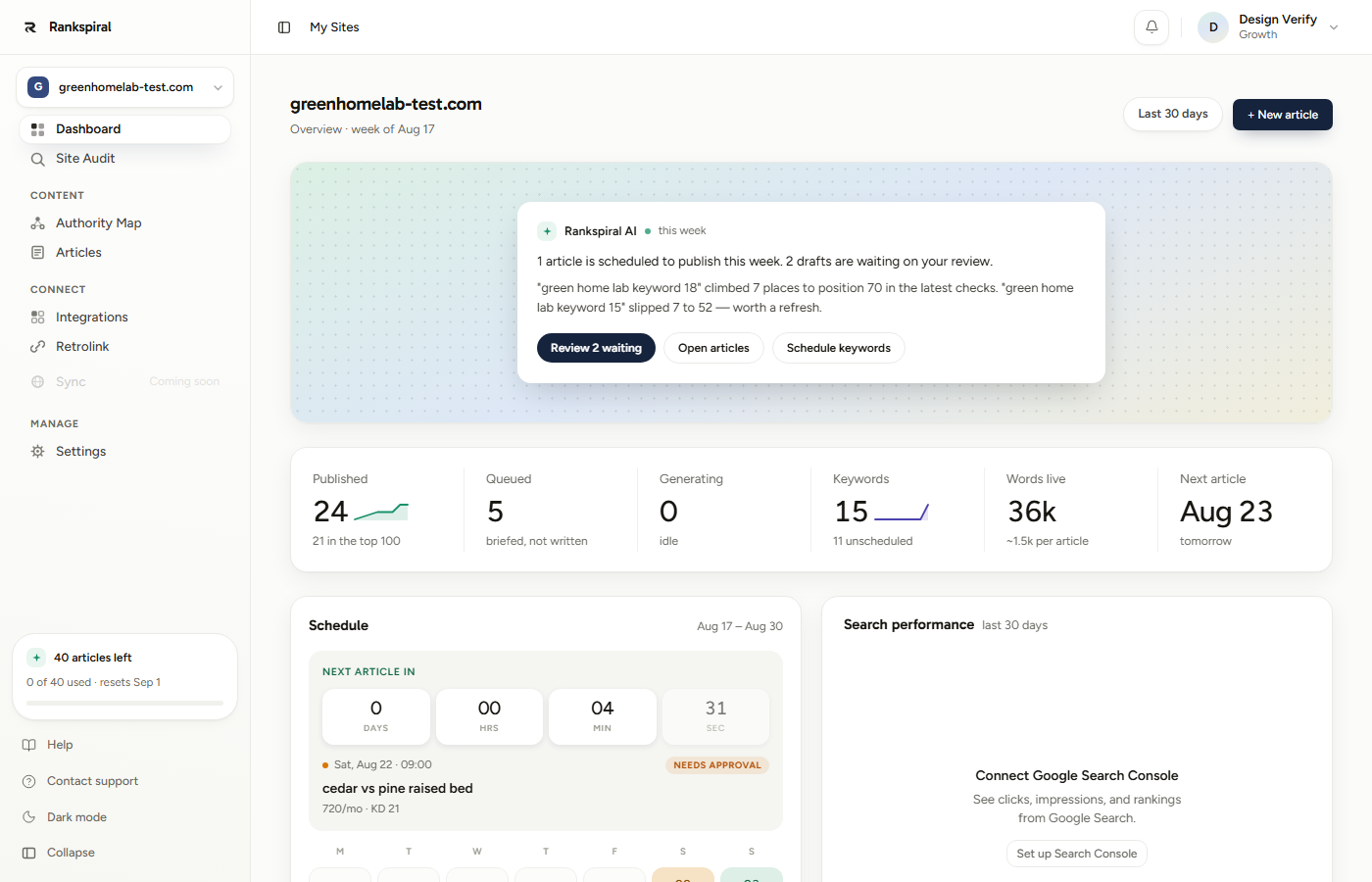
The dashboard summary at the top is the part worth building a habit around. It tells you what moved and what is waiting on you, in sentences, which is more useful than six numbers most mornings.
Where to go next
If you have not set up a site yet, start with the walkthrough. If you have, the fastest win is connecting your CMS so articles stop piling up in drafts.
Quick Start: from sign-up to your first published article→ Connecting your site to WordPress, Shopify, Webflow, or Framer→ New to SEO? Start with clusters and pillars explained→One last thing, and it is the thing that separates the sites that work from the ones that do not.
Finish a cluster before you start another one. Six articles covering one subject completely will out-earn twenty articles covering twenty subjects halfway... every time, and the map is built to make that the easy path rather than the disciplined one.
Was this page useful?
Tell us what was missing and we'll fix the page.