Smart Internal Linking
Links added while an article is written, and Retrolink going back through older posts to link them forward. How both work and when to reject.
Updated Sep 9, 2026 · 15 min read
Internal linking is the SEO task everyone agrees matters and nobody does. It has no deadline, no visible payoff on the day you do it, and it gets worse every time you publish something new.
Which makes it a perfect job for a machine.
RankSpiral links at two moments: while an article is being written, and retroactively across everything you have already published. The second half is Retrolink, and it was recently rebuilt from the ground up. This page covers both.
What it does
Two systems, different jobs.
The name is the idea. Your first ten articles have almost nothing to link to. By the time you have thirty, your oldest articles are sitting on dozens of missed opportunities to link to your newest ones, and no article ever goes back to fix itself. Retrolink does, on a schedule, forever.
Every article you publish also triggers its own targeted scan, so the back catalog starts pointing at a new piece right away instead of waiting for the next scheduled pass.
And linking is no longer only article-to-article. Retrolink now also finds spots in the back catalog for the things your business earns from: partner links, money pages, and store products. That gets its own section below.
The thing people misunderstand: Retrolink never writes anything. Every anchor is a phrase that already exists in your article, found and verified before the suggestion ever reaches you. Approving a suggestion cannot reword a sentence, and it cannot fail to find its spot.
Links added while writing
After the draft and the style pass, a link stage reads the whole article and proposes three to eight internal links, chosen from what it actually knows about your site: your product and collection pages, your published articles, and the pages imported from your sitemap. It cannot invent a URL, because it is choosing from a list.
Its house rules: the anchor must already exist in the text, never in the first paragraph, never two links in one paragraph, never the same target twice, and no click here anchors, ever.
Store products get their own selection logic, and it got smarter recently. Articles link the products most relevant to their topic, ranked against the article's keyword and title, so a garden-hose guide sees your watering gear rather than whatever synced first. That works the same at 20 products or 500.
Product links are also capped by article shape: a listicle can carry up to 12, comparisons and reviews 6, guides and other articles 3, always deduped so the same product is never linked twice. And one taste rule is enforced in code rather than requested politely: a product link is never placed inside a sentence that criticises the product.
That covers new articles. Everything below is about the ones you already have.
How a Retrolink suggestion earns its place
Retrolink needs at least 2 published articles, and lives in the sidebar as Retrolink. Each suggestion answers two separate questions, and neither answer is guessed.
Are these two articles actually related? That is computed from evidence, strongest first: the articles target keywords in the same topic cluster of your authority map, or under the same pillar, or Google shows their keywords on overlapping results pages, or their titles share meaningful words. No cluster, no SERP overlap, no title overlap... no suggestion.
Where should the link live? The engine first looks for the target's keyword, or a known variant of it, written verbatim somewhere in the source article. When that literal match does not exist, AI reads the full article and points at an existing phrase that naturally leads to the target: the phrase "which wood lasts longer in wet climates" is a perfect doorway to a cedar-vs-pine article, even though no keyword matches.
Either way, the phrase is then verified to still exist in the article, at a spot where a link can legally go. Links are never placed inside headings, inside existing links, inside bold text, or inside images and HTML attributes.
A few caps keep things tasteful: at most three Retrolink links per source article, and the same anchor phrase never points at the same target from more than three articles across your site.
Money links: linking to what you sell
Internal links build authority. Money links are the other job: your back catalog quietly pointing readers at the things your business actually earns from.
Full scans now look beyond your own articles. They also find spots for your active Partner links (the affiliate and product links under Settings → Offerings), the pages you starred as money pages, and your store products, whether they came from the Shopify sync or a CSV import. Products you excluded from the store catalog stay excluded here too.
The never-invent-anchors guarantee holds, with its own two evidence tiers:
- Named in text - the product or page is already mentioned by name in the article. Linking an existing mention is the most natural monetization there is; approve on sight.
- Contextual fit - AI matched an existing phrase to the link's purpose, guided by the partner link's What it is description. Worth a quick read of the sentence tooltip before approving.
Either way, the anchor is verified to exist at an insertable spot before the suggestion is saved. Every row in the table also carries a type tag now, so you always know what a link points at: Internal, Money page, Affiliate, Product, or Shopify.
Money links wait for review by default. Auto-approve strong matches only ever touches internal suggestions. There is a separate opt-in for money automation, and it approves everything a scan finds, both evidence tiers; the Automation section below covers it, and why we suggest leaving it off.
Compliance is automatic where it belongs. Affiliate links go in with rel="sponsored", as Google requires, and the three-affiliate-per-article cap is enforced: Retrolink will not even suggest into an article already at that cap. Your own products, Shopify items, and money pages get normal links with no sponsored tag, because they are yours.
The FTC disclosure is yours to add. RankSpiral never inserts a disclosure paragraph into your content: many sites already carry one in their page template, and doubling it up looks broken. If yours does not, add a short line to your blog layout, and the Partner links card in Settings will keep reminding you while an affiliate link is active.
Money rows share the taste caps too: they count toward the same three-Retrolink-links-per-article limit as internal suggestions.
One quirk worth knowing: money spots come from full scans, meaning Scan for Opportunities or the schedule. The targeted scan that fires when you publish a new article only links the back catalog to that article, so it skips money targets.
Broken money links: when a product disappears
The reverse problem gets watched too. Delete a product from your store, and every article still linking it now sends readers to a dead page at exactly the moment they were ready to buy. Nobody checks for that by hand, so RankSpiral does.
Every product sync diffs the new catalogue against the previous one. Shopify catalogues refresh automatically once a day, and a CSV re-import runs the same diff, so a removed product is noticed within a day without you pressing anything. Anything that vanished is checked against your published articles, and each article still linking it becomes a finding in an amber Broken money links panel at the top of the Links page.
Each finding shows the article, the anchor text, and the product it points at, with up to three ways out:
- Remove link - unwraps the anchor. The sentence stays exactly as written; only the dead link goes.
- Swap to … - re-points the link at a close replacement from your live catalogue. This button only appears when a genuinely similar product exists and the anchor text stays truthful pointing at it: "this pizza oven" can move to another pizza oven, but an anchor naming the exact product can only be removed, because pointing it elsewhere would make the article lie.
- Dismiss - leave it alone and stop flagging it. Useful when the page still exists outside the catalogue.
Nothing is ever applied automatically. A dead link looks like a store glitch; a link quietly moved to the wrong product looks deliberate, so a human clicks every fix.
Fixes edit the article inside RankSpiral. Use Resync to CMS (or leave auto-republish on) to push the corrected article to your live site. And a product that returns to your catalogue clears its own findings on the next sync, so a temporary removal never needs cleanup from you.
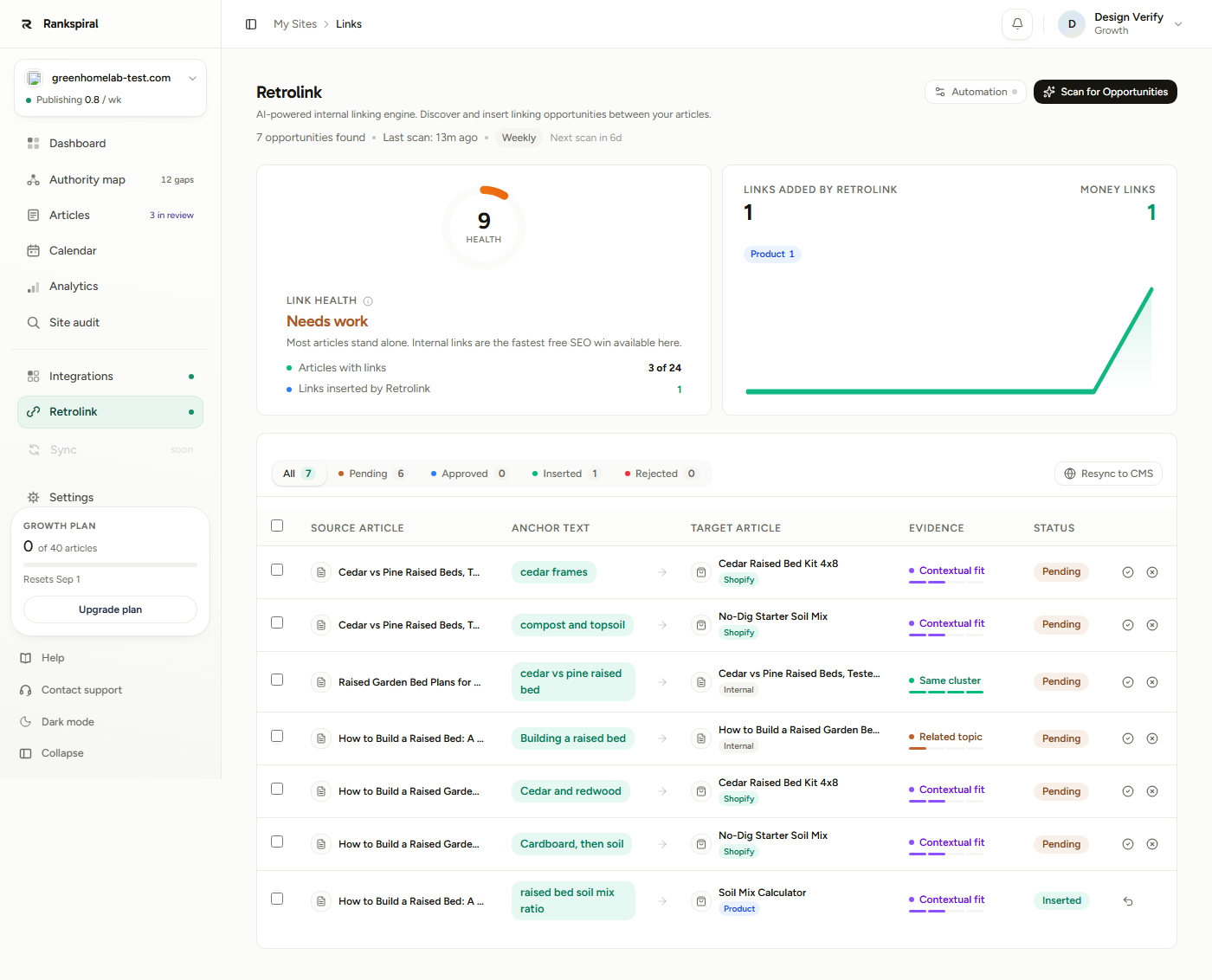
The Link health card is a 0 to 100 score: 70% is coverage (the share of articles with at least one internal link) and 30% is depth (average internal links per article, where three or more earns full marks). The tiers read Excellent at 80+, Good at 60+, Getting there at 35+, and Needs work below that. Approving suggestions raises both halves.
Its neighbor, Links added by Retrolink, counts every inserted link, with Money links broken out on the right and a chip per type underneath. One glance tells you how much of the linking work has been monetization.
Below them, the suggestions table, with filter tabs for All, Pending, Approved, Inserted, and Rejected. The column that matters most is Evidence: instead of a bare score, each suggestion tells you why it exists, with a strength meter and a tooltip.
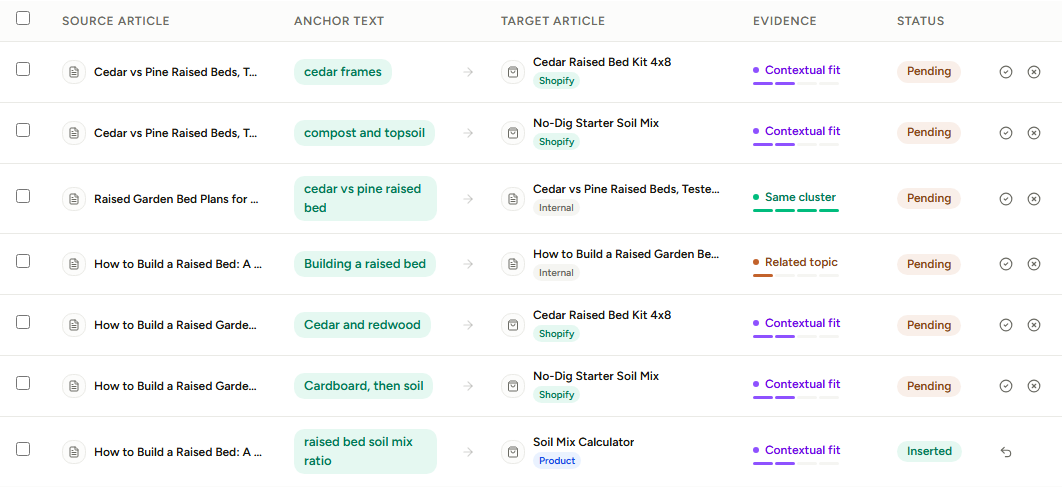
- Same cluster - both articles target keywords in the same topic cluster on your authority map. The strongest internal-link signal there is; approve these on sight.
- Same pillar - both sit under the same pillar topic, so the link reinforces a hub Google already associates them with.
- Ranks together - Google shows their keywords on overlapping results pages. Searchers already treat the topics as related.
- Related topic - the titles share meaningful words. Reasonable, but worth a quick look before approving.
Those four labels belong to Internal rows. Money rows speak their own two-word vocabulary, Named in text and Contextual fit, explained in the section above.
Hover any anchor and a tooltip shows the surrounding sentence with the phrase highlighted. That is the fastest way to judge a suggestion without opening the article.
Approve, reject, undo
Approving does everything in one click: the link is inserted into the article immediately, and if a CMS is connected, the article is re-published so the change goes live. Select several rows and the bulk bar approves them together.
Rejecting is permanent. Retrolink will never suggest that source-to-target pair again, so a no means no rather than a see-you-next-scan. If you change your mind, the rejected row keeps an undo button that returns it to pending.
Inserted rows carry an Undo button too. It removes the link from the article, leaves the sentence intact, and marks the article for re-publish. Nothing about undoing is destructive.
If some articles changed in RankSpiral but not on your live site, Resync to CMS pushes every article with updated content to your connected CMS: WordPress, Webflow, Framer, Shopify, or webhook.
Automation
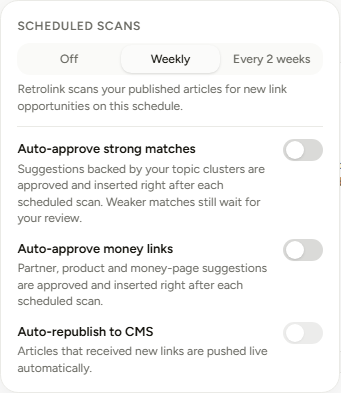
The Automation button on the Retrolink page opens a small panel with four controls.
| Option | What it does | Default |
|---|---|---|
| Scheduled scans | Retrolink scans your published articles on this schedule: Off, Weekly, or Every 2 weeks. | Weekly |
| Auto-approve strong matches | After each scheduled scan, internal suggestions backed by your topic clusters are approved and inserted automatically. Weaker matches always wait for your review. | Off |
| Auto-approve money links | Opt-in: every money suggestion from a scheduled scan (partner, product, and money-page, both evidence tiers) is approved and inserted automatically. The panel warns you when you switch it on, and means it. | Off |
| Auto-republish to CMS | Articles that received new links are pushed live automatically. Requires a connected CMS and at least one auto-approve toggle on. | Off |
Two design choices worth knowing. There is deliberately no daily option, because link opportunities only change when your content changes, and every published article already gets its own scan the moment it lands. And the auto-approve toggles only ever act on the scan that just ran; they never bulk-approve whatever happens to be sitting in your review queue.
Our honest advice on the money toggle: leave it off unless review genuinely never happens. Unlike the internal toggle, it does not filter by evidence strength, it approves the whole scan, and a money link in a slightly wrong sentence costs reader trust in a way an internal link never does. The Named in text rows are safe on sight; the Contextual fit rows are the ones worth your thirty seconds.
Scheduled scans start once a site has at least five published articles. The manual Scan for Opportunities button works from two.
The set-and-forget configuration: Weekly scans, auto-approve on, auto-republish on. Cluster-backed links flow in on their own, and your only job is a weekly skim of the amber Related topic rows plus any money suggestions waiting for their yes.
Getting the most out of it
Approve by evidence tier, not by gut. Same cluster and Same pillar rows are backed by your authority map; approve them in bulk without reading. Spend your actual attention on Related topic rows, where a shared title word occasionally connects two articles that merely sound alike.
Give every partner link a "What it is". Unless the label is a famous brand, the name alone tells the AI almost nothing. That one field is the targeting context both Retrolink and article generation use to find the right moment: for a link labeled SunSpray drip kits, write portable drip irrigation kits for raised beds, link when readers plan their watering setup, and the contextual matches sharpen immediately.
Mention a perk in the description if your affiliate link carries one. Write readers get 15% off into the description and the writer may work it into the anchor wording where it reads naturally. One caution, which the field itself repeats: RankSpiral has no way of knowing when an offer expires, so remove the perk from the description the day it ends, or older articles keep promising it.
Chase coverage before depth. Coverage is 70% of your health score, so one link into every article beats five links into a few. Filter to Pending, sort your approvals toward articles that appear as targets for the first time, and watch the tier jump.
Write in clusters if you want automation to do the work. Cluster evidence comes from the authority map, so articles generated from your map produce strong, auto-approvable suggestions. One-off articles from manually imported keywords can only ever earn Ranks together or Related topic, which always queue for review.
Reject with confidence. Rejection is permanent now, which changes the habit: you are not batting away a suggestion that will return next week, you are teaching the system a fact about your site. Be decisive and the pending queue stays short.
Publishing through a webhook? Send the URL back. Ten minutes of work, and every internal link becomes exact even if your site renames slugs. The next section explains it.
The common mistake: letting pending suggestions pile up because reviewing feels like a chore. A suggestion sitting in the queue helps nobody. Either turn on auto-approve and let the strong ones through, or block out five minutes weekly... the whole queue rarely takes longer.
Troubleshooting
Held back: target page not live on your site yet
Before inserting a link, Retrolink checks that the target article's URL actually exists on your live site. If your site publishes under different URLs than RankSpiral's slugs, common with webhook integrations that rename slugs, the link is held back instead of going in broken. It stays approved and inserts automatically once the URL resolves.
The real fix, for webhook users: reply to our publish request with the article's final URL as JSON, {"url": "https://yoursite.com/blog/your-final-slug"} (the key postUrl also works, alongside a normal 200 status). RankSpiral stores that URL and uses it for every internal link from then on. Re-publish your existing articles once and the URLs backfill. It is one line in most webhook handlers.
Links point to /article-slug but my blog lives at /blog/article-slug
Same root cause: RankSpiral does not know your site's URL structure until you tell it. The webhook URL reply above is the complete fix.
"No CMS connected for this project" when clicking Resync
Connect an integration first: WordPress, Webflow, Framer, Shopify, or a webhook. Links still insert into your articles inside RankSpiral without one; syncing them to a live site is what needs the connection.
Approved, but "anchor no longer present"
The article's text changed after the scan, so the phrase the suggestion pointed at no longer exists. Run a fresh scan and the engine re-reads the current text.
A scan finds no money suggestions
Three usual causes:
- Nothing to target yet - money targets come from active Partner links, starred money pages, and your store catalogue (Shopify sync or CSV import), all under Settings → Offerings.
- It was the post-publish scan - that one skips money targets by design. Run Scan for Opportunities or wait for the schedule.
- Everything is already linked - articles that mention your products already link to them. That is the goal state, not a bug.
A scan finds nothing
Usually good news: every sensible pair is already linked, or already rejected. The engine also remembers which pairings it inspected and found no natural anchor for, and skips them until the article's content changes, so an unchanged site legitimately produces quiet scans.
The Authority Map: where cluster evidence comes from→ Internal linking strategy: the thinking behind the links→ Site settings: where Partner links, money pages, and store products live→ Webhook publishing: the full contract, including the URL reply→Nobody has ever sat down on a Saturday and thought, today I will go back through forty old posts and add links to the new ones.
That is the point. The value was always real, the willingness never was.
Was this page useful?
Tell us what was missing and we'll fix the page.