Multi-Language Support
Content language and target market are two settings, not one. What each controls, 32 languages, 55 markets, and why hreflang is not included.
Updated Aug 26, 2026 · 6 min read
There are two settings in RankSpiral that sound like the same setting, and confusing them is the most common reason a site's keyword data looks wrong.
One decides what language your articles are written in. The other decides which country's search results the research runs against.
They are separate on purpose, and once you see why, the whole thing gets simple.
Two settings, side by side
Both live in Settings → General, one next to the other.

The helper text under the market picker says the quiet part out loud: the market drives keyword research, search volumes and rank tracking, and the writing language is set separately above.
| Setting | What it controls | Default |
|---|---|---|
| Language | The language your articles are written in. 32 options. | English |
| Target Market | Which country and search language keyword research, volumes, difficulty, cost per click and rank checks run against. 55 options. | United States |
Both are per site, not per account, so a portfolio can hold one site writing German for Austria and another writing English for Singapore without either interfering with the other.
Articles are written natively, not translated. There is no English draft behind a Spanish article. The model writes in the target language from the outline forward, which is why idiom and sentence rhythm survive in a way machine translation never manages.
Why they are separate
Because plenty of real businesses need them to be.
- English content, Canadian market. You write in English, but you want Canadian search volumes, Canadian competitors in the research, and rank checks that reflect what a reader in Toronto actually sees.
- Spanish content, but which Spanish market. The same Spanish article aimed at Mexico competes against a completely different set of pages than one aimed at Spain, with different volumes and a different cost per click on every term.
- One language, several countries. Running a separate site per market with the same writing language is how you get keyword data that reflects each country rather than an average of all of them.
Tie the two together and you lose all of that. Keeping them apart costs you one extra dropdown.
Picking a market
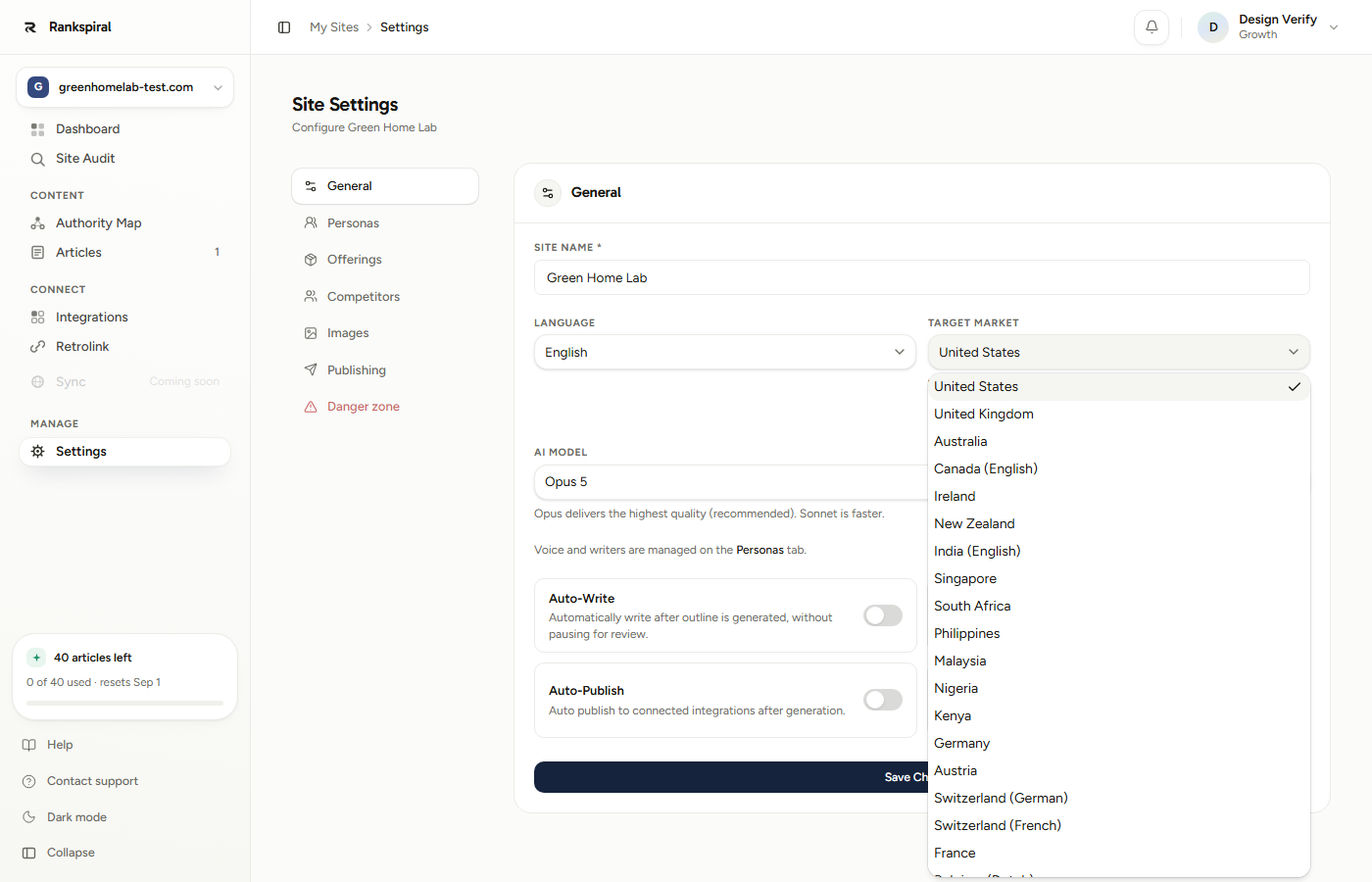
Fifty-five entries, grouped roughly by region, from the United States down to Vietnam. Most are a straight country.
Some are not, and those are the interesting ones.
Countries with more than one search language get one entry per language. Canada appears as Canada (English) and Canada (French). Switzerland appears as German and French. Belgium as Dutch and French, the UAE as Arabic and English, India as English and Hindi. Same country, same search engine, genuinely different results.
Picking a variant stores a research-language override on the site, so the keyword work runs in that language rather than the country's default. Switching back to the primary entry clears it again.
The market list is shorter than a full list of countries because it is validated against what the keyword research provider actually supports on the endpoints RankSpiral uses. Every entry in the dropdown is one we have confirmed returns real data. Nothing in the list is aspirational.
One detail for anyone comparing notes with another tool: research language codes follow the provider's convention, not always the obvious ISO one. Norwegian, for example, runs as nb (Bokmål) rather than no.
The 32 languages
English, Spanish, French, German, Italian, Portuguese, Dutch, Polish, Swedish, Danish, Norwegian, Finnish, Czech, Romanian, Hungarian, Bulgarian, Croatian, Serbian, Slovak, Slovenian, Greek, Turkish, Arabic, Hebrew, Hindi, Japanese, Korean, Chinese, Thai, Vietnamese, Indonesian and Malay.
All 32 are available on every plan, including the trial. Language is not a tiered feature.
What RankSpiral does not do: hreflang
RankSpiral does not generate hreflang tags. If you run one site per language and want search engines to serve the right version to the right country, those tags are your job, handled in your CMS or theme. What RankSpiral handles is the language the content is written in and the market its keyword data comes from. We would rather you learn that here than three months into a rollout.
In practice this matters when you run parallel sites covering the same topics in different languages. Each RankSpiral site will happily research and write its own market. Cross-linking those versions so a search engine understands they are translations of each other is a technical SEO task that lives outside the product.
Getting the most out of it
Set both before you build the map, not after. The Authority Map is built from live search data in whatever market the site is pointing at, and you get three builds a month. Building against United States and then discovering you meant Germany costs you a build and gives you a map full of the wrong competitors.
Run one site per market, not one site with mixed intentions. If you sell into Spain and Mexico, that is two sites. Volumes, cost per click and difficulty differ enough between them that a single blended map will systematically mis-rank your backlog. It also means each one gets its own personas and its own tone.
Write your brand voice description in the target language. A voice guide written in English for a Japanese site works, but the instructions land better when they are in the language the writer is producing. Things like use short sentences mean different things in different languages, and describing the rhythm you want in that language gets you closer on the first attempt.
Check the first non-English article's headings before you queue nine more. Open the outline while it is still editable and confirm the H2s read like something a native speaker would search for. If they do not, fix them there, because the writing stage reuses the outline's heading text exactly.
Expect non-Latin scripts to run longer and cost more. Japanese, Korean, Thai and Hungarian all consume noticeably more model budget per finished word than English does. This is normal and the writing budget accounts for it, but if you are on your own API keys it will show up on your bill.
You have it right when the Keywords tab shows terms in your target language with volumes that look plausible for that country, and your articles read like they were written there rather than translated there.
Troubleshooting
- Keyword volumes look far too high or too low. The market is probably still on United States. Change Target Market, then run Refresh Data on the Keywords tab, because existing keywords keep the numbers they were pulled with.
- Articles are in the right language but headings came out in English. Headings are set at the outline stage, which takes its cue from the keyword and the research rather than from a separate setting. If the keyword is English, the outline often follows. Fix the outline before approving it, or add keywords in the target language.
- I changed the language and my drafts did not change. Language applies at generation time. Existing articles keep the language they were written in. Regenerate, or edit them by hand.
- My country is not in the market list. The list covers what the research provider supports on the endpoints we use. Pick the nearest market that shares your search language: results will not be perfect, but they will be real data rather than a silent failure.
- My country is there twice. That is deliberate. Pick the entry whose bracketed language matches what your readers search in.
Language is who you are writing for. Market is where they are standing when they search. Set both, and everything downstream stops guessing.
Was this page useful?
Tell us what was missing and we'll fix the page.