Every Limit and Quota Explained
All seven counters in one place: articles, keywords, map builds, data refreshes, auto-assign runs, AI requests and retries, with their reset rules.
Updated Sep 9, 2026 · 9 min read
Most of RankSpiral has one number you care about: articles per month. Behind it sit six more counters, each with its own reset, its own scope, and its own reason for existing.
None of them are hidden, exactly. They just tend to introduce themselves at the worst possible moment.
Here is every one of them, what it counts, and what happens when you run out.
The one that matters: monthly articles
Articles are pooled across all your sites. Five sites on Portfolio share the same 100, and you can spend all of them on one site if that is where the opportunity is.
| Plan | Articles | With your own API keys | Sites |
|---|---|---|---|
| Trial | 2 total, not per month | Not available | 1 |
| Starter | 30 / month | Not available | 1 |
| Growth | 50 / month | 100 / month | 3 |
| Portfolio | 100 / month | 210 / month | 5 |
| Agency | 220 / month | 500 / month | 10 |
The trial number is the one that surprises people. It is a lifetime bucket, not a monthly one, so those 2 articles do not come back on the 1st.
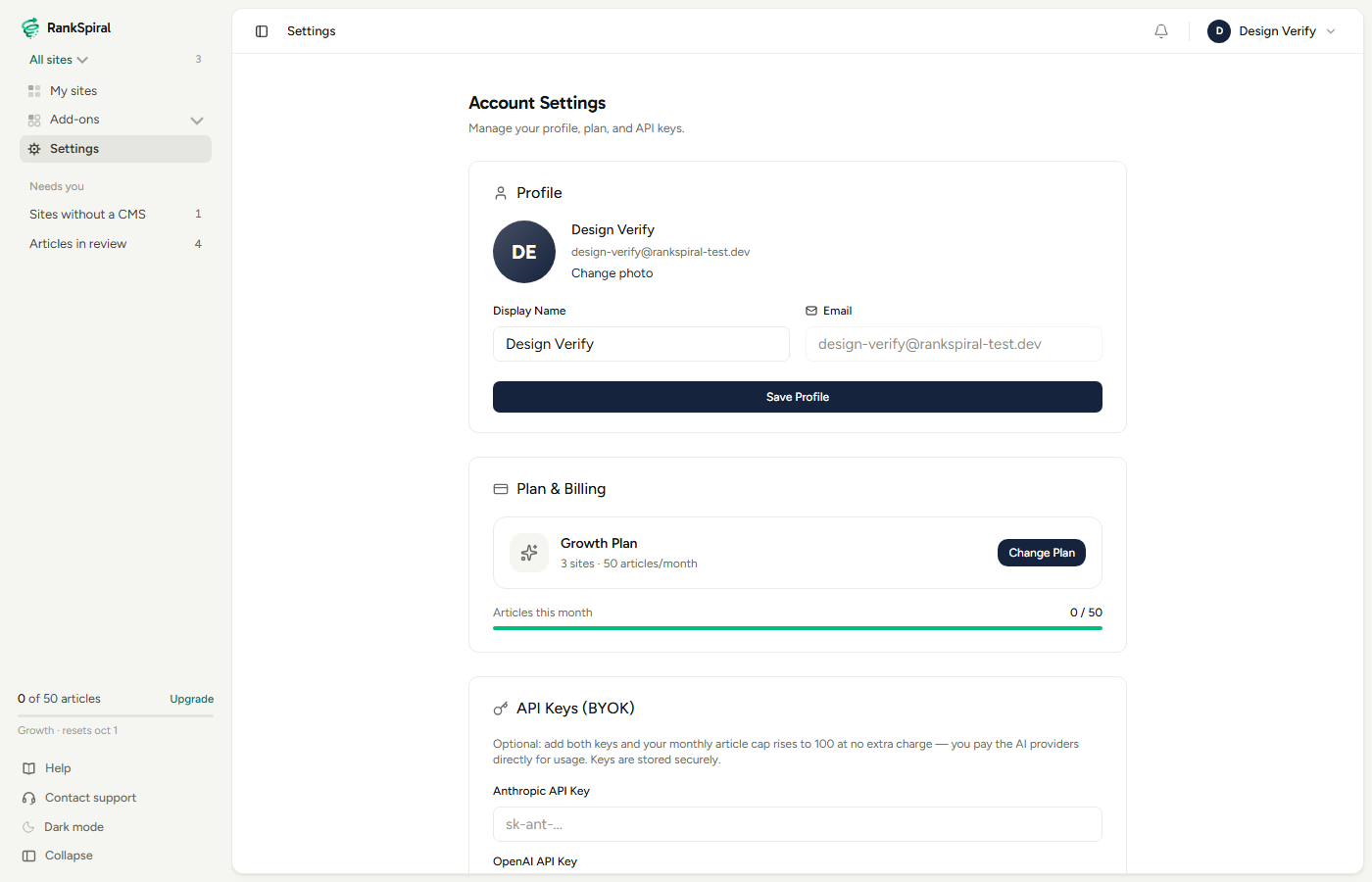
You can see the count in two places: the Articles this month bar in Settings under Plan & Billing, and the small widget at the bottom of the sidebar on every page, which also tells you the reset date. The bar turns amber at 70% and red when you are out.
Deleting an article does not give the credit back. Consumption is recorded in a ledger keyed to the article, and the ledger survives deletion. This is deliberate: the work was already paid for in research, model calls and images by the time you saw it.
Refreshes and rewrites spend the same credits
Improving a published article draws on the same pool as writing a new one, with one honest twist. An analysis from the Improve tab uses 1 article credit, charged only when it finds actionable work; applying the resulting refresh or rewrite is then included in that same credit.
A "nothing needed" verdict is free. Charging for it would give us a quiet incentive to always find something, so we do not.
Rewrites carry one extra cap: 3 applied rewrites per article, for its lifetime. After that, the honest advice is a new article aimed at a different target.
Retries never cost you an article
This is the good news, and it is worth being precise about.
Every article debits your allowance exactly once, at creation. Re-running research, regenerating images, retrying the style pass, retrying links, redoing inline visuals, regenerating meta: none of them debit again, no matter how many times you click.
They are capped instead, per article, per stage.
| Retry | Cap | What it re-runs |
|---|---|---|
| Research | 3 per article | The research pass that feeds the brief |
| Regenerate Images | 3 per article | All images on the article at once |
| Single image redo | 8 per article | One image at a time. Cheaper and more taste-driven, so it gets more room |
| Retry Style Pass | 3 per article | The rhythm and readability edit |
| Retry Links | 3 per article | Internal and external link insertion |
| Retry Inline Visuals | 3 per article | In-body charts and callout blocks |
| Meta generation | 3 per article | Meta title and description |
Hit one and you get told exactly which: "This article has reached its style pass retry limit (3). Generate a new article if you need a different result."
The caps are per stage, so an article can legitimately use three style retries and three link retries and eight single-image redos without touching your monthly allowance once.
On BYOK, the caps loosen: 15 retries per stage and 40 single-image redos, because the inference runs on your own keys.
Automatic recovery is separate and also free. If a generation stalls, a background job retries it every five minutes and gives up after 5 attempts, marking the job failed. Those attempts are not charged and do not count against your manual retries.
Tracked keywords count differently than you expect
maxTrackedKeywords is the most misread number in the product, because it does not count the keywords the Authority Map builds for you.
| Plan | Keywords you add |
|---|---|
| Trial | 50 |
| Starter | 100 |
| Growth | 500 |
| Portfolio | 1,500 |
| Agency | 3,000 |
The cap applies only to keywords you added by hand, imported by CSV, or pulled in through "find related". Map-built keywords are free on every plan, and so are legacy keywords from before the distinction existed.
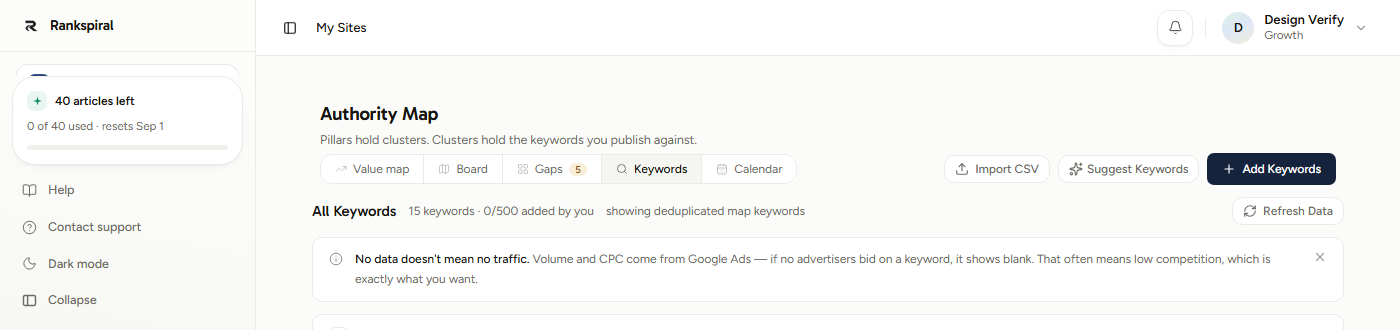
That is what 0/500 added by you means in the keywords header: fifteen keywords exist, none of them count. The map is full quality on every tier by design, so a Starter site gets the same research depth as an Agency one.
When you hit it: "You've used all 500 added-keyword slots on your Growth plan (map keywords don't count against this). Upgrade to add more." Adding is also capped at 200 keywords per batch, which is a paste-size guard rather than a plan limit.
One inconsistency worth knowing. Adding keywords directly into a cluster from the map view still counts all keywords on the site against the cap, not just the ones you added. If that path refuses you while the header says you have slots left, add them from the Keywords tab instead. It is a known bug, not a rule.
The per-site monthly counters
Three actions are expensive per run rather than per item, so they get a flat monthly allowance instead of a per-keyword cost. All three are per site, all three reset on the 1st.
- Content map builds: 3 per site per month. A full build runs AI generation plus live search-volume and SERP data for up to 200 keywords, which makes it the single most expensive click in the product. The message on the third rebuild: "This site has used all 3 content map builds for this month. The limit resets on the 1st."
- Keyword data refreshes: 4 per site per month. A refresh costs the same whether you have 1 keyword or 700, which is why it is a run allowance and not a keyword one. Initial data when you add a keyword is always free, so this is purely for updating numbers you already have. Keywords with data under 30 days old are skipped, and if everything is that fresh, the click reports it and no refresh is used.
- Auto-assign runs: 4 per site per month. Sorting unassigned keywords into clusters uses live search results plus naming calls. Snapshots are reused between runs, so re-clicking after adding one keyword only pays for that one keyword.
The auto-assign message is the friendliest of the three, and also the most useful: "You've used all 4 auto-assign runs this month. Resets on the 1st, or drag keywords into clusters manually anytime." Dragging is free and unlimited.
AI suggestion requests
One shared monthly pool per account, drawn on by every "suggest" button in the product: suggest keywords, suggest pillars, suggest clusters, suggest cluster keywords, and suggest competitors.
| Plan | AI requests / month |
|---|---|
| Trial | 2 |
| Starter | 15 |
| Growth | 30 |
| Portfolio | 75 |
| Agency | 150 |
There is also a five-second burst guard between requests, which is not a quota, just a brake. If you get "Please wait a few seconds between requests", that is all it is.
One fairness rule worth knowing: a request is only counted when the model actually runs. Site-wide keyword suggestions research in the background for a minute or two, and if that run fails partway, it costs you nothing.
When each one resets
| Counter | Scope | Resets |
|---|---|---|
| Articles (paid plans) | Account, pooled across sites | 1st of the month, UTC |
| Articles (trial) | Account | Never. It is a lifetime bucket |
| Keywords you add | Site | Never. It is a standing total, not a monthly spend |
| Content map builds | Site | 1st of the month, UTC |
| Keyword data refreshes | Site | 1st of the month, UTC |
| Auto-assign runs | Site | 1st of the month, UTC |
| AI suggestion requests | Account | 1st of the month, UTC |
| Per-stage retries | Article | Never. They belong to that article for its lifetime |
Everything monthly resets on the 1st in UTC, not your local midnight. If you are in Los Angeles, your month rolls over at 5pm on the last day; in Sydney, at 10am on the 1st.
Getting the most out of your allowances
Build the map once, in your first week, and then leave it alone. Three builds per month sounds tight until you realise a rebuild throws away your cluster arrangement. Add keywords to the existing map instead, and use a rebuild only when your actual business focus changes.
Spend refreshes on a schedule, not on impulse. Four per month is one per week. Search volumes are monthly averages that barely move week to week, so one refresh at the start of each month plus one after a big content push is genuinely enough.
Drag before you auto-assign. Auto-assign is worth its run when you have thirty unassigned keywords. For three, dragging them into a cluster takes twenty seconds and costs nothing.
Redo one image, not all of them. The single-image retry has eight uses per article versus three for the full regenerate. If only the hero is wrong, fix the hero.
If you keep hitting the article cap mid-month, look at BYOK before you look at the next tier. On Growth and up, connecting your own Anthropic and OpenAI keys roughly doubles the cap at the same subscription price (Growth goes from 50 to 100). You pay the model providers directly for what you generate.
A sane monthly rhythm on Growth: one map build in month one and none after, one data refresh at the start of the month, one auto-assign run after each batch of new keywords, and articles queued steadily rather than in a single burst on the 28th.
When you hit a wall
- "You've reached the article limit for your plan this month." Nothing is lost. Queued keywords stay queued and generate after the reset, or immediately if you upgrade.
- "Your trial includes 2 articles. Subscribe to keep publishing." The trial bucket is lifetime, so waiting will not refill it.
- A retry button says the article reached its limit. That article is done with that stage. Edit it by hand, or generate a fresh one, which does debit an article.
- "Retry tracking is unavailable right now." Not a quota message. The retry ledger could not be read, so the action was refused rather than run unmetered. Try again.
- Your article count looks wrong after a failed generation. A failed generation that produced an article row still counts. A generation that never created an article is refunded automatically.
Every one of these numbers exists for the same reason: the expensive parts of this product are expensive per run, and a flat allowance is more honest than a surprise invoice.
Which is a long way of saying the limits are the price staying the price.
Plans and pricing, side by side→ Publishing your articles→ BYOK: raising your article cap with your own keys→ The Authority Map, and what a build actually does→ Changing or cancelling your plan→Was this page useful?
Tell us what was missing and we'll fix the page.