Webhook and API Publishing
The full webhook contract: every payload key, the X-Webhook-Secret header, the test call, timeouts, and why your handler must upsert by slug.
Updated Sep 9, 2026 · 9 min read
If your site does not run on WordPress, Shopify, Webflow or Framer, the webhook is your integration. You give RankSpiral a URL, it POSTs each published article there as JSON, and what happens next is entirely your code.
This page is the contract: every key in the payload, the two event types, how the secret works, and what counts as success.
Available on Growth, Portfolio and Agency (and during the trial). On Starter the card shows a Growth+ badge and no form.
Connecting it
Site sidebar, Integrations, then the Webhook / API card at the bottom of the grid.
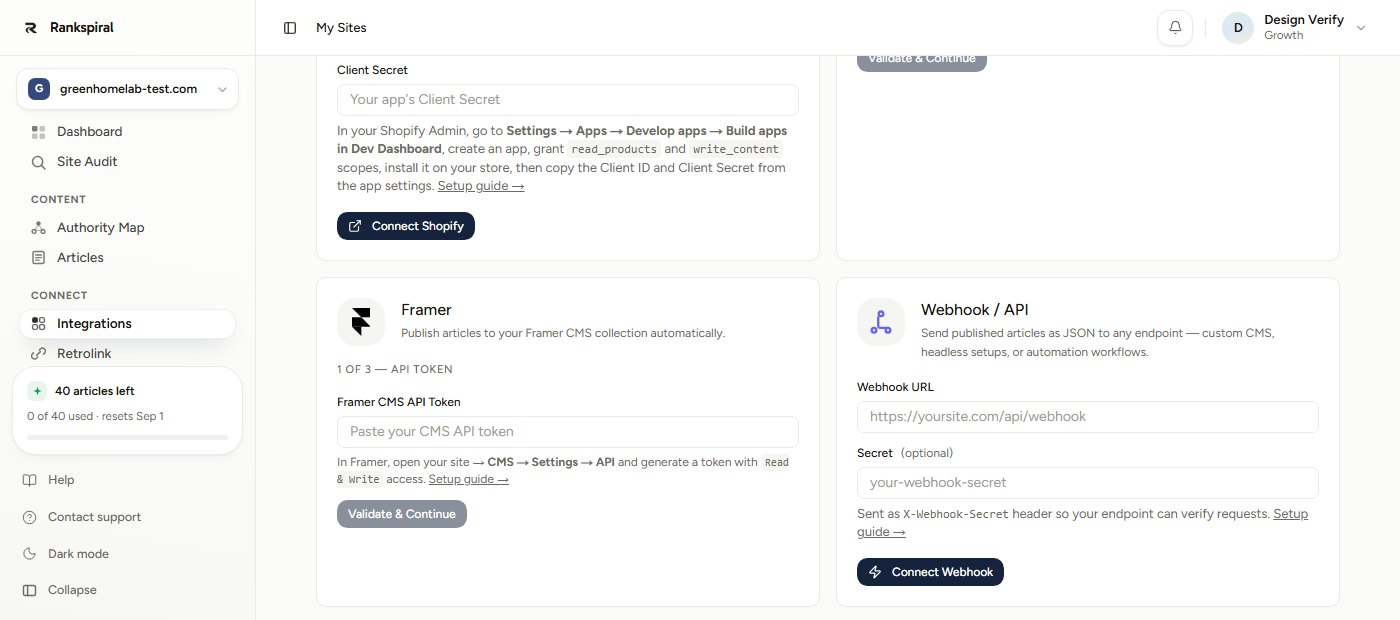
- Paste your endpoint into Webhook URL. A trailing slash is stripped for you. Both HTTP and HTTPS are accepted, though there is no reason to use HTTP.
- Add a Secret (optional). It is stored encrypted and sent as an
X-Webhook-Secretheader on every call. Skip it and no such header is sent at all. - Click Connect Webhook. The card flips to a green Connected pill showing your URL, with Test Webhook, Edit and Disconnect buttons.
Saving does not test anything. Unlike the WordPress or Shopify cards, connecting a webhook does not call your endpoint. Any URL that passes safety validation saves successfully, so a typo stays invisible until you click Test Webhook.
URLs are validated for safety, at save time and again on every call. Localhost, cloud metadata hosts, and anything resolving to a private or internal IP are refused, and redirects are followed manually (up to 5 hops) with the same check applied to each target.
The payload
Method POST. Headers: Content-Type: application/json, plus X-Webhook-Secret when you configured a secret. Nothing else, so there is no signature header and no idempotency key to match on.
The body carries these keys:
| Key | Type | What it contains |
|---|---|---|
event | string | "publish" for articles written in RankSpiral, "update" for articles imported from your site. See below |
canonicalUrl | string | The article's live URL. Present on imported articles; omitted when unknown |
title | string | The article title. Always present |
slug | string | The article slug, or one derived from the title if none was set |
content | string | The full article as HTML. See the notes below |
excerpt | string | The meta description, or whole sentences built from the content when none was generated |
metaTitle | string | The SEO title, falling back to title when none was generated |
metaDescription | string | Same value as excerpt |
featuredImage | string or null | The first image URL found in the content, or null |
featuredImageAlt | string | The hero image alt text, or the first image's alt, or an empty string |
keyword | string | The article's primary keyword |
faq | array | The article's FAQ as {question, answer} pairs with plain-text answers, for receivers rendering their own accordion. Empty array when the article has no FAQ |
publishedAt | string | ISO 8601 timestamp, generated at send time |
The empty-excerpt bug is fixed. Older versions of this page warned that excerpt and metaDescription always shipped empty. They are now populated on every publish, from the generated meta description or a sentence-level fallback. If you built a workaround, you can retire it.
The update event
Articles you imported from your existing blog publish with event: "update" and their canonicalUrl, because their URL is the ranking asset: an update must edit the existing page at that URL, never create a new one. Match on canonicalUrl first, then slug.
A receiver that only handles "publish" can simply ignore "update" until it is wired, which fails safe: nothing duplicates, the live page just does not receive the improvement yet.
Three things to know about content specifically:
- It keeps the H1 and the hero image. The WordPress and Shopify paths strip both because those platforms render a title themselves. The webhook payload does not, so strip them yourself if your template adds its own heading.
- It may end with an FAQ schema block. A
<script type="application/ld+json">FAQPage block is appended unless FAQ schema injection is turned off for the site. Handy if you inject the body raw, worth stripping if you build your own schema. - The Markdown-to-HTML conversion is basic. Headings, paragraphs, bold, italic, links, images and list items are handled. Tables, blockquotes and code fences are not, and list items arrive without a wrapping
ulorol.
Testing it
Test Webhook sends a hard-coded dummy article rather than a real one. That makes it safe to click, but it also means the test payload is not identical to the real one.
| Test call | Real publish | |
|---|---|---|
event | "test" | "publish" or "update" |
featuredImageAlt / faq | Absent entirely | Present |
canonicalUrl | Absent | Present on imported articles |
| Everything else | Sample values | Real values |
Do not hard-validate your schema against the test call. A validator built from the test payload will reject real publishes, because the real one adds keys the test omits. Treat the test as a connectivity check, not a contract.
Success is any 2xx status. The toast reads "Test payload sent successfully". Anything else surfaces as "Endpoint returned 500 Internal Server Error." or "Could not reach endpoint: ..." with the underlying reason attached.
Verifying and responding
Verification is a straight string comparison. The header carries your secret in plain text, so your handler checks it and rejects the request when it does not match:
If
request.headers['x-webhook-secret']does not equal your stored secret, return 401 and stop.
There is no HMAC and no timestamp, so serve your endpoint over HTTPS and rotate the secret if it ever leaks.
Your response matters in exactly one way. If you return JSON containing a url field (or postUrl), RankSpiral stores it and shows a clickable View post link on the article:
{ "url": "https://yoursite.com/blog/raised-garden-bed" }
Anything else is ignored. A 200 with an empty body is a perfectly valid success, and a non-JSON response is silently accepted.
Retries, timeouts and failure
Set your expectations here, because this is the part that surprises people.
- There are no retries. One attempt per publish. No backoff, no queue, no dead-letter.
- The timeout is 30 seconds, counted across all redirect hops.
- A failure is not recorded anywhere. The error appears as a toast and nothing else. No failure column, no email, no badge on the article.
- Response bodies are capped at 10 MB, so do not echo the article back.
Which leads to the one architectural rule that matters: acknowledge fast, process afterwards. Write the payload to a queue or a file, return 200, and do the real work in the background. An endpoint that publishes synchronously and takes 35 seconds will fail with nothing to retry it.
Auto-publish makes silent failures worse. When an article publishes automatically after generation, a webhook failure is not surfaced at all, not even as a toast. If you run auto-publish, log every inbound call on your side and alert on the gaps.
The re-send you did not ask for
Retrolink re-pushes articles when it inserts internal links into them, and refreshes re-push after edits. Those re-sends go through the exact same code path, which means your endpoint receives another event: "publish" payload for a RankSpiral-written article it has already seen. Only imported articles get the distinct "update" event; there is still no article ID or revision number.
So the single most important thing to build correctly: upsert on slug (and on canonicalUrl for updates). If your handler blindly creates, you will get duplicates every time Retrolink runs.
Getting the most out of it
Upsert on slug, from day one. Not as a future improvement. The first Retrolink approval will re-send everything it touched, and an append-only handler turns that into a duplicate for every linked article.
Return the live URL in your response. Two lines of code, and it gives you a working link from the RankSpiral article straight to the published post. Without it, you are checking your CMS by hand to confirm anything landed.
Log the raw body of every call for the first month. The payload has quirks (the retained H1, the appended schema block, the two event types), and having the actual JSON on hand answers "why does my page look like that" in seconds.
Test with the real thing, not just the test button. Publish one genuine article early. The test payload omits featuredImageAlt, faq and canonicalUrl, so only a real publish shows you the full shape.
Set a secret even for an internal endpoint. It is one field, and the URL is the only thing standing between your CMS and anyone who guesses it.
A handler that will not embarrass you: check the secret, return 200 immediately, queue the payload, upsert by slug, strip the leading H1 if your template renders titles, and respond with the resulting URL. About thirty lines in most stacks.
If it is not working
- "Request blocked: URL resolves to a private/internal network." Your endpoint is on localhost or a private IP. RankSpiral runs in the cloud and cannot reach it. Use a tunnel for local testing.
- "Could not reach endpoint: This operation was aborted." You hit the 30-second timeout. Acknowledge first, process after.
- "Endpoint returned 401." Your secret check is failing. The header is
X-Webhook-Secretand the value is the plain secret, not a hash. Note that editing the URL without retyping the secret keeps the old one. - Duplicate posts on your site. Retrolink re-sent articles it had linked. Upsert on
slug. - An imported article created a second copy instead of updating the original. Your handler treated
event: "update"as a publish. Match oncanonicalUrland edit the existing page. - Two H1s on your published page. The payload keeps the article's own H1 and your template adds another. Strip the first heading server-side.
- Nothing arrives and no error appears. Auto-publish is on and swallowing the failure. Publish one article manually to see the real message.
The webhook is the least opinionated integration in the product, which is both its appeal and its catch: nothing is handled for you, including the things you would rather not think about.
Handle idempotency, and it will run for years without you looking at it.
Publishing your articles: manual, auto and scheduled→ Connecting your site for the first time→ Retrolink, and why it re-sends articles→ Which plans include the webhook→Was this page useful?
Tell us what was missing and we'll fix the page.