Quick Start Guide
From sign-in to a published article: five onboarding screens, a map built from live search data, and the first-week habits that matter.
Updated Aug 26, 2026 · 7 min read
By the end of this page you will have a site in RankSpiral, a full authority map built from real search data, and your first article written and live.
The part you actually do takes about three minutes. The rest is waiting, and you can wait somewhere else.
Before you start: your website URL, and login access to your CMS if you want the first article published rather than just written. No credit card. The trial runs three days and includes two full articles, images and links and all.
Step 1: Sign in
There is no password to invent. Go to the login page, type your email, and click Continue with email. A six-digit code arrives, you paste it, and you are in.
The same screen handles first-time signup and returning users, so if you are new, this is your account being created.
Step 2: Answer five short screens
Onboarding is five steps and the footer tells you where you are. Only the first one needs thought.
- Tell us about your business - paste your Website URL and click out of the field. RankSpiral reads your homepage plus your pricing, about, features, and product pages, and then fills in Project Name and Description for you. A green panel counts down for about fifteen seconds while it works.
- Who do you compete with? - it suggests competitors it found in your niche. Pick up to four, or click Skip for now. One good competitor is genuinely enough.
- A little about you - industry, how you found us, main goal, and SEO experience. All four are required and none of them are trick questions.
- Set your preferences - Target market, Language, Tone of voice, and Image style. Every field has a working default.
- Review and launch - check the summary, then click Build my content strategy.
Read the auto-filled description before you continue. It becomes the writer's understanding of your business for every article that follows. Scrapers get it subtly wrong more often than they get it obviously wrong, and a subtly wrong description produces forty subtly wrong articles.
Target market and Language are separate on purpose. Target market decides where rankings are measured and which search volumes are used. Language decides what the writing is in. Selling to Germany in English is a normal combination, and the two fields let you say so.
Step 3: Let it build (2 to 3 minutes)
A full-screen progress page takes over, and it is doing more than it looks like:
Setting up your project · Discovering pillar topics · Building content clusters · Finding keyword opportunities · Fetching search metrics · Finalizing your strategy
Underneath, it is pulling live keyword suggestions, checking your competitors' keywords through a relevance filter, running real Google result pages to decide which keywords belong together, and scoring each one for whether you could actually win it.
Then it writes your first article automatically, on the best keyword it found.
That first article spends one of your two trial articles. It is the real pipeline, not a sample, so treat it as your quality test rather than a freebie.
Step 4: Look at your map
You land on Authority Map, on the Value map tab.
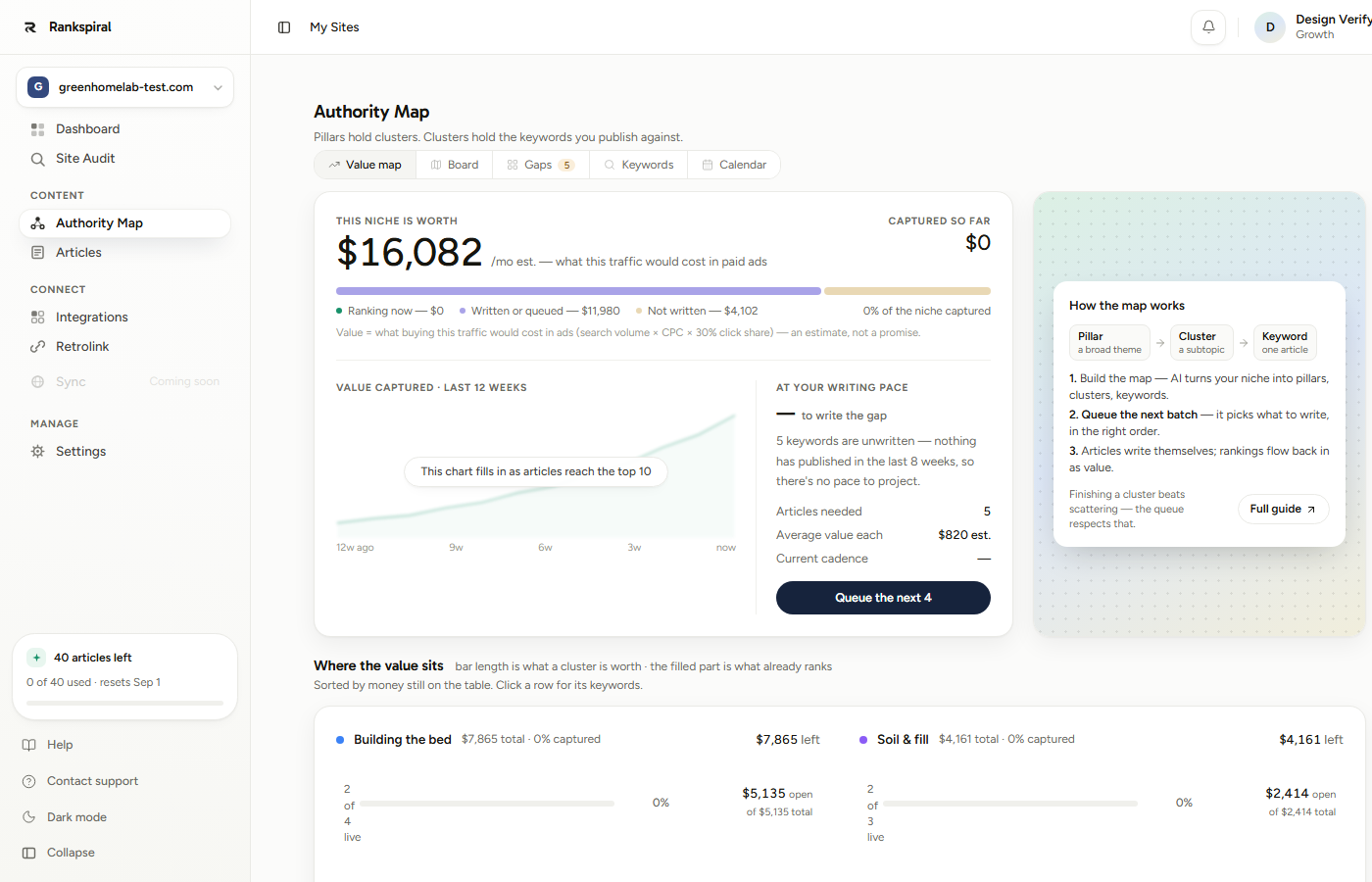
The big number is what this traffic would cost you in ads, and it exists to rank your options rather than to predict your revenue. The second number, captured so far, is the one that should move.
Five tabs run across the top, and each answers a different question:
- Value map - where is the money, and what should I write next.
- Board - the structure. Pillars across, cluster cards underneath, coverage percentage on each.
- Gaps - which pillars are missing an intent. This is the sharpest tab in the product and almost nobody finds it in week one.
- Keywords - the full table with volume, difficulty, CPC, and status.
- Calendar - what publishes on which day.
Step 5: Queue a batch instead of picking one
The temptation is to hunt for a good keyword yourself. Resist it for now.
Click Queue the next 4 on the Value map, or Queue the top 4 on the Gaps tab. RankSpiral picks by value at stake against difficulty, which is the calculation you would be doing by eye and worse.
The first article starts writing immediately and the rest are scheduled one per day, which you will see appear on the Calendar tab.
The batch size scales with your plan's monthly allowance, so the button might say a different number than four.
Step 6: Read the article properly
Go to Articles. Three tabs: Pending Review, All Articles, and Published.
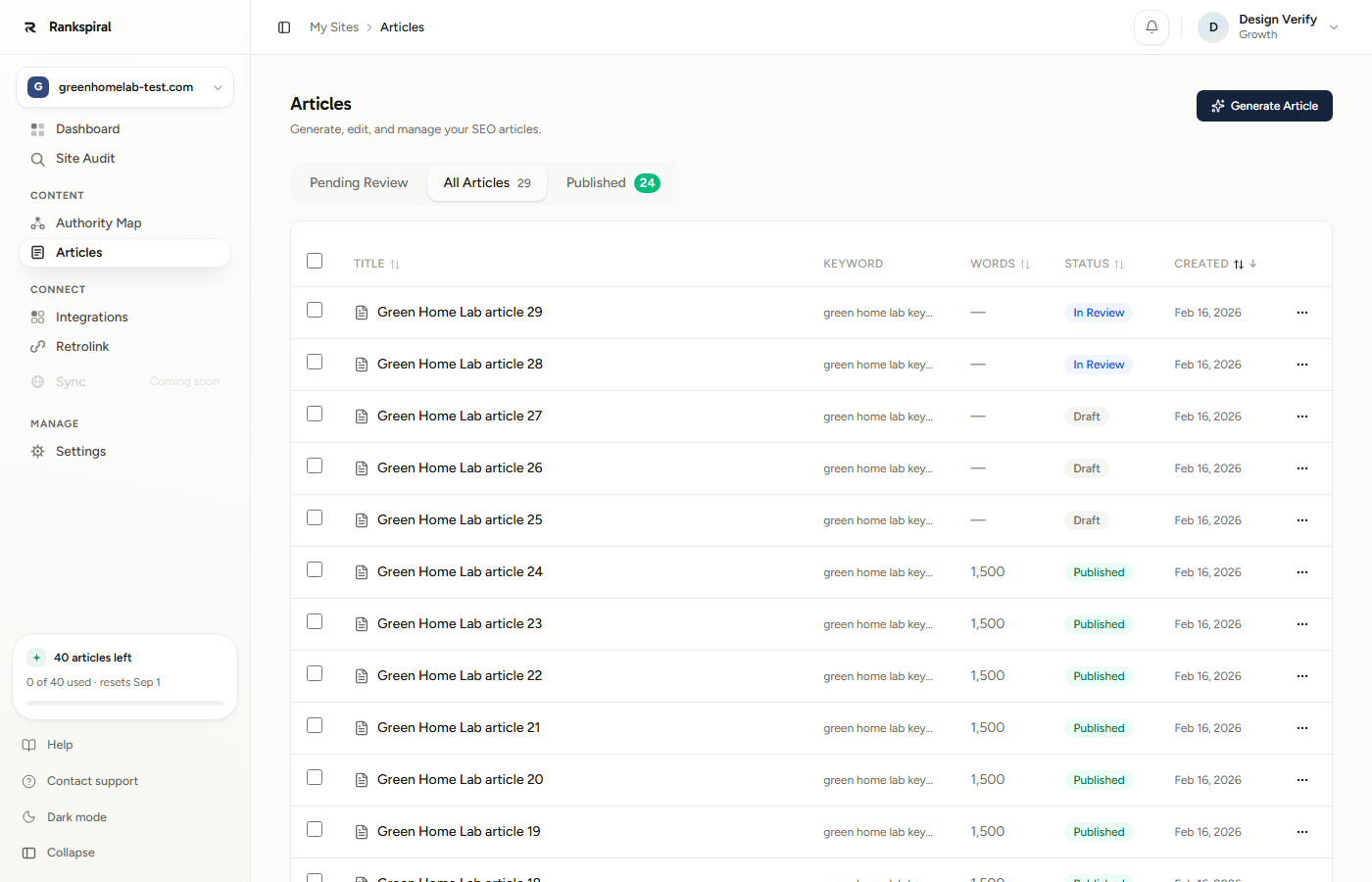
An article runs three visible stages: Brief, Writing, and Draft. Writing is itself six passes, and the strip tells you which one is running.
Writing the article → Polishing rhythm → Generating images → Inserting links → Writing meta tags → Finalizing
When it reaches In Review, open it and read the whole thing. Not skim. Read.
This is the highest-leverage twenty minutes you will spend in RankSpiral, because everything you notice here is fixable once, in settings, for every article afterwards.
Step 7: Connect a CMS and publish
Go to Integrations, connect WordPress, Shopify, Webflow, Framer, or a webhook, then publish the article from the article view.
Full setup detail for each platform lives on its own page.
Connecting your site: every platform, step by step→How you know it worked
Your Authority Map shows three or more pillars with real search volumes, one article sits at Published on your own domain, and the Calendar has articles waiting on future dates. That is the machine running.
Within a day or two, the Published tab starts showing a Rank and a Change column. Do not read anything into the first numbers. New pages routinely spend weeks nowhere before they appear at all.
What to do in your first week
Write your voice description before article three, not after article thirty. Behaviors, not adjectives: "short sentences", "real numbers instead of vague claims", "never use the words leverage or seamless". Fifteen minutes here changes every article that follows. The Brand Voice page has phrasings you can paste straight in.
Fill in Offerings on day one. In Settings → Offerings, list what you sell with real URLs, and import your pages while you are there. Offerings are what internal links point at, so an article written before you fill them in links to nothing useful and cannot be retrofitted cheaply.
Finish one cluster before starting another. Six articles covering one subtopic completely beats twenty articles covering twenty subtopics halfway. The queue already works this way; the mistake is overriding it because a different keyword looked shinier.
Check the Gaps tab in week one. It shows each pillar split by informational and commercial intent, and an empty cell there is a question your readers are asking that you have not answered. It is the fastest route to work that matters.
Decide about Auto-Write deliberately. Sites created through onboarding have it on, which means articles write straight through without pausing for you to approve the outline. If you would rather steer the structure first, switch it off in Settings → General and articles will stop at the outline for your approval.
If it did not work
- Auto-fill did not finish. Some sites block scrapers, and some have almost no homepage text. Type the project name and description yourself. Nothing downstream is harmed.
- The map came back thin or slightly off-topic. Usually a description problem. Fix it in Settings, add your real competitors, then rebuild. You get three map builds per site per calendar month, resetting on the 1st.
- Keywords show no volume or CPC. That data comes from Google Ads, and a keyword nobody bids on shows blank. It often means low competition, which is good news wearing an unhelpful disguise.
- The article stalled mid-pipeline. A recovery job sweeps stuck articles every five minutes and picks up where it left off. Give it ten minutes before doing anything.
- Publish is greyed out. No CMS connected yet, or the article has not reached a finished state. Check the status chip first.
Most people spend their first hour hunting for the perfect first keyword.
Spend it reading one finished article instead. The keyword you pick barely matters in month one, and the voice you set in month one shows up in every article for the next year.
Was this page useful?
Tell us what was missing and we'll fix the page.