Auto Scheduling & Publishing
Spread keywords across a calendar, pick a cadence, and decide how much runs without you. Auto Schedule, Auto-Write, and Auto-Publish explained.
Updated Sep 9, 2026 · 8 min read
Every content plan dies the same way. Not from bad strategy, from a Tuesday where nobody felt like writing.
Scheduling is the fix, and it is boring in exactly the right way. You spend ninety seconds spreading keywords across a calendar, and then articles appear whether or not anyone remembered.
This page covers the Auto Schedule dialog, the calendar, and the two toggles that decide how much of this happens without you.
What it does
Auto Schedule takes your unscheduled keywords and spreads them across future dates at a cadence you pick. Each morning, a job wakes up, finds the keywords due that day, and starts writing them.
That is the whole mechanism. The nuance is in what "due" triggers.
Scheduling schedules writing, not publishing. A keyword's scheduled date is the day its article gets generated. Whether that article then goes live on your site is a separate setting, Auto-Publish, and it is off by default. Plenty of people schedule thirty keywords, come back a week later, and find thirty finished drafts sitting in review. Which is either exactly what they wanted or a nasty surprise, depending on whether they read this paragraph.
How to use it
- Open Calendar in the sidebar (it is the Authority Map's calendar tab, promoted to its own item).
- Click Fill the calendar. The Auto Schedule Keywords dialog opens.
- Choose your Scope, Frequency, and Start date, then check the preview.
- Click Schedule 11, or whatever number yours says. The dialog closes and the dates appear on the calendar immediately.
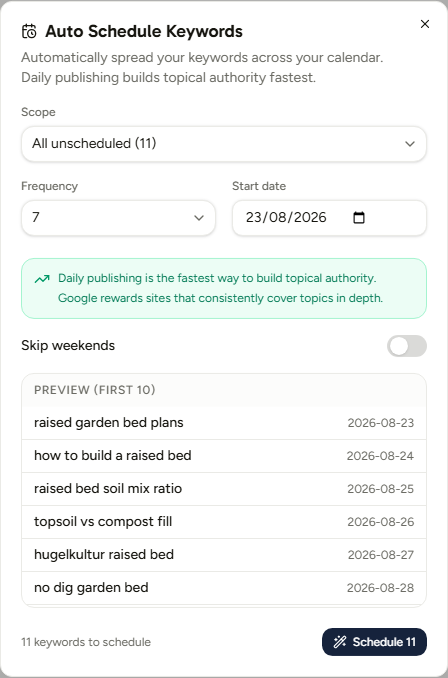
The preview is the part worth actually reading. It shows the first ten keywords with their assigned dates, so a cadence that spreads your queue into next March is visible before you click rather than after.
Scope: what gets scheduled
Three shapes, and the indented ones are clusters.
- All unscheduled - everything not already on a date.
- Pillar: [name] - one pillar's worth.
- Cluster names, indented beneath their pillar - one cluster.
Each option shows its own count, so you know what you are committing to.
Frequency: seven options, one right answer
| Option | Spacing | Who it suits |
|---|---|---|
| 1 article / week | Every 7 days | Testing the waters, or a very small queue |
| 2 articles / week | Every 3 days | A side project with real intent |
| 3 articles / week | Every 2 days | Steady, sustainable, unremarkable |
| 5 articles / week | Daily-ish | Weekday publishing |
| 7 / week (daily) | Every day | The default, badged Best |
| 14 / week (2x daily) | Twice a day | Badged Aggressive. A real content gap to close |
| 21 / week (3x daily) | Three a day | Badged Aggressive. Rarely the right call |
Daily is the default because consistency is the variable that actually correlates with getting somewhere. It is also the cadence the queue was designed around.
Frequency does not create articles out of nothing. It spreads the keywords you already have, so scheduling ten keywords at 7 per week fills ten days and then stops. Your monthly article allowance is the real ceiling.
Start date and Skip weekends
Start date defaults to tomorrow. Skip weekends is off by default, and pushes any Saturday or Sunday assignment to the following Monday.
Leave weekends on unless you have a reason. Search engines do not observe them, and a five-day cadence with an every-other-week gap is a worse rhythm than a straight seven.
The calendar
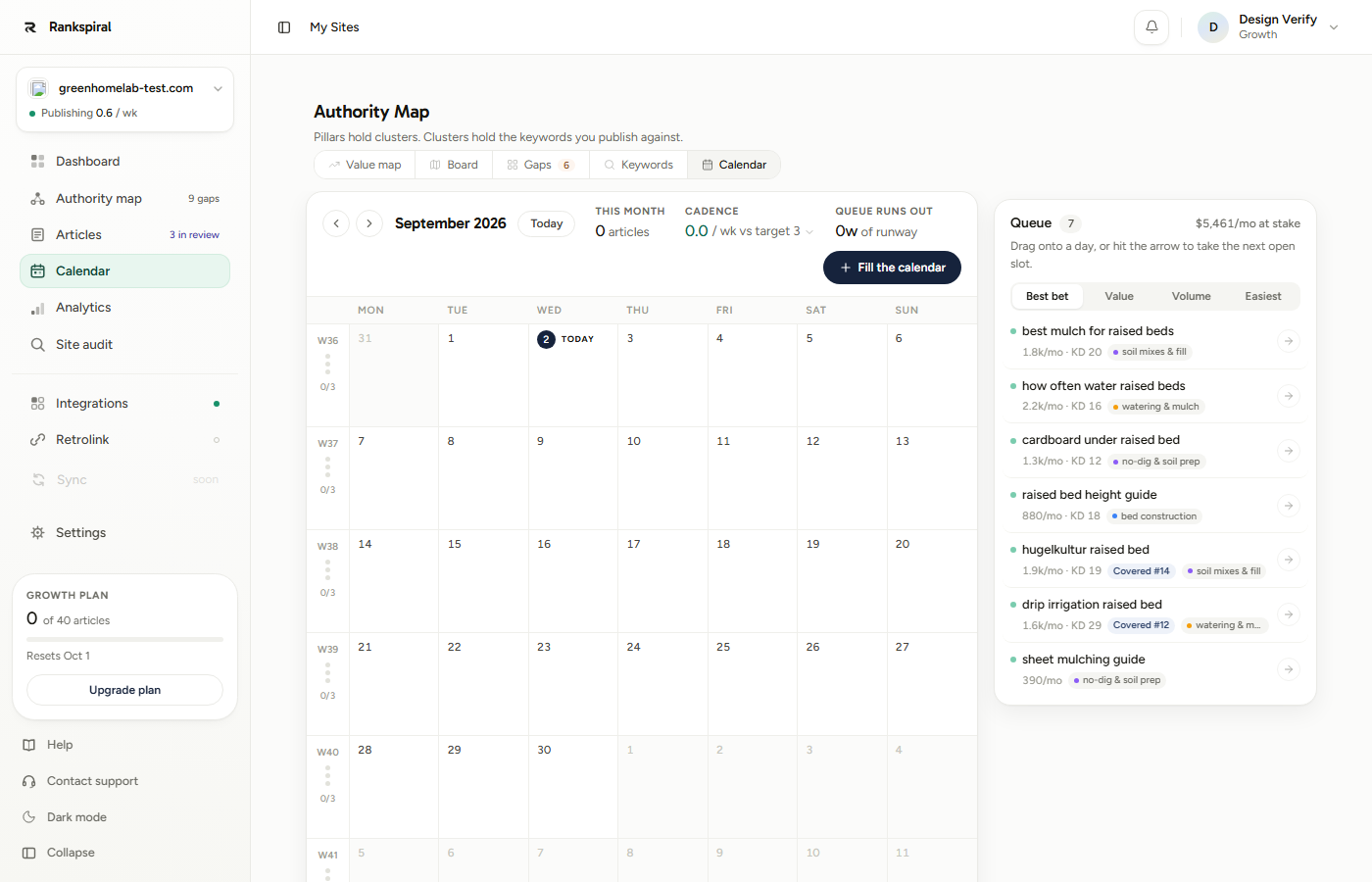
A month at a time, starting Monday, with a stats strip across the top: This month (articles so far), Cadence (your actual weekly rate against the target you picked), and Queue runs out (how many weeks of runway your scheduled keywords cover). The week gutter on the left shows each week's fill against target, so a thin fortnight is visible before it happens.
Scheduled keywords sit on their days as chips carrying real article states: live, scheduled, writing, in review. Click a day to open its detail panel.
Drag anything anywhere. Queue rows and day chips both drag onto days; drop a chip back on the queue to unschedule it. Changes save as you drop.
The queue
The right-hand Queue rail is your work still to do, and only that: a keyword whose article already exists never appears in the queue, and the $/mo at stake figure at the top counts only the open work. Sort it by Best bet (the default, value weighed against difficulty), Value, Volume, or Easiest, and use the arrow on any row to drop it into the next open slot without dragging.
Two chips worth reading on queue rows: the cluster tag tells you where the article builds authority, and a Covered chip warns that your site already ranks for that keyword with an existing page, so a new article would compete with your own URL.
Need a keyword gone entirely? Open it from the Authority Map and use Delete keyword in its drawer. The article, if one exists, stays.
Settings and options
Two toggles decide how automatic this really is, and both live in Settings → General.
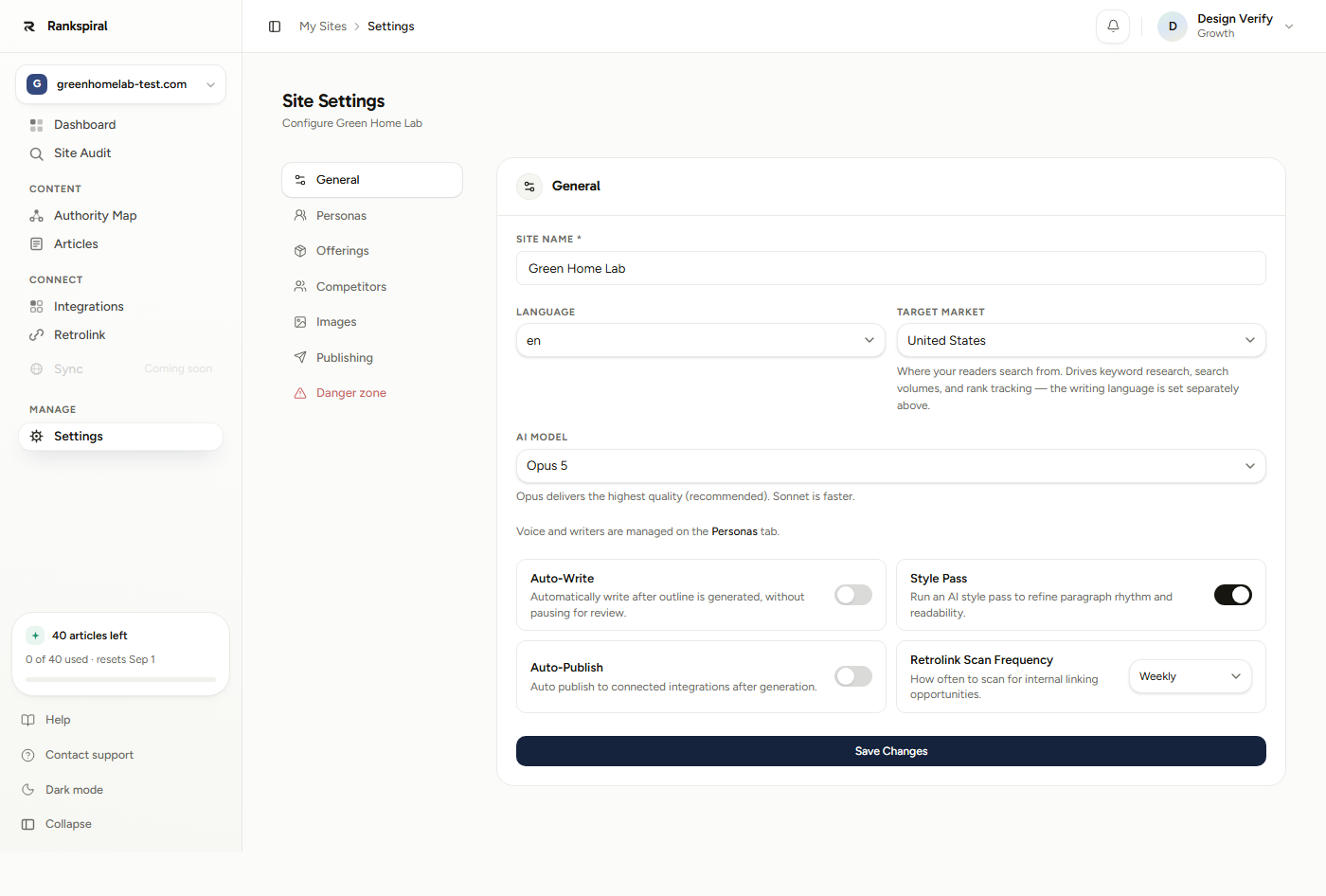
| Setting | What it does | Default |
|---|---|---|
| Auto-Write | Writes straight through after the outline instead of pausing for your approval | Off for sites you create by hand, on for sites created through onboarding |
| Auto-Publish | Pushes finished articles to your connected CMS with no review step | Off |
| Style Pass | An extra editing pass for paragraph rhythm and readability | On |
The two combinations worth knowing:
Auto-Write off, Auto-Publish off. Maximum control. Each article stops twice: once at the outline for your approval, once at the finished draft. Right for your first week.
Auto-Write on, Auto-Publish on. Fully hands-off. Keywords become live posts on your site with nobody in the loop. Right once you trust the voice, and not a day before.
What runs each morning
Scheduled generation kicks off at 08:00 UTC daily. The job picks up keywords whose date has arrived and starts them through the pipeline.
Two behaviors worth knowing, because both look like bugs otherwise.
Backlogs catch up, they do not vanish. If more is due than can run in one morning, the leftovers stay queued and get picked up on following days. Nothing is silently dropped.
Running out of article quota does not burn your queue. A keyword that cannot be written because you are at your monthly limit goes back to queued rather than being marked done. When your allowance resets, it is still there waiting.
You can watch the next one arrive on the project Dashboard, where the Schedule card counts down to the next article and tags it Needs approval or Auto-writes depending on your settings.
Getting the most out of it
Schedule by cluster, not by "all unscheduled". This is the single change that most improves results. Set the scope to one cluster, run it at 7 per week, and that cluster finishes in a week as a complete, internally linked set. Six articles that cover one subtopic properly outrank twenty scattered ones, and the internal linking has somewhere sensible to point.
Start at 3 per week for your first fortnight, then move to daily. Not because daily is wrong, but because your voice description almost certainly needs one revision, and finding that out after six articles is cheaper than after twenty. Read articles two and five closely, fix what you notice, then raise the cadence and stop reading every one.
Set the start date to tomorrow, not today. It is already the default. Anything scheduled for today has already missed this morning's run and waits until the next one, which reads like nothing happened.
Treat 14 and 21 per week as a one-time move, not a setting. They exist for a real case: you have forty mapped keywords, a competitor is eating your category, and you want the gap closed this month. Use one, then drop back to daily. Sustained triple-daily publishing on a young site is a good way to produce a lot of thin pages quickly.
Turn Auto-Publish on only after the fifth article you did not need to edit. That is the actual signal. Not "the last one was fine", but a run of five where you opened the draft, read it, and closed it without touching anything. Until then the review step is doing real work.
Re-queue from the Gaps tab, not the calendar. When your calendar empties, the instinct is to auto-schedule whatever is left. Go to Gaps instead and queue against the empty intent cells. Same effort, considerably better targets.
You have it right when the Dashboard Schedule card shows a countdown to tomorrow, the calendar has dots stretching two weeks out, and you have not opened RankSpiral in four days.
Troubleshooting
- Nothing generated on a scheduled date. Check your remaining article allowance first, in the sidebar. Out of quota means the keyword reverts to queued and waits for the reset, rather than failing.
- Articles generate but never go live. Auto-Publish is off, which is the default, or no CMS is connected. Both live one click apart.
- Articles stop at the outline and wait. Auto-Write is off. Either approve outlines as they appear, or switch it on in Settings → General.
- Auto Schedule says zero keywords to schedule. Everything already has a date. Drag some back to Unscheduled, or add keywords first.
- Dates landed further out than expected. The frequency spreads across weeks, so 30 keywords at 3 per week fills ten weeks. Re-run at a higher frequency; new dates replace the old ones.
- An article shows as generating for a long time. A recovery sweep runs every five minutes and resumes stalled articles from where they stopped. Give it ten minutes before intervening.
The best publishing schedule is not the fastest one.
It is the one still running in month four, when the articles you queued in month one finally start showing up in the results and you had almost stopped checking.
Was this page useful?
Tell us what was missing and we'll fix the page.