Topical Map
The Authority Map: pillars, clusters, and keywords built from real search results, plus how to read its five tabs and what to write first.
Updated Sep 9, 2026 · 10 min read
Ask any AI for keyword ideas and it will hand you fifty. Confidently, instantly, and with no idea whether a single one of them is winnable.
The Authority Map is the opposite bet. It goes and looks.
Real search volumes, real competitor keywords, real Google result pages, and then a structure built from what it found rather than what it imagined. This page explains what it builds, how to read the five tabs, and what to do with it once it exists.
In the sidebar this feature is Authority Map, under Content. Older material calls it the topical map or content map. Same thing.
What it does
The map has three levels, and the whole product rests on them.
- Pillars - broad themes you want to own. A category page could sit on each one. Builds produce three to six.
- Clusters - subtopics inside a pillar, each holding a handful of related keywords.
- Keywords - one keyword becomes one article. This is the level where work happens.
The interesting part is how keywords get sorted into clusters, because it is not the model's opinion.
RankSpiral pulls the actual Google results page for each keyword and compares which URLs show up. If two keywords share four or more of the same top-10 URLs, Google already treats them as the same question, so one of them becomes a variant of the other rather than a second article. Share two or three and they belong in the same cluster with their own articles each. Share one or none and they are separate topics.
The misconception worth killing early: the AI does not decide what merges. Search results decide the structure and the model only names it. That order matters, because a model asked to group keywords by meaning will happily merge two things Google ranks completely differently, and you find out four articles later.
Every keyword also gets a winnability score computed from evidence rather than guessed. Low difficulty helps. Forum and Reddit results in the top 10 help a lot, because those are pages you can beat. A page of yours already sitting at position 11 to 30 makes it a quick win outright.
The five tabs
They are not five views of the same thing. They answer five different questions.
Value map: what should I write next
The default tab, and the one to build a habit around.
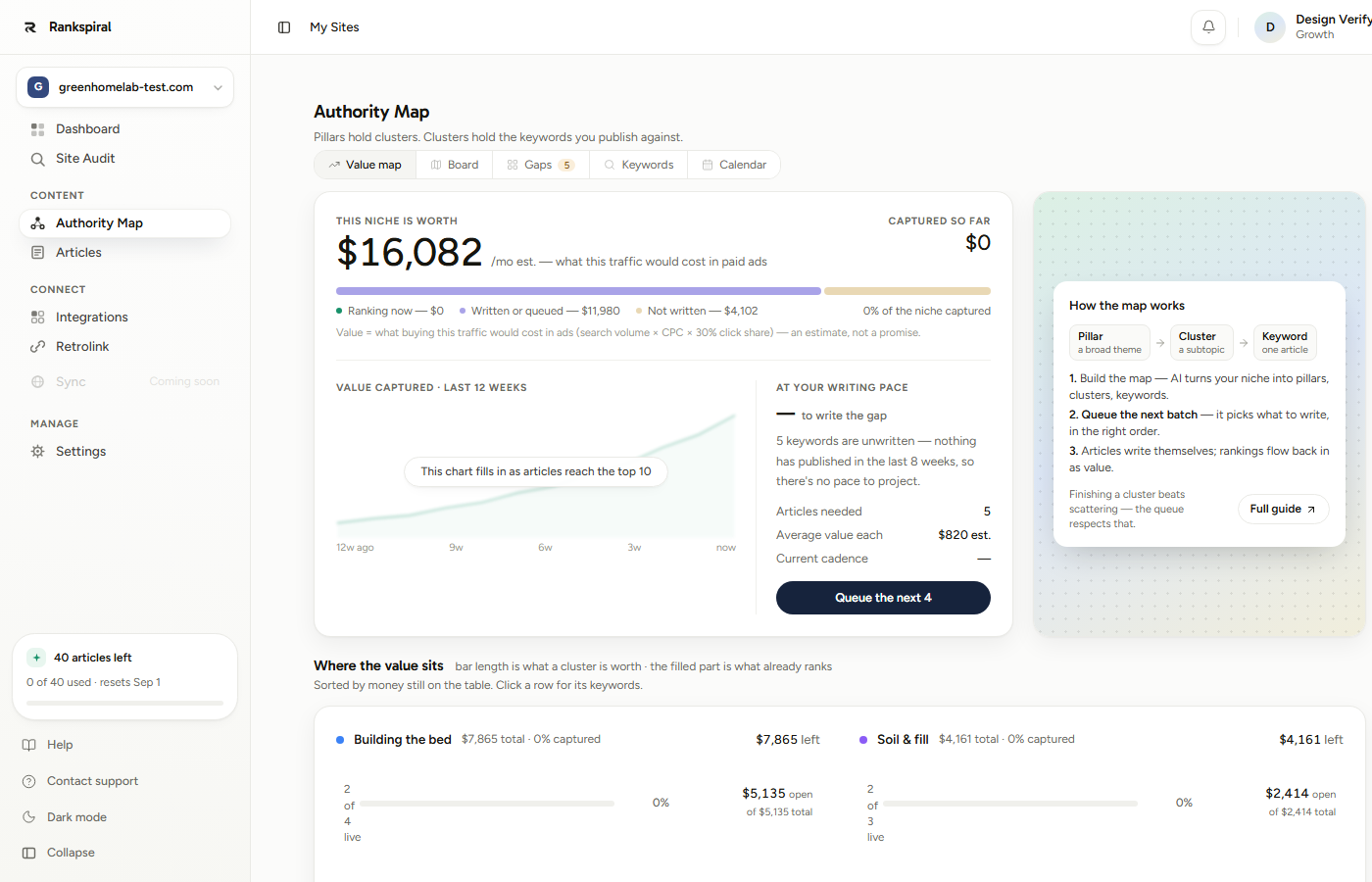
This niche is worth is what the traffic would cost in ads, and it is an estimate used for ordering, not a revenue forecast. Captured so far is the number that should climb.
Below that, Where the value sits sorts clusters by money still on the table, which is a more useful sort than volume. A high-volume cluster you already dominate is worth less than a medium one you have not touched.
Board: the structure
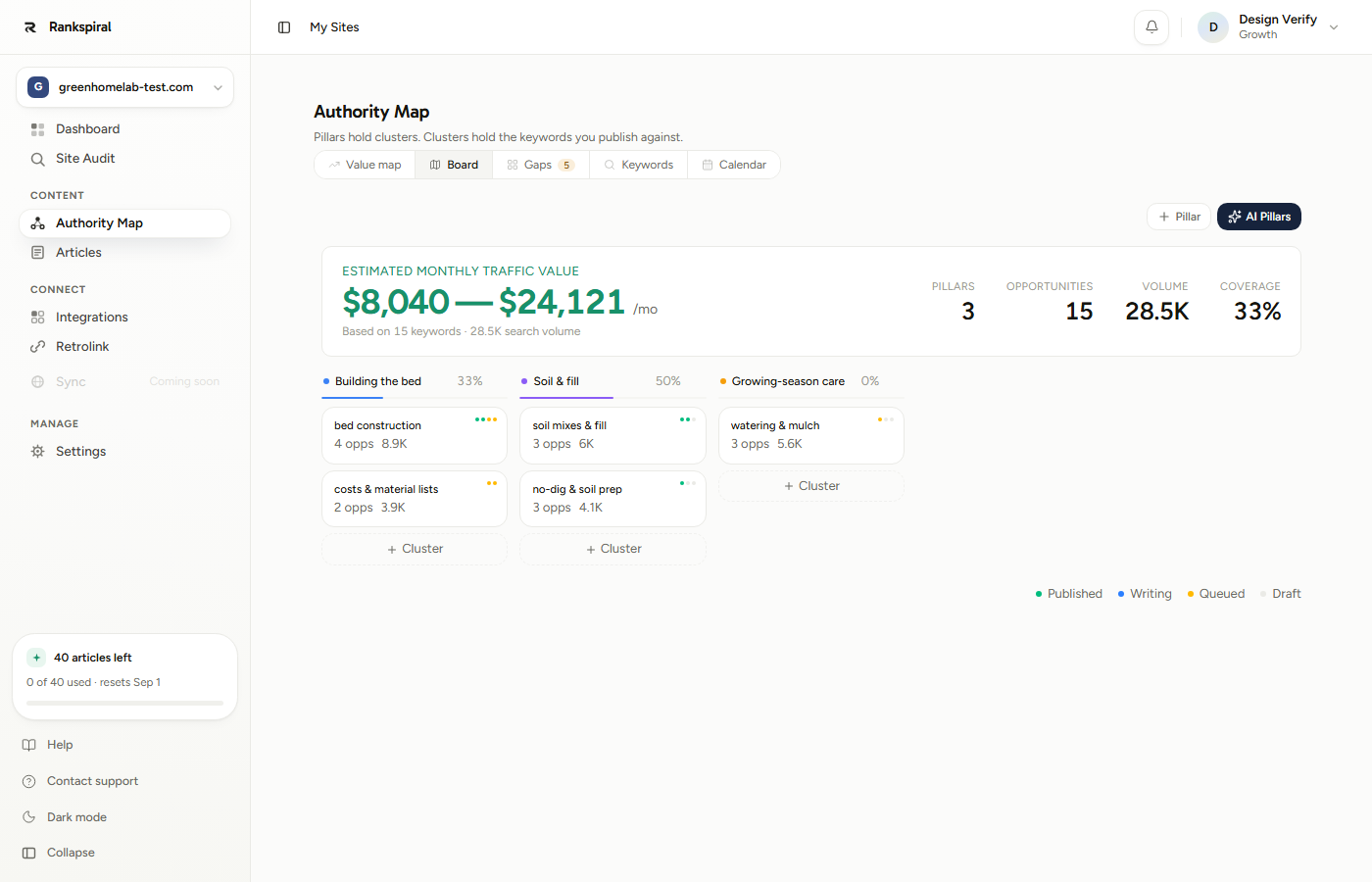
Pillars run across, cluster cards sit underneath, and each cluster card shows its opportunity count and combined volume. The coloured pips are article status: published, writing, queued, draft.
The percentage next to each pillar is coverage, meaning how many of that pillar's keywords have an article written. It is the honest score. Two buttons live up here: Pillar to add one by hand, and AI Pillars to have some suggested.
Gaps: the tab nobody finds in week one
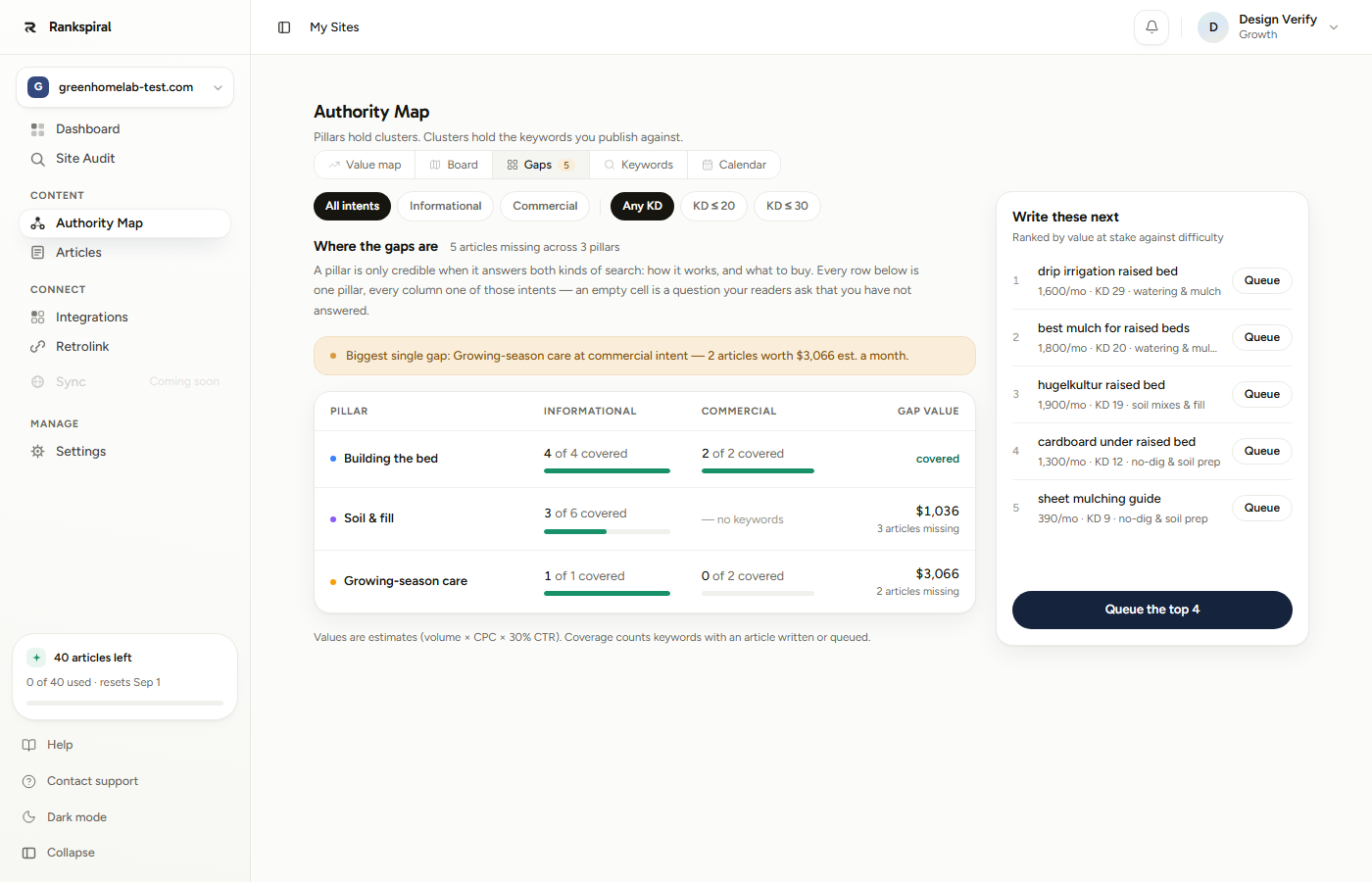
Every pillar is split by intent: Informational and Commercial. An empty cell is a question your readers ask that you have not answered.
This matters more than it sounds. A pillar with ten how-to articles and nothing commercial reads to a search engine as a hobby blog, and a pillar with only commercial pages reads as a catalogue. Credibility comes from covering both.
Filters across the top narrow by intent (All intents, Informational, Commercial) and by difficulty (Any KD, KD ≤ 20, KD ≤ 30). The Write these next panel on the right ranks what is left by value against difficulty.
Keywords: the full table
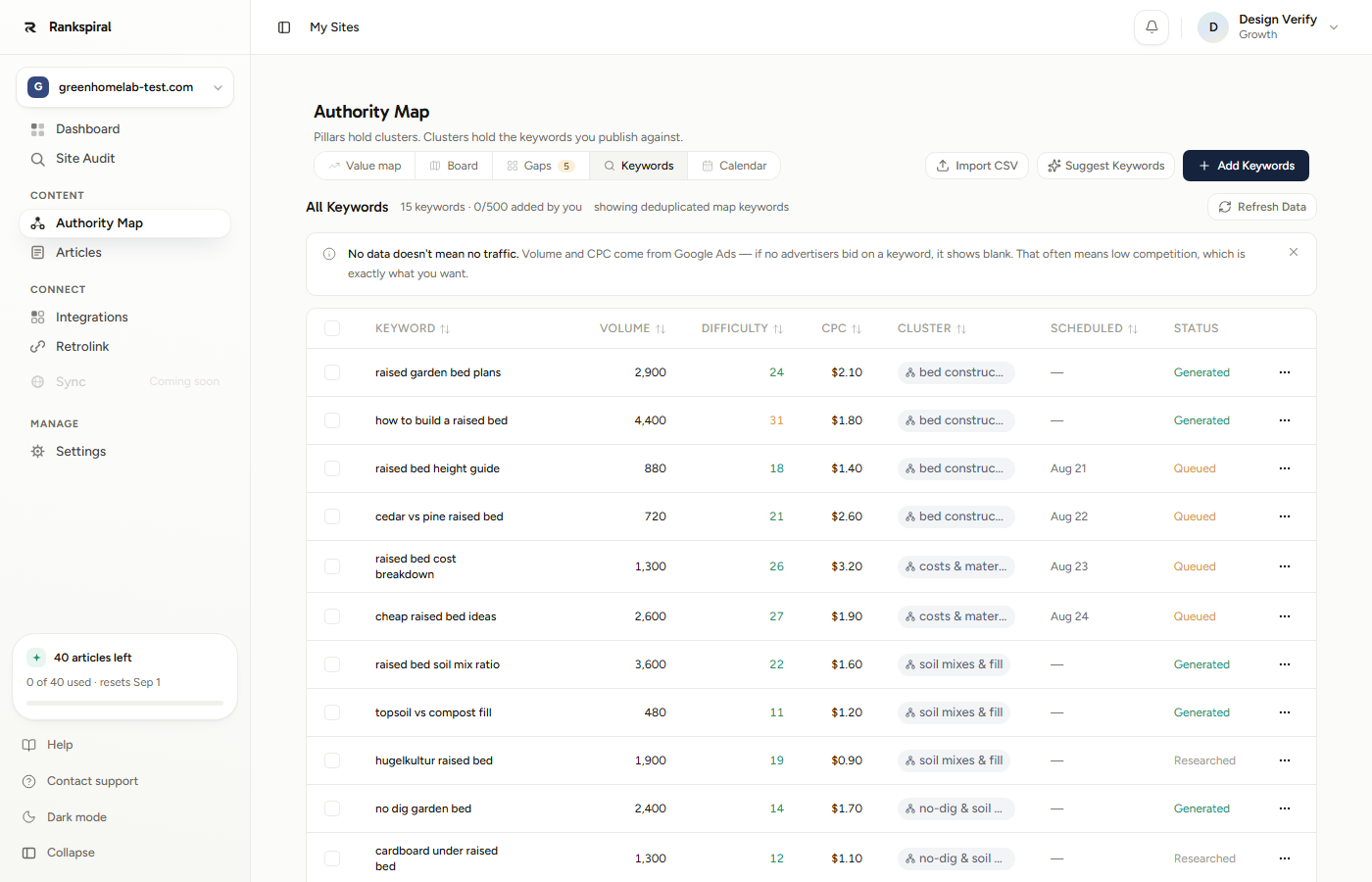
Sortable columns for Keyword, Volume, Difficulty, CPC, Cluster, Scheduled, and Status. Volume cells carry a twelve-month sparkline, so seasonal terms are visible at a glance rather than after you publish in the wrong month.
Small chips next to a keyword tell you where it came from: added for yours, AI for a model backfill, related for an auto-expansion. Map-built keywords carry no chip.
Clicking a keyword anywhere on the map opens its drawer: metrics, scheduling, a Generate Article button, and at the bottom, Delete keyword. Deleting removes the keyword only; the article, if one exists, stays.
Calendar: when it happens
Scheduled keywords by date, drag and drop between days, and an unscheduled panel grouped by cluster. Covered properly on Auto Scheduling.
How to use it
- Open Authority Map. If the site is new, click Build Full Map and wait two to three minutes.
- Skim Board once. You are checking that the pillars are actually your business, not a neighbouring one.
- Go to Gaps and look for empty cells. That is your real backlog.
- Click Queue the top 4, or use Queue the next 4 on the Value map. The first article starts writing now, the rest schedule one per day.
- Come back weekly. Watch coverage climb, and re-queue when the calendar empties.
The queue button's number scales with your plan's monthly article allowance, so it may not say four.
Settings and options
| Control | What it does | Limit |
|---|---|---|
| Build Full Map | Full research build from live search data | 3 per site per calendar month |
| AI Pillars | Suggests pillar themes from your business | Up to 5, from the monthly AI pool |
| AI Keywords | Suggests keywords for one cluster | Up to 10, from the same pool |
| Suggest Keywords | Keyword ideas for the whole site, researched in the background | Up to 20, from the same pool |
| Add Keywords | Type or paste your own | 200 per batch, counts against your plan |
| Import CSV | Bulk import (Pillar, Cluster, Keyword) | Counts against your plan |
| Refresh Data | Re-pulls volume, difficulty, CPC for keywords with data older than 30 days | 4 per site per month |
| Auto-assign | Clusters your unassigned keywords by shared results | 4 per site per month |
All the monthly counters reset on the 1st, and every button that consumes one shows how many you have left before you spend it.
Two of those buttons are politer than they look. Suggest Keywords now runs as a background job: it takes a minute or two, you can close the dialog and come back, and the results wait for you, complete with volume and difficulty. An AI request is only counted when the model actually runs, so a failed run costs you nothing.
And Refresh Data skips any keyword whose numbers are under 30 days old, because that data moves monthly (rankings are checked on their own schedule). If everything is already fresh, the click tells you so and does not use one of your four monthly refreshes.
Limits by plan
Here is the thing people get backwards, so it is worth stating loudly.
The map itself is full quality on every plan, including the trial. Build depth is not tiered. What your plan caps is how many keywords you add on top, through Add Keywords or Import CSV, and map-built keywords never count against it.
| Plan | Keywords you can add | AI suggestion requests / month |
|---|---|---|
| Trial | 50 | 2 |
| Starter | 100 | 15 |
| Growth | 500 | 30 |
| Portfolio | 1,500 | 75 |
| Agency | 3,000 | 150 |
The Keywords tab header shows this as a running count, phrased as added by you, which is the number the cap applies to.
Getting the most out of it
Fix the inputs before you rebuild, not after. A disappointing map is almost always a description problem. Go to Settings, make the description say what you sell and who buys it in plain words, add three real competitors, then rebuild. You have three builds a month, so spending one on the same bad inputs is the expensive mistake.
Start at Gaps, not at the biggest number. Sort the Board by volume and you will pick the hardest keyword you own. Open Gaps instead and write into the empty commercial cell of a pillar that already has informational coverage. Those articles rank faster because the pillar around them is already credible.
Filter to KD ≤ 20 for your first ten articles. It is right there on the Gaps tab. A new site ranking for a difficulty-45 keyword is a nine-month project; a difficulty-15 keyword is a six-week one. Ten early wins also give the internal linking something real to point at, which compounds. Raise the filter once something of yours is in the top 30.
Trust the queue button over your own taste. It ranks by value at stake against difficulty and it keeps clusters together, which is exactly what you would do if you had the patience. Try this: queue four with the button, queue four by hand next month, and compare which set reached the top 30 first.
Check the variant chips before you complain about missing keywords. A +3 pill next to a keyword means three other phrasings collapsed into it because Google returns the same pages for all of them. Those are not missing, they are already covered by the article you are about to write. Writing them separately is how sites end up competing with themselves.
Spend a data refresh in month two, not week one. You get four a month and volumes barely move week to week. Save them for after a seasonal shift or a batch of new keywords, and use Add Keywords with Research and find related checked when you want fresh data and expansion in the same spend.
The most common mistake: rebuilding the map because the first one looked thin, without changing anything about the inputs. You get the same map, one build poorer. Change the description, add competitors, then rebuild.
It is working when a pillar's coverage reads above 50 percent, the Gaps table shows covered where it used to show a dollar figure, and the Value map's captured number has moved off zero.
Troubleshooting
- The map is off-topic or aimed at the wrong business. The site description misled it, usually because auto-fill scraped a thin homepage. Rewrite the description in Settings, add competitors, rebuild.
- Clusters look too similar to each other. They shared enough top-10 URLs to be judged related. Check the variant chips first, then merge by hand if you still disagree.
- Keywords have no volume, difficulty, or CPC. Volume and CPC come from Google Ads, and terms nobody bids on come back blank. That usually signals low competition rather than no traffic. Run Refresh Data if the whole table is empty.
- Nothing happens when I click Build Full Map. Either you have used all three builds this month, or a build is already running. The counter resets on the 1st.
- Add Keywords silently added fewer than I pasted. You hit your plan's added-keyword cap and the rest were trimmed. Map keywords are free; only yours count.
- Unassigned keywords are piling up. Use Auto-assign, which groups them by shared search results. Four runs a month.
A keyword list tells you what to write. A map tells you what to write next, and which four things after that, and when to stop.
That second thing is the whole job.
Was this page useful?
Tell us what was missing and we'll fix the page.