AI Article Generation
How RankSpiral researches, outlines, writes, and polishes long-form SEO articles, stage by stage.
Updated Sep 9, 2026 · 6 min read
Pick a keyword, get back a researched, structured, illustrated, and internally linked article that is ready to review and publish. This page explains every stage of that pipeline, the settings that shape it, and how to get the best articles out of it.
What it does
RankSpiral does not hand your keyword to an AI model with "write an article about this" and hope. Generation is a pipeline of dedicated stages: research first, structure second, writing third, then separate editing passes for rhythm, images, links, and metadata. Each stage does one job, which is why the output does not read like default AI text.
The one thing people misunderstand: the article is written from research, not from the model's memory. Before writing, the pipeline searches the live web for what currently ranks, what people ask, and what competitors miss. That research shapes the outline, and the outline governs the writing.
Stage 1: Web-powered research
The pipeline analyzes search intent (informational, commercial, comparison, listicle), collects semantic keywords and "People Also Ask" questions, and identifies authoritative sources and content gaps in what currently ranks.
Stage 2: Outline
From the research, it builds an outline: an SEO-optimized title, 5 to 7 main sections with subheadings, key points per section, and a content format for each section (prose, list, comparison table, steps, or FAQ). If Auto-Write is off, generation pauses here with an Outline Ready status so you can edit the structure before a word is written.
Stage 3: Writing
The full article is written in one pass from the complete outline and research, in your site's tone or custom brand voice, with your product offerings woven into relevant sections rather than bolted on.
Stage 4: Style pass
A separate pass restructures paragraph breaks for natural reading rhythm: standalone paragraphs for impactful lines, varied paragraph lengths, better scannability. It changes where breaks fall, never what the article says. It runs on every plan and can be toggled per site.
Stage 5: Images
Each article gets 3 AI-generated images: 1 hero image plus 2 section images. You choose the look per site from five presets (Flat & Minimal, Photorealistic, Illustrated, Dark & Cinematic, Watercolor), or write a fully custom style prompt, or upload a reference image for the AI to match your brand's visual style. Output is WebP for fast page loads.
Stage 6: Link insertion
A dedicated pass inserts three kinds of links at contextually relevant phrases: product links to your offerings, internal links to your previously published articles, and authority links to external sources found during research. Links are never placed in headings, external links open in a new tab, and competitor links are marked nofollow.
Stage 7: Meta and finalizing
The pipeline generates the meta title and description, injects FAQ schema markup for rich results (a per-site toggle, on by default), and runs Retrolink, which scans your existing articles for natural places to link back to the new one. The article then lands at In Review, ready for you.
How to use it
- Start from a keyword - open your site's Articles page and click Generate Article. A dialog opens where you pick the target keyword.
- Generate - click Generate. The article appears in your list and its status chip walks through the stages as they run: Researching, Outlining, Writing, then the finishing passes (Polishing, Images, Links, Meta).
- Shape the outline - if Auto-Write is off, the article waits at Outline Ready. Open it, adjust sections and key points, and continue when the structure matches your intent.
- Review and publish - when the chip reads In Review, read the article in the editor, make any edits, and publish to your connected CMS.
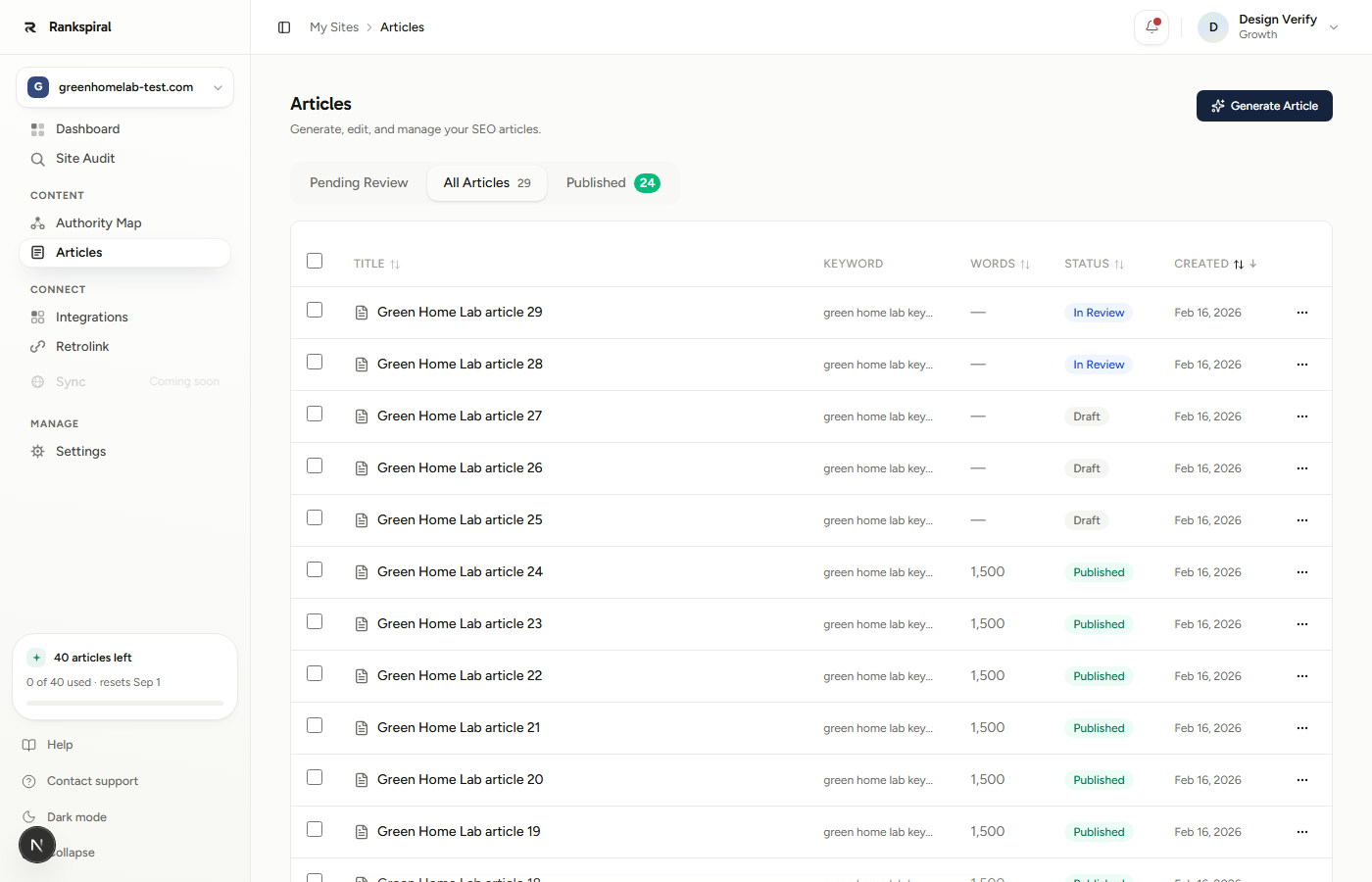
When the chip flips to Published, you are done: the article is live on your connected CMS with images, links, meta tags, and schema already in place.
Articles can also be generated in bulk from your Authority Map, and on a schedule with auto-publishing; both are covered in their own pages linked below.
Settings & options
These live in your site's settings and apply to every article the site generates:
| Option | What it does | Default |
|---|---|---|
| AI Model | Which model writes the article. Growth and up choose per site: Sonnet 5, Sonnet 4.6, or Opus 5. Starter and the trial write on Opus 5 with no picker. | Opus 5 |
| Auto-Write | Writes immediately after the outline instead of pausing for your review. | Off |
| Style Pass | Runs the paragraph-rhythm pass after writing. | On |
| Image style | Preset, custom prompt, or reference image for article images. | Flat & Minimal |
| Inline Data Visuals (beta) | Auto-generates stat blocks, charts, and callout images from article data as PNGs. Growth and up. | Off |
| FAQ schema | Injects FAQ structured data for rich results (Publishing tab). | On |
How long articles are, honestly
Most articles land between 1,500 and 2,500 words, sized by what the topic needs. That is deliberate. The outline stage budgets words per section and cuts thin filler, because a 2,000-word article that answers the query beats a 3,500-word article that circles it, both for readers and for ranking. If you want a longer piece, add sections at the outline stage rather than asking for padding.
Getting the most out of it
- Leave Auto-Write off for money pages, on for volume - review the outline on commercial and comparison articles where structure decides conversions. For cluster support content, Auto-Write plus a quick pass at In Review is faster and just as safe.
- Edit the outline, not just the article - deleting a weak section before writing takes one click; rewriting 300 misdirected words after takes twenty minutes. The outline is the highest-leverage edit point in the whole pipeline.
- Fill in your offerings and competitors before generating - the research and link stages read your site settings. An article generated with your product catalog configured links to your products at natural phrases; one without it cannot.
- Run a model taste test once - generate three articles on Sonnet 5 and three on Opus 5 from the same cluster, read them aloud, and standardize on the one that sounds like you. Model feel differs by niche more than any benchmark suggests.
- Set your voice once, per site - if every article needs the same manual voice fixes in review, stop editing articles and go edit your brand voice; every future article inherits the fix.
Troubleshooting
- The article sits at Outline Ready and nothing happens - Auto-Write is off, so the pipeline is waiting for you. Open the article, review the outline, and continue. If you never want this pause, switch Auto-Write on in site settings.
- Generation seems stuck in Writing - a recovery process checks for stalled generations every few minutes and resumes them automatically, so give it a little time before assuming the worst. If an article stays stuck well beyond that, its status will surface a failure you can retry.
- The article finished without images or links - each finishing pass retries a limited number of times and is then skipped so a hiccup in one stage cannot hold your article hostage. The article still completes; add images or links in the editor.
- No FAQ rich results appear in Google - check the FAQ schema toggle in your site's Publishing settings is on, and remember rich results are Google's call: valid schema makes you eligible, not guaranteed.
Was this page useful?
Tell us what was missing and we'll fix the page.