My Sites: Running a Portfolio
The portfolio view: KPI row, site cards, the 21-day stalled flag, the site switcher, and why your article allowance is pooled across sites.
Updated Sep 9, 2026 · 7 min read
Running one site is a to-do list. Running four is a triage problem, and the honest question is never "how is everything doing" but "which one needs me today".
My sites is built to answer the second question in about four seconds.
This page covers the KPI row, what each site card is telling you, the flag that floats a site to the top, and the one rule that catches almost everybody out: your article allowance is shared, not split.
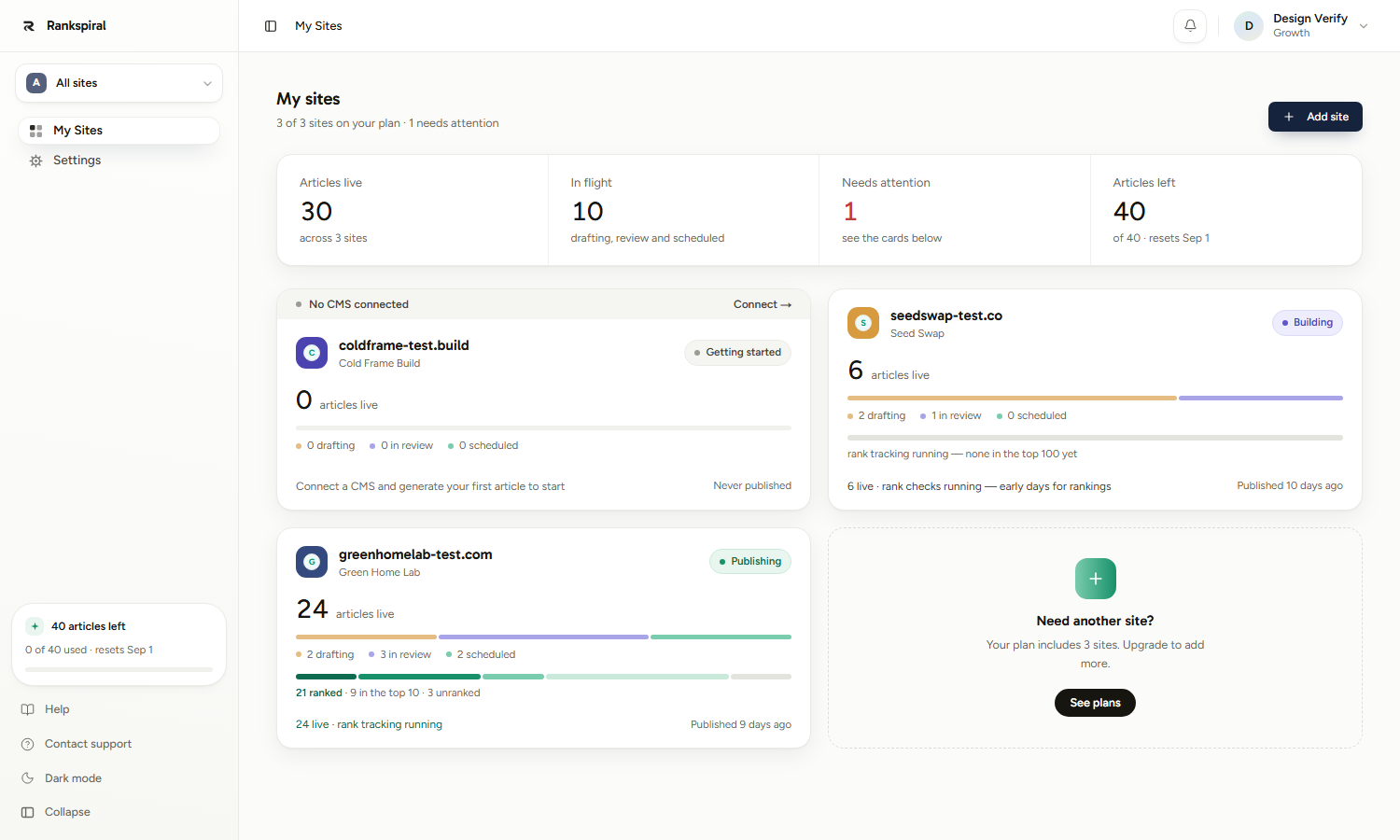
The four numbers across the top

- Articles live - published articles across every site, with a green delta for how many went live in the last seven days.
- In flight - everything not yet live: drafting, in review, and scheduled, added together.
- Needs attention - how many sites carry a banner. It renders red the moment it is above zero, and the matching cards are already sorted to the top.
- Articles left - your remaining article allowance and the date it resets. On trial this reads of 2 trial articles, because the trial bucket is a lifetime one rather than monthly.
The header line above them is worth reading too. 3 of 3 sites on your plan, 1 needs attention tells you both your site cap and your triage load in one sentence.
When at least one site has Search Console connected, a Search performance chart appears under the KPIs with clicks and impressions summed across every connected site, for the last 30 days.
Reading a site card
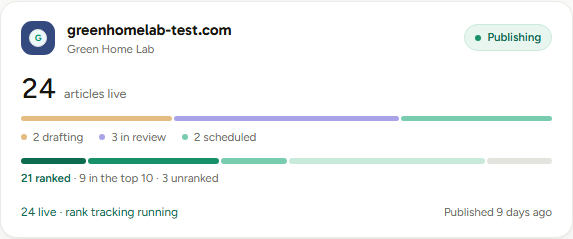
Each card is the same shape, top to bottom.
The status chip on the right is derived, never set by you:
| Chip | When it applies |
|---|---|
| Getting started | Nothing published and nothing in flight |
| Building | Work in flight but nothing live, or fewer than 20 published |
| Publishing | 20 or more published, and something went live recently |
| Paused | Has published before, but nothing in the last 21 days |
Then the big number, articles live, with a mint +N this week when applicable. If Search Console is connected on that site you also get 30-day clicks and a small trend line on the same row.
Two thin strips sit below, and they are not the same thing:
- The pipeline strip (amber, periwinkle, mint) splits your unfinished work into drafting, in review, and scheduled. A fat periwinkle band means articles are waiting on you, not on the machine.
- The rank strip (dark mint through grey) mirrors the buckets on that site's Overview, summarised underneath as 21 ranked, 9 in the top 10, 3 unranked. It only appears once the site has published something.
The bottom line is a plain-language momentum note plus when the site last published. Published 9 days ago is a fact you will act on far more often than any percentage above it.
The attention flag, and exactly what triggers it
A site gets at most one banner, and flagged sites sort to the top of the grid ahead of the normal newest-first order.
There are precisely two triggers.
- No CMS connected - checked first, so it wins over anything else. On a site with articles already published it renders red, because publishing is genuinely blocked. On a brand-new site with nothing live it renders as a neutral setup nudge instead, since it is a task rather than an emergency.
- Publishing has stalled - nothing published for more than 21 days. The banner names the exact gap ("Nothing published in 34 days") and its button becomes Review N waiting if drafts are sitting in review, because that is usually the actual cause.
Twenty-one days is the same threshold the site Overview uses, so the two surfaces can never disagree about whether a site has stalled. If a card says Paused, opening that site will say the same thing.
Notice what does not raise a flag: bad rankings, an empty cluster, a low authority score. Those are slow problems. This page only interrupts you for things that have stopped the machine.
The site switcher
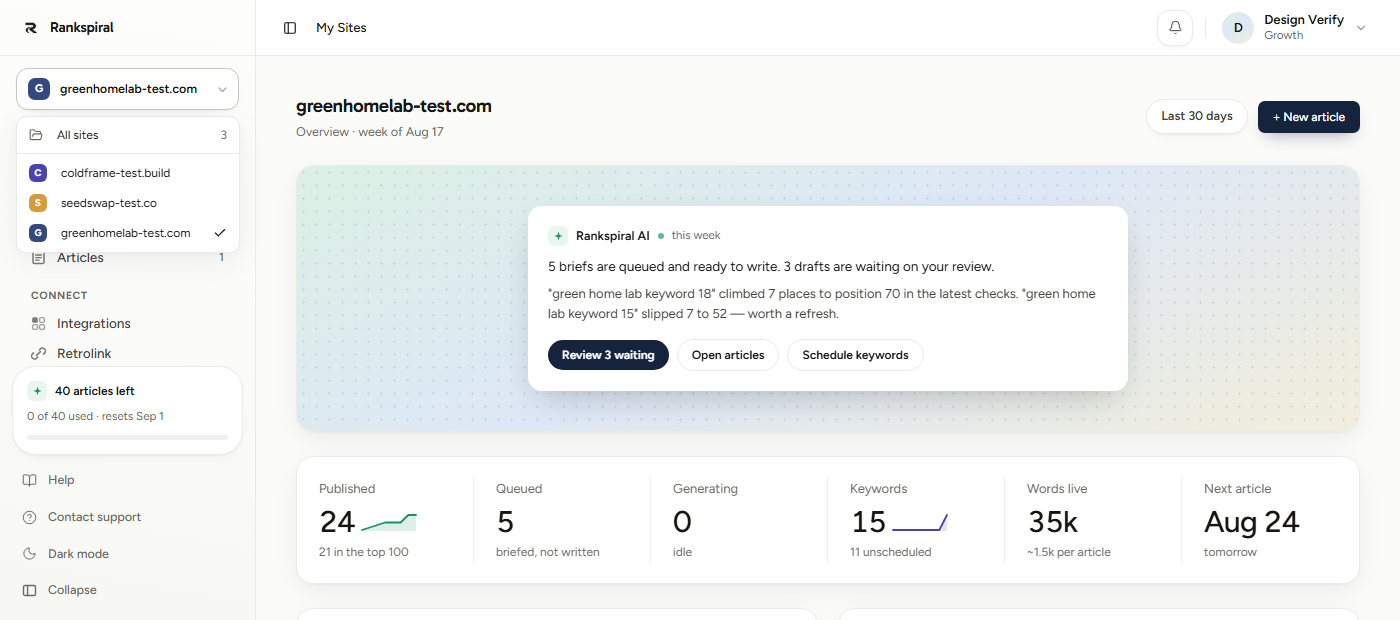
The button at the top of the sidebar carries the current site's name, or All sites when you are on the portfolio. Open it and you get every site, a tick on the one you are in, and an All sites entry back to this page.
Each site keeps one colour chip permanently, derived from its id rather than its position in the list. Sort order can change, the colour will not, which makes the chips genuinely usable as recognition.
Switching keeps you on the portfolio-level pages, so it is the fastest way to compare the same screen across two sites.
Articles are pooled. Sites are not.
This is the concept that surprises people most, so it is worth stating flatly.
Your plan's monthly article allowance belongs to your account, not to any individual site. Every article any site generates comes out of the same number.
On Growth, that is 50 articles a month total. You can spend all 50 on one site, split them 25 and 25, or run one site hard while another sits idle. Nothing reserves a share for a site that is not using it.
That is a feature, not an oversight. A portfolio almost never wants an even split, and a per-site cap would strand allowance on your quietest site every single month.
The allowance survives deletion. Generating an article and then deleting it still spends the article. The counter reads a ledger rather than counting rows, so generate-and-delete is not a way to get more.
Two smaller details worth knowing. Paid plans reset on the 1st of the calendar month, and the KPI tile names the date. Retries do not debit: re-running a failed stage on an existing article costs you nothing from the allowance.
Tracked keywords work the other way around, by the way. That cap is per site, and it only counts keywords you added by hand or by CSV.
What happens when you hit your site limit
Every plan has a maxProjects ceiling: Starter 1, Growth 3, Portfolio 5, Agency 10. Trial gets one.
The dashed Add site tile at the end of the grid changes rather than disappearing. Below the limit it reads Add your fourth site and links to the setup flow. At the limit it reads Need another site? with a See plans button that opens the pricing dialog in place.
The header line changes too, from a count to 3 of 3 sites on your plan. Nothing about your existing sites changes; you simply cannot add another until you upgrade.
Getting the most out of a portfolio
Work the flagged cards, then close the tab. The sort order is the workflow. If nothing is flagged and no site is Paused, your portfolio genuinely does not need you today, and the temptation to go poke at rankings is worth resisting.
Concentrate the pool rather than spreading it. Four sites at 10 articles a month each is four sites that never finish a cluster. One site at 40 for two months, then the next, builds actual depth. Search rewards depth in a way it does not reward breadth, which is the single biggest lever a portfolio owner has.
Check the periwinkle band before you blame the pipeline. A site that looks slow is very often a site with six drafts waiting on a human. That is the one bottleneck no amount of allowance fixes.
Connect Search Console on every site, even the quiet ones. It is the only way the card gets a clicks trend, and impressions move months before rankings do. It costs two minutes per site.
Give a stalled site a decision, not a shrug. Either queue a batch this week or accept it is parked. A site drifting at nineteen days from stalled, repeatedly, is the worst of both.
When something looks off
- A site shows 0 articles live but you published there. The card counts articles with status Published inside RankSpiral. Articles you pushed manually outside the product are not counted.
- No rank strip on a card. That site has nothing published yet, or no rank check has completed. Checks start after publishing, not after writing.
- No clicks trend on a card. Search Console is not connected for that specific site. The connection is per site, not per account.
- Articles left says 0 mid-month. The pool is spent across all sites. It resets on the 1st, or upgrade for a bigger pool.
- A card is flagged "No CMS connected" but you connected one. Check you connected it on that site rather than another. Integrations live per site.
A portfolio is not four blogs. It is one budget, four bets, and a weekly decision about where the budget goes.
This page exists to make that decision take four seconds instead of an afternoon.
Was this page useful?
Tell us what was missing and we'll fix the page.