Rank Tracking
Where each published article ranks, how the check cadence adapts to article age, and the weekly review habit that turns positions into decisions.
Updated Sep 11, 2026 · 7 min read
Publishing without rank tracking is writing into a void and calling the silence success.
RankSpiral checks where each published article actually sits in Google, keeps the history, and shows you the direction of travel next to the piece itself. This page covers what gets tracked, how often, and the one habit that turns the numbers into decisions.
What it does
Every article you publish has one primary keyword. RankSpiral searches Google for that keyword, in your target market, and records where your page comes up.
It looks through the top 50, so "starts to rank" here means entering the top 50. Anything deeper comes back as not ranking, because position 60 and position 400 are the same thing in practice.
The unit of tracking is the published article, not the keyword. Keywords sitting in your map with no article yet are not being checked. This trips people up: your plan's tracked-keyword number caps how many keywords you can add, and has nothing to do with how many rankings get measured. Publish an article, and its keyword is tracked.
How often it checks
Not everything, every day. Rankings move over days, not hours, and Google's own Search Console data lags about two days behind, so checking more often than that measures noise.
The cadence adapts to how much a given article could plausibly be moving:
| Article age | Checked | Why |
|---|---|---|
| 0 to 14 days | Every 2 days | New pages move fast and unpredictably |
| 2 weeks to 6 months | Weekly | Movement slows and settles |
| Over 6 months | Monthly | Established pages rarely swing |
| Any age, position 5 to 20 | Weekly | Striking distance. Worth watching closely |
The striking-distance exception is the interesting rule. An article stuck at position 14 for eight months is the most actionable page you own, so it keeps a weekly check rather than dropping to monthly with its cohort.
You can see your own split on the project Dashboard, on a small chip reading something like 3 2-day · 21 weekly.
Where to read it
The Published tab
Go to Articles and pick Published. This is the main view.
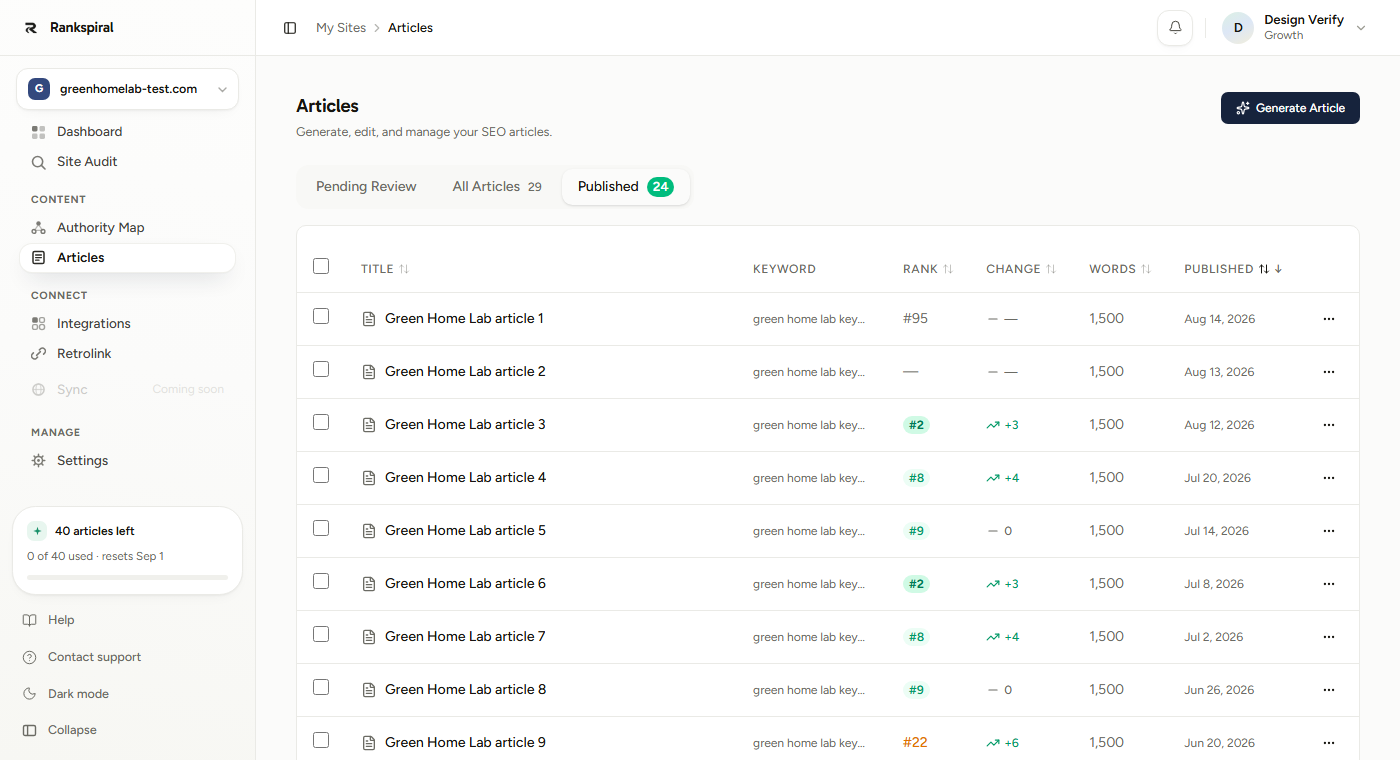
Two columns matter. Rank shows the current position, styled by how good it is: a solid green badge for the top three, a lighter green badge through position ten, amber to thirty, plain grey to fifty, and a dash for not ranking.
Change shows movement since the previous check. A green up arrow with +4 means you climbed four places. A red down arrow with -7 means you lost seven. A flat 0 means no change, and a dash means there is not yet a previous check to compare against.
Both columns sort, and sorting by Change is the fastest weekly review you can do.
Rank History on the article
Open any published article and the sidebar carries a Rank History section: Current, Best, and Change, above a small line chart of every check.
The chart is inverted so that up means better, and it is labelled Lower is better in case the axis catches you out. Best is the one to watch, because it tells you what the page has already proved it can do.
Rank distribution on the Dashboard
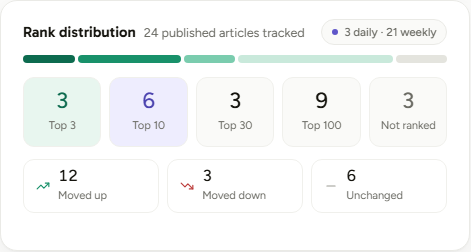
Five buckets: Top 3, Top 10, Top 30, Top 100, Not ranked, with a proportional bar above them and a movement summary below.
Counting articles per bucket beats an average position, which is a number that can improve while every page you care about gets worse.
Settings and options
| Control | Where | Notes |
|---|---|---|
| Refresh Rank | Row menu on the Published tab | On demand, once per 24 hours per article |
| Target market | Settings → General | 55 markets. Decides where rankings are measured |
| Refresh Data | Authority Map → Keywords | Volume, difficulty, CPC. 4 per site per month |
| Google Search Console | Integrations | Adds real clicks and impressions alongside positions |
The row menu shows how long ago each article was last checked, so you are not spending a manual refresh on something measured an hour ago.
Target market is not the same as language. Market decides which Google you are measured in; language decides what the article is written in. Selling to Germany in English is a normal setup, and getting the market wrong means tracking rankings in a country your buyers do not live in.
What it does not tell you
Worth being straight about, because position data flatters itself.
Position is not traffic. Rank tracking measures where you appear, not whether anyone clicked. For that you need Search Console connected, which puts real clicks and impressions on the same dashboard.
One keyword per article is measured. A good article ranks for dozens of long-tail terms it was never aimed at, and none of those show here. Search Console does show them, which is another reason to connect it.
Rankings are personalised and volatile in reality. These are consistent unpersonalised desktop checks, which makes them comparable over time. They will not always match what you see when you search yourself.
Getting the most out of it
Sort by Change once a week and look only at the extremes. Top five and bottom five. The top five tell you which topic is working, so write more of it. The bottom five usually share a cause, and a shared cause is a fixable one. The middle sixty are noise.
Hunt positions 11 to 20 relentlessly. Page two is the highest-leverage real estate you own, and RankSpiral flags it on the Dashboard for exactly that reason. An article at 14 needs a stronger intro, two more internal links pointing at it, and a section answering the question its competitors cover and it does not. That is an afternoon, and the payoff is bigger than a new article.
Do not judge anything before month four. New sites routinely publish twenty solid articles and see nothing rank for months. This is normal and it is the single most common reason people quit right before it starts working. Set a calendar reminder for four months out and stop checking daily.
Use Best position, not Current, to decide what to improve. A page that touched position 8 and slid to 34 is a very different problem from one that never got above 60. The first has proven it can rank and lost ground to a competitor, which is recoverable. The second may be aimed at the wrong keyword.
Save the manual refresh for after a change, not before. It is capped at once per 24 hours per article, and its real use is checking whether an edit landed. Rewrite the intro, add links, wait a week, then refresh. Refreshing a page you have not touched just tells you what the automatic check would have said anyway.
Connect Search Console in week one. It costs ten minutes and it turns "position 12" into "position 12, 340 impressions, 4 clicks", which is the difference between a number and a decision. A keyword with impressions and no clicks is a title-tag problem, and you cannot see that from position alone.
It is working when the Top 30 bucket starts filling before the Top 10 one does, and the movement row shows more moved up than moved down across a month. That is what compounding looks like from the inside, and it is much less dramatic than people expect.
Troubleshooting
- Every article shows a dash for Rank. Either nothing has been checked yet, or nothing is in the top 50. For a site under four months old, the second is expected rather than broken.
- Change shows a dash even though Rank has a number. Only one check exists so far, so there is nothing to compare against. It fills in on the next one.
- Rankings look wrong compared to my own search. Your search is personalised by location and history. These checks are not, which is what makes them comparable week to week.
- A ranking has not updated in a week. The article is probably on the weekly or monthly tier. Check the cadence chip on the Dashboard, or use Refresh Rank for an immediate answer.
- Refresh Rank is refusing to run. It is limited to once per 24 hours per article. The row menu shows when it was last checked.
- Rankings track the wrong country. Change Target market in Settings → General. Future checks use the new market; existing history stays as it was recorded.
The number that matters is not today's position.
It is how many articles moved from nowhere into the top 50 this month, because that is the queue that becomes your top 10 next quarter... and it is the only one that is still moving when the exciting numbers have gone flat.
Was this page useful?
Tell us what was missing and we'll fix the page.