Site Audit: What Every Check Means
Every check the site audit runs, what it tests and how to fix it, how the score is built, and what the free public tool leaves out.
Updated Aug 26, 2026 · 15 min read
A red list is only useful if you know what the red means. "Canonical points to a different page" is either a five-second fix or completely fine, depending on the page, and the audit does not tell you which.
This page does. Every check the engine runs, what it actually tests, and what to do when it fails.
What the audit actually does
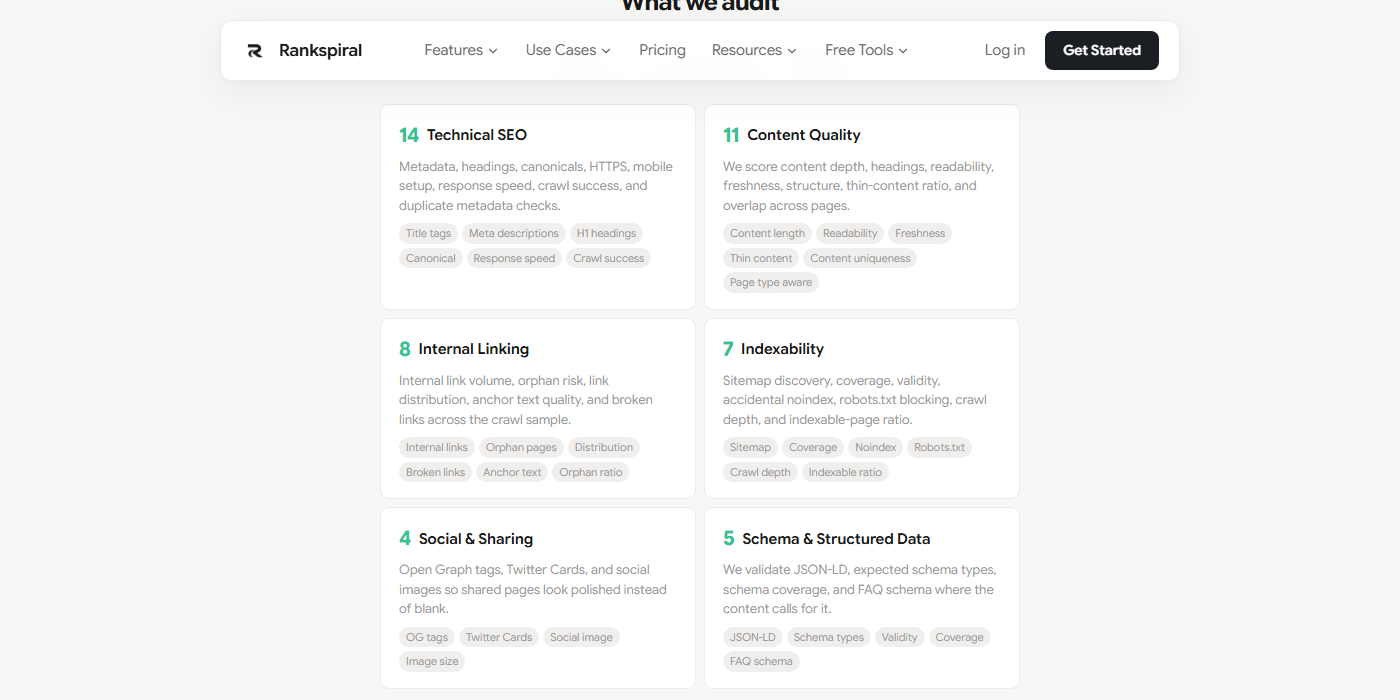
It crawls your site, not just your homepage. Starting from your site URL, it reads robots.txt, finds your sitemap, discovers internal links, and fetches up to 50 pages four at a time with a 10-second timeout each. Then it runs 49 checks across six categories and scores the result out of 100.
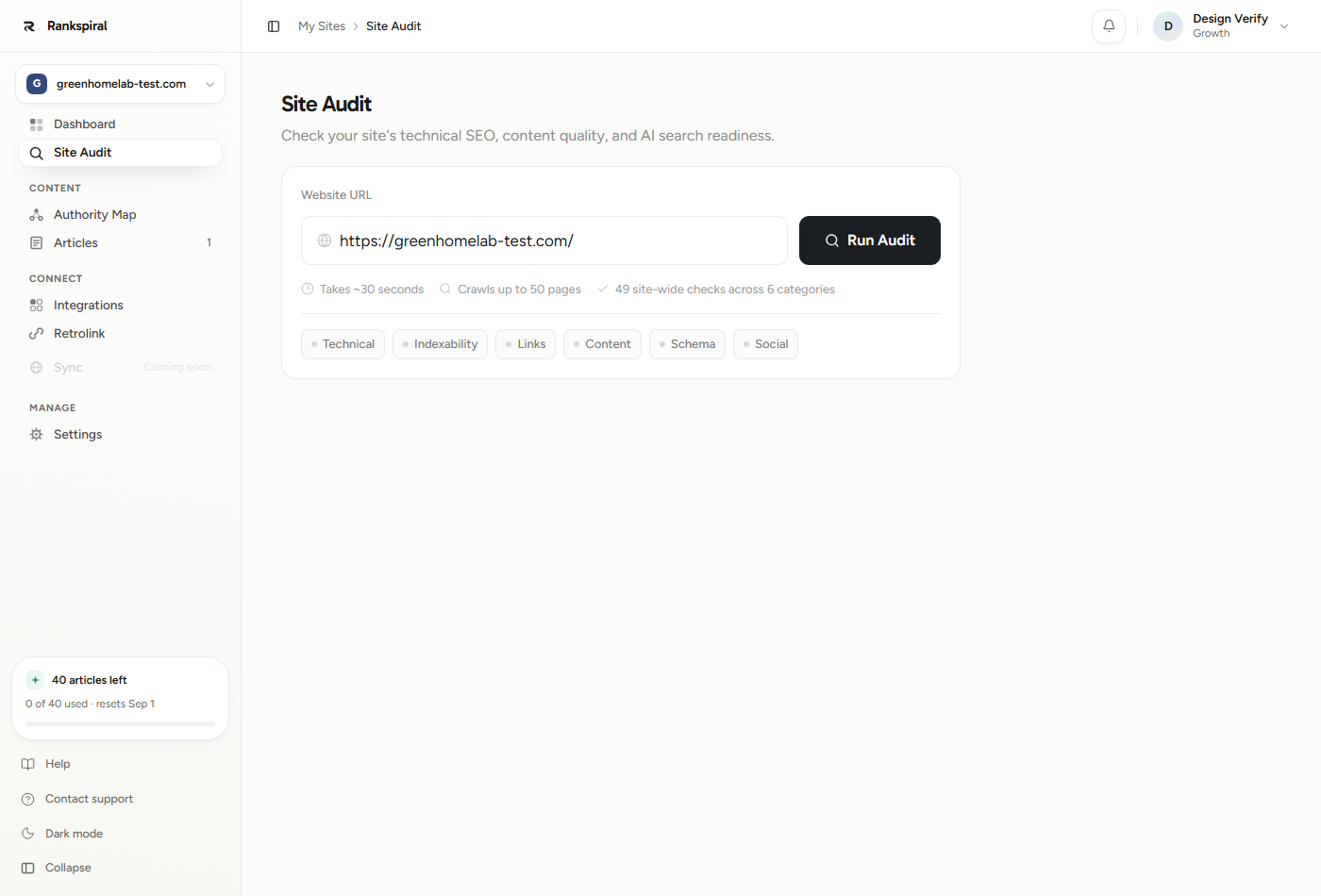
Every result has two views, toggled at the top of the report: Site-wide and Homepage. Site-wide is the real audit. Homepage runs a reduced set (no duplicate checks, no orphan checks, no crawl depth) because a single page cannot duplicate itself or be orphaned from itself.
Statuses, and what the words mean. A check comes back as pass, warning, fail, or skip. The report labels fails as critical and skips are hidden entirely, so a check that does not apply to your site simply will not appear.
How the score is built
Categories are not equal. Content Quality carries the most weight, and Social carries none at all.
| Category | Checks | Weight in the overall score |
|---|---|---|
| Content Quality | 11 | 30% |
| Technical SEO | 14 | 22% |
| Indexability | 7 | 20% |
| Internal Linking | 8 | 18% |
| Schema & Structured Data | 5 | 10% |
| Social & Sharing | 4 | 0% |
Inside a category, a pass is worth 1, a warning 0.55, a fail 0. Checks are weighted (a broken canonical hurts more than a missing image dimension), and a check failing on most of your pages gets its weight multiplied by up to 2.5, so widespread problems dominate the number instead of hiding in an average.
Two safety rails then cap the result. Certain checks are guardrails, and failing one caps the whole category at 50 no matter how well everything else scored. Separately, if any check fails on more than 80% of pages the category is capped at 60, and more than 50% caps it at 75.
That is deliberate. A site with perfect metadata and no HTTPS should not score 88.
The guardrails, so nothing surprises you: HTTPS, mobile viewport, robots meta, crawl success, heading hierarchy, thin content ratio, content uniqueness, orphan page ratio, sitemap exists, crawl depth, and schema coverage. Fail one, and its category is capped at 50.
Score labels: 90 and up is Excellent, 70 and up is Good, 50 and up is Needs Improvement, below 50 is Poor.
Technical SEO (14 checks)
The metadata and delivery layer. This is where most first audits bleed points, and also where the fixes are fastest.
| Check | What it tests | How to fix it |
|---|---|---|
| SSL / HTTPS | Every audited page is served over HTTPS. Guardrail. | Install a certificate and force a redirect from HTTP. Nothing else on this list matters more. |
| Title tag | Present, and between 50 and 60 characters. Missing fails, off-length warns. | Write titles that land in the range. Google truncates around 60 characters, and under 50 you are leaving room unused. |
| Meta description | Present, and between 150 and 160 characters. | Missing is the fail worth fixing. Off-length is a warning, and the lowest-value item on this page. |
| H1 heading | Exactly one H1. Zero fails, two or more warns. | Usually a theme issue: a logo or a sidebar widget wrapped in an H1. Fix the template, not the post. |
| Heading hierarchy | Heading levels never skip more than one step (H2 to H4). Guardrail. | Almost always someone picking a heading level for its font size. Change the styling, not the level. |
| Canonical URL | Present, same host, and pointing at this page. Missing or cross-domain fails, pointing elsewhere warns. | Add a self-referencing canonical sitewide. A canonical pointing elsewhere is only a warning because it is sometimes correct. |
| Mobile viewport | A viewport meta tag set to width=device-width. Guardrail. | One line in your head template. Missing it caps your Technical score at 50. |
| Robots meta | Pages are not marked noindex. Guardrail. Cart, checkout, account, search and admin paths are exempt. | Find the plugin or template flag doing it. This is the single most expensive accidental setting in SEO. |
| Language | The html tag has a lang attribute. | Set it once in your template. Low weight, but it matters more if you publish in more than one language. |
| HTML response speed | Fails above 2,500ms or 350KB of HTML, warns above 1,200ms or 250KB. | This measures your HTML only, not images or scripts. Slow here usually means server or database, not front end. |
| Image dimensions | Images carry width and height attributes. Fails when 60% or more are missing them on a page with at least three images. | Prevents layout shift. Most modern themes do this already, so a fail points at hand-written HTML. |
| Crawl success | Every selected page was fetched. Guardrail. Warns if 90% or more succeeded, fails below that. | Check the listed paths for 404s, timeouts, or a firewall blocking the crawler. |
| Duplicate titles | No two crawled pages share a title (compared lowercase, trimmed). | Usually paginated archives or product variants. Differentiate them or canonicalize the copies. |
| Duplicate meta descriptions | Same test, on meta descriptions. | Lower stakes than duplicate titles. Fix the templated ones first. |
The crawler identifies itself as RankSpiral-Audit/1.0. If crawl success fails on a site you know is healthy, that is the string to allowlist in your WAF or bot rules.
Content Quality (11 checks)
The heaviest category, and the one that behaves least like a checklist. It is also page-type aware: product and collection pages are never scored on word count, because a 200-word product page is doing its job.
| Check | What it tests | How to fix it |
|---|---|---|
| Content length | Fails under 300 words, warns under 800. Skipped on product and collection pages. | Under 300 words is not a page, it is a note. Either expand it or merge it into the page it should have been part of. |
| Average content length | Averaged across blog and standard pages only. Passes at 800 words or more. | Look at this before you look at any individual page. It tells you whether depth is a habit or an accident. |
| Heading in content | Content pages have headings, and at least one H2. No headings fails, H1-only warns. | A page that stops at the H1 is a wall of text. Add H2s at the natural turns, not every 200 words. |
| Pages without headings | Counts them sitewide. One or two warns, three or more fails. | Fix these before you touch anything else in this category. They are the cheapest wins on the page. |
| Image alt text | Fails when half or more images lack alt text on a page with at least three images. | Describe what the image shows and why it is there. Decorative images can take an empty alt. |
| Readability | Fails above 30 words per sentence on average or paragraphs over 5 sentences. Warns at 24 words or 4 sentences. | Split the longest paragraph in each section. That one habit moves this check more than rewriting sentences does. |
| Content freshness | Passes under 183 days, warns under 365, fails beyond that or when no date can be found at all. | Read from your Last-Modified header, time tags, and schema dates. No detectable date is a fail, so publish one. |
| FAQ structure | Question-shaped headings or bolded questions. Passes when 25% of content pages have them, warns at 10%. | This is an AI-search check as much as an SEO one. Answer engines lift question-and-answer blocks directly. |
| Structured content | Lists or tables in the body. Passes at 30% of content pages. | Not every article needs a table. Comparison and how-to pieces almost always do. |
| Thin content ratio | Share of content pages under 300 words. Guardrail. Warns above 25%, fails above 50%. | The guardrail that catches sites publishing volume over substance. Consolidate rather than pad. |
| Content uniqueness | Pairwise word-overlap between your own pages. Guardrail. Pairs over 70% similar are flagged. | Two pages overlapping this heavily are competing with each other. Merge them and redirect the loser. |
Internal Linking (8 checks)
The category most people ignore and most sites fail. Links are how authority moves between your pages, and an unlinked page is a page you wrote for nobody.
| Check | What it tests | How to fix it |
|---|---|---|
| Internal link count | Outbound internal links per page. Passes at 5 or more, warns at 3 to 4, fails below 3. | Link out from every article to the cluster it belongs to. Five is a floor, not a target. |
| Average internal links | The same number, averaged sitewide. | A better health signal than any individual page. If the average is under 3, you have a habit problem. |
| Link distribution | The ratio of your most-linked page to the median. Warns above 5:1, fails above 10:1. | A high ratio means one page hoards all the links. Spread them toward the pages you actually want ranking. |
| Anchor text quality | Share of internal anchors using generic text ("click here", "read more", "here", "this", "link", "learn more"). Warns at 20%, fails above 40%. | Anchor text tells the engine what the target page is about. "Read more" tells it nothing. |
| Orphan pages | Pages with zero inbound internal links, homepage excluded. One or two warns, three or more fails. | Link to them from the relevant pillar or cluster page. This is exactly what Retrolink automates. |
| Orphan page ratio | Orphans as a share of non-homepage pages. Guardrail. Warns above 15%, fails above 40%. | The guardrail version of the check above. Ratio matters more than count on a large site. |
| Broken internal links | Internal links pointing at pages that failed to load during this crawl. | Fix the target or the link. See the honest caveat below before you trust a clean pass here. |
| Broken external links | Probes the first 20 unique external links (8 on the free tool). Warns at 1 to 4 broken, fails at 5 or more. | Replace or remove. A 403 from a site that blocks bots is a false positive worth checking by hand. |
Broken internal links undercounts, and you should know it. A link only counts as broken if its target was itself one of the pages crawled this run and failed. Links pointing outside the 50-page sample are never probed, so a green result here means "none found in the sample", not "none exist".
Indexability (7 checks)
Whether Google can reach and is allowed to keep your pages. Two checks here carry the highest weights in the entire audit, because a page that cannot be indexed is worth exactly zero regardless of how good it is.
| Check | What it tests | How to fix it |
|---|---|---|
| Sitemap exists | A sitemap found via robots.txt or at /sitemap.xml. Guardrail. Follows sitemap indexes two levels deep. | Generate one and reference it from robots.txt. Everything below depends on this passing. |
| Sitemap coverage | Crawled pages that are missing from the sitemap. Warns at 1 to 3, fails at 4 or more. | Usually a stale cached sitemap. Regenerate it, then resubmit in Search Console. |
| Sitemap validity | Samples the first 5 sitemap URLs and checks they resolve. One failure warns, two fails. | Dead URLs in a sitemap waste crawl budget and erode trust in the file. |
| Noindex misuse | Pages that look like real content but are marked noindex. The heaviest check in the audit. | Cart, checkout, account, search and admin paths are exempt. Anything else flagged here is almost certainly a mistake. |
| Robots.txt blocking | Disallow rules that block blog, article, product, collection, category or page paths. Tied for heaviest. | Read the offending rules in the check details. A stray Disallow: / from a staging config is the classic. |
| Indexable page ratio | Share of sampled pages that are reachable, not noindexed, and have substance. Passes at 80%, warns at 60%. | "Substance" means 100 words or more, or a homepage, product or collection page. |
| Crawl depth | Clicks from the homepage to the deepest content page. Guardrail. Passes at 2, warns at 3 to 4, fails beyond. | Pages unreachable from the homepage link graph force an automatic fail. Add hub pages rather than deeper menus. |
Schema and Social
Schema is 10% of your score. Social is 0%, and knowing that saves you an afternoon.
| Check | Category | What it tests, and what to do |
|---|---|---|
| JSON-LD present | Schema | Any application/ld+json block. Fails sitewide once 35% of pages are missing it. |
| Schema types | Schema | The type matches the page intent: Organization or WebSite on the homepage, Article or BlogPosting on posts, Product, CollectionPage. Wrong type warns, missing fails. |
| Schema validity | Schema | Parses, and has a @context plus a @type or @graph. Malformed JSON fails. Validate before shipping template changes. |
| Schema coverage | Schema | Guardrail. Passes at 60% of content pages carrying schema, warns at 20%. |
| FAQ schema | Schema | FAQPage markup on content pages. Passes at 25%, warns at 10%. RankSpiral adds this to published articles automatically unless you turn it off. |
| Open Graph tags | Social | og:title, og:description, og:image. Partial warns, none fails. |
| Twitter Card tags | Social | twitter:card, twitter:title, twitter:description. |
| Social image | Social | The og:image URL is probed and must resolve. Up to 8 unique images per audit (4 on the free tool). |
| Social image size | Social | Passes at 1200 x 630 or larger. Undersized warns. |
Social checks are shown but never scored. The category has a weight of zero, so the Social card can read 40 and your overall score will not move by a point. Fix them for the humans sharing your links, not for the number.
Getting the most out of it
Read the Priority Fix Queue first, then close the rest of the report. It ranks the top six issues by weight times severity times how many pages are affected, which is a better order than your instincts. Work down it, re-audit, and repeat.
Fix guardrails before anything else, even if only one page fails. A single noindexed article does not look scary in the list, but a guardrail fail caps that category at 50, which can cost you fifteen points overall. Sort by "critical", find the guardrail names from the warning box above, and clear those first.
Use the ratio checks to decide whether a problem is a habit. Content length tells you a page is thin. Thin content ratio tells you your publishing process produces thin pages. The first is an afternoon, the second is worth changing how you write briefs.
Do the boring template fixes in one sitting. Mobile viewport, html lang, self-referencing canonical, and one H1 per page are all single-line theme edits that touch every page at once. Twenty minutes here usually moves Technical SEO more than a week of individual page work.
Re-audit a week after publishing, not the same day. Freshness, sitemap coverage and internal link counts all lag your actual changes, and a same-day re-run mostly measures your cache.
A realistic target: 70 or above with zero guardrail fails. Chasing 95 means fighting checks with weights under 0.3, and that time is better spent publishing the next cluster.
The free public tool, and what it holds back
There is a logged-out version at /tools/seo-audit. It runs the same engine and the same 49 checks, which is worth saying plainly, because most free audit tools run a shallow subset.
What differs is the crawl depth and how much of the result you get to see.
| Free tool at /tools/seo-audit | Site Audit in your project | |
|---|---|---|
| Sign-in | Not required | Required, and the URL must be on your project's site |
| Pages crawled | 25 | 50 |
| External links probed | 8 | 20 |
| Social images probed | 4 | 8 |
| Checks run | All 49 | All 49 |
| Issues shown per category | Top 3 | All of them |
| Which pages are affected | Hidden | Listed per check |
| Page-by-page table | Not included | Every crawled page, with its own score |
| Priority Fix Queue | Locked | Top 6, ranked |
| History | None | Last 6 runs, last 4 shown |
| PDF export | No | Yes, via Export PDF |
| Shared result lifetime | 24 hours | Kept |
| Rate limit | 6 audits per hour, 1 per URL per 10 minutes | 12 per 10 minutes, 1 per URL per minute |
One genuinely useful quirk: the free tool shows a How to fix line under every issue, and the in-app category cards do not (in-app, that guidance lives in the Priority Fix Queue). If you want the fix text for a check that is not in your top six, the public tool is the faster place to read it.
There is no plan limit on audits. Run them as often as the rate limits allow.
If the audit looks wrong
- "Crawl success" fails on a site that loads fine in your browser. Your firewall or bot protection is blocking
RankSpiral-Audit/1.0. Allowlist it and re-run. - Every content check scores badly and the pages look empty. Look for the Client-rendered content detected notice at the top. The audit reads server-rendered HTML, so a JavaScript-only site shows almost no content, and so does Google's first pass.
- Only one page was crawled. The Single-page crawl notice means no sitemap was found and no internal links were discovered. Fix the sitemap first, then re-audit.
- The score dropped after you published more. Expected, and usually honest. New posts start with no inbound links, so orphan and internal link counts dip until Retrolink or your own linking catches up.
- "Project audits can only scan URLs on your configured project site." The URL is outside your project's domain. Set the right domain in Settings, or use the free tool for a one-off.
One closing thought, because the report can feel like a scolding.
The audit is not a grade, it is a queue. Two guardrail fixes and a linking pass will move it more than obsessing over meta description lengths ever will.
Retrolink: fixing orphan pages and internal links→ The Authority Map: pillars, clusters and keywords→ Connect Search Console to see what the audit cannot→ Every limit and quota explained→Was this page useful?
Tell us what was missing and we'll fix the page.