
Internal linking is the highest-ROI lever in SEO. This is not a controversial opinion. It's math. You control the links, they cost nothing, and they work the moment Googlebot finds them.
And yet most sites are actively mismanaging them. Orphan pages sitting in the dark. Equity pooling on the homepage like a puddle no one's mopping up. New content published into the void, waiting weeks for its first crawl. Not because internal linking is hard. Because no one gave you a reproducible system.
This guide fixes that. You'll get a prioritization score, a 90-day experiment template, and audit steps that produce measurable results. Not theory. A process. The spreadsheet is free. The excuses are on you.
Why Internal Links Are Quietly Running Everything
An internal link is the same HTML as a backlink. Same <a href> tag. Same anchor text. Completely different authority dynamics.
A backlink requires someone else to cooperate. An internal link requires you to open a text editor.
One of these is more reliable.
The sites ranking above you probably don't have better content. They have better wiring. Their pages are connected in ways that tell Google what matters, what's related, and what to crawl next. Your pages are connected in ways that tell Google... your developer once installed a WordPress theme and never touched the sidebar again.
Here's what's happening right now on most sites: orphan pages are invisible to Googlebot. New content sits unindexed for weeks. High-authority pages hoard equity they'll never use. And somewhere, a product page with real commercial intent is buried at depth 6, receiving approximately zero link equity and ranking accordingly.
This guide ends with you fixing that. Systematically. With numbers.
How Internal Links Actually Move Rankings
Internal links do three things that affect rankings. They control crawlability, distribute equity, and signal topical relationships. Every other benefit (user engagement, lower bounce rate, more pageviews) is a side effect of these three mechanisms working correctly.
Understanding how they work isn't optional. It's the difference between adding links that move rankings and adding links that do nothing.
Crawlability and Index Speed
Googlebot follows links. That's how it discovers pages. A page with zero internal links pointing to it will be crawled less frequently, indexed later, and may fall out of the index entirely.
This is not speculation. Google's own crawl budget documentation confirms that internal link depth and frequency influence how often a page gets crawled.
The practical application: adding internal links to a new page from already-crawled, high-traffic pages is the fastest way to get it indexed. Faster than submitting to Search Console. Faster than pinging the URL Inspection API. Faster than waiting and hoping, which is the current strategy for most sites.
You can measure this. Pull the Coverage report in Google Search Console before adding links. Note the "Last crawled" timestamps via URL Inspection for your target pages. Add the links. Check again in 7-14 days. The recrawl timestamps will tell you exactly what happened.
Pages that were orphaned often get recrawled within 48-72 hours of receiving links from frequently-crawled source pages.
That's not magic. That's plumbing.
PageRank Flow and Equity Distribution
Link equity passes through internal links. This is the original PageRank model, and while Google has evolved it significantly since 1998, the core principle holds: pages that receive more internal links from authoritative pages rank better than pages that don't.
Here's a worked example that competitors won't give you.
Assume your homepage has a PageRank score of 100 (arbitrary units, stay with me). It links to 10 pages in your main navigation. Each of those pages receives roughly 10 units of equity. One of those pages links to 5 subpages. Each subpage receives roughly 2 units.
Now one of those subpages links to a blog post. That blog post receives a fraction of 2 units.
That's depth 4. The blog post is getting crumbs.
Meanwhile, if you add a contextual link from the homepage directly to that blog post, it jumps from crumbs to roughly 10 units. A 5x increase in equity from a single link.
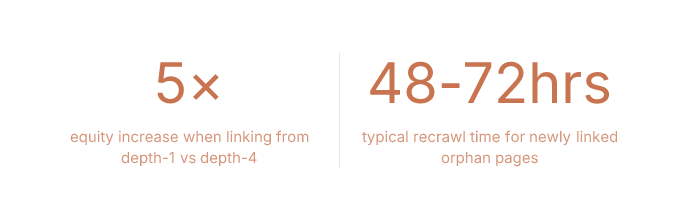
The math is simplified. The principle is not. Depth matters. Source authority matters. And most sites have their most important commercial pages sitting at depths where equity barely reaches them.
Topical Authority Signals
When pages on related subtopics link to each other and to a pillar page, Google's understanding of your site's topical coverage improves. This is the topic cluster model. Hub-and-spoke. Whatever you want to call it.
The mechanism is straightforward: a cluster of 8 articles on "noise-cancelling earbuds" (reviews, comparisons, technology explainers, buying guides) all interlinked and pointing to a central pillar page outranks a single 10,000-word page on the same topic.
Not because 8 pages have more words. Because the link graph signals depth of coverage.
Google sees the connections and infers: this site has comprehensive expertise on this topic. The single 10,000-word page, no matter how good, is a monologue. The cluster is a library.
Build the library. Wire it together. The rankings follow.
The Priority Score: Which Pages to Link From

Every guide says "link from high-authority pages." None of them tell you how to score and rank those pages numerically. So you're left staring at your site thinking, "I guess the homepage is important?" and calling it a strategy.
That ends here.
Building the Scoring Formula
The Priority Score formula:
Priority Score = (Organic Sessions × 0.4) + (Referring Domain Count × 0.4) + (Conversion Rate × 0.2)
Normalize each component to a 0-100 scale before applying weights. The output is a score from 0 to 100 for every page on your site.
Here's why each weight exists.
Traffic Weight
Organic sessions (weighted at 0.4) indicate how frequently Googlebot visits the page. High-traffic pages get crawled more often. A link from a page Googlebot visits daily gets followed faster than a link from a page Googlebot visits monthly.
Traffic also means real humans see the link. Which means clicks. Which means engagement signals. Which means the link does double duty.
Backlink Weight
Referring domain count (weighted at 0.4) measures how much external equity the page holds. A page with 47 referring domains has equity to pass. A page with 0 referring domains is passing along nothing.
You're looking for pages that are already receiving authority from external sources. Those are your distribution hubs.
Conversion Weight
Conversion rate (weighted at 0.2) ensures you're not just optimizing for SEO outcomes. A link from a high-converting page to another relevant page serves a business goal.
This is the weight that separates an SEO tactic from a business decision.
Most people skip it. Most people also can't justify their internal linking work to stakeholders.
Related, probably.
Running the Audit
The audit uses two data sources: Screaming Frog and Google Search Console.
Step 1: Crawl your site with Screaming Frog. Export the Internal Links report (Bulk Export → Links → All Inlinks). This gives you every page and how many internal links point to it.
Step 2: Export Performance data from GSC (Pages tab, last 90 days). You need URL, Clicks, and Impressions columns.
Step 3: Export your backlink data. Ahrefs, Moz, or Semrush. You need URL and Referring Domains.
Step 4: Pull conversion data from Google Analytics (or whatever you use). You need URL and Conversion Rate.
Step 5: Merge everything into one spreadsheet. Columns: URL, Organic Sessions, Referring Domains, Conversion Rate, Inlink Count, Priority Score.
Step 6: Calculate the Priority Score for every page. Sort descending.
Your top 20 pages by Priority Score are your source pages. These are where you'll add links from. Your target pages are the ones with high commercial value but low inlink counts.
The free CSV template at rankspiral.com has this structure pre-built. Download it, paste your data, and the scoring formulas are already there.
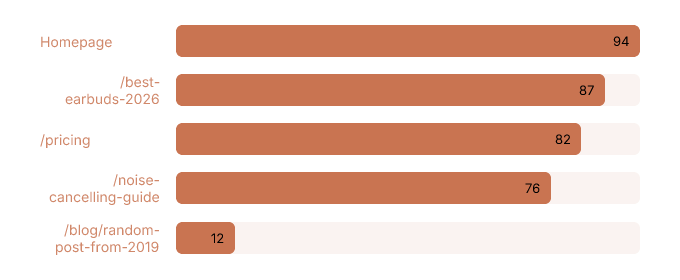
Orphan page detection is part of this audit. In Screaming Frog, filter for pages where Inlinks = 0. These pages are invisible to Googlebot unless they appear in your sitemap. The fix is immediate: add them to relevant hub pages, topic cluster pillar pages, or category navigation. An orphan page is a page you wrote and then abandoned. Rude, honestly.
Anchor Text That Won't Hurt You
Anchor text for internal links in 2026 follows one rule: be descriptive.
"How PageRank flows through internal links" beats "click here."
Always.
Exact-match keyword anchors are fine for internal links. Google's over-optimization penalties (Penguin, etc.) apply to external link profiles, not internal ones. You can link to your "best running shoes" page with the anchor "best running shoes" without triggering anything.
But. Using the same anchor for the same target page across 40 different articles looks mechanical. Because it is mechanical. Vary your anchors. Use synonyms, partial matches, and natural phrases. Anchor text diversity isn't just an SEO signal. It's a sign that a human wrote the content.
Now the part everyone ignores: WCAG link-purpose requirements. Anchors must make sense out of context for screen readers. A screen reader user navigating by links hears a list of anchor texts without surrounding sentences. "Click here," "read more," and "this article" are meaningless in that context.
Descriptive anchors that satisfy WCAG also happen to be better for SEO.
Accessibility and rankings aligned. Not in conflict. This almost never happens in SEO, so enjoy it.
On link quantity: there is no hard limit. But a page with 300 internal links is diluting equity across all of them. The practical ceiling for most content pages is 100-150 total links. Navigational links (header, footer, sidebar) count toward this total but pass less equity than contextual body links. A link embedded in a paragraph about the topic carries more weight than a link in a footer that appears on every page.
Stop counting nav links in your contextual link totals. They're different animals.
For most blog posts and content pages, aim for 5-15 contextual internal links in the body. That's the range where you're distributing equity meaningfully without turning every paragraph into a link farm.
Rankspiral's Link Opportunity Score is what this manual process looks like when automated. The platform surfaces a per-article score (e.g., 92/100) and automatically weaves contextual links into new and existing content using the same traffic + backlink + conversion logic. It's the spreadsheet, minus the spreadsheet.
Edge Cases That Break Everything
The standard internal linking advice works for standard sites. Then there are the sites where nothing is standard and everything is on fire. JavaScript-rendered links, faceted navigation generating 47,000 URL combinations, and pagination strategies from 2014 that no one has revisited.
These are the problems that don't show up in beginner guides. They show up in your crawl reports at 2 AM.
JavaScript-Rendered Links
If a link only exists in the DOM after JavaScript executes, Googlebot may not follow it on the first crawl pass.
Google uses a two-wave rendering model. First wave: raw HTML. Second wave: rendered JavaScript. The second wave happens later. Sometimes much later. Sometimes never, for low-priority pages.
The diagnostic: crawl your site with Screaming Frog (which renders JS) and compare against a raw HTML fetch in Google's URL Inspection tool. If links appear in Screaming Frog but not in the raw HTML source, they're JS-dependent.
Those links exist on a maybe.
The fix is server-side rendering or static HTML fallbacks for navigation and contextual links. You don't need to rewrite your entire site. You need to ensure that the links carrying equity and enabling crawlability are present in the initial HTML response.
Everything else can stay in JavaScript. The decorative stuff. The interactive bits. The things that make designers happy and Googlebot indifferent.
Faceted Navigation and Pagination
Ecommerce sites generate thousands of URL combinations through faceted navigation. ?color=red&size=M&sort=price. Each combination is a URL. Each URL is a page Googlebot might crawl instead of your actual product pages.
Canonical tags handle the duplicate content issue. But the internal linking problem is separate. If faceted URLs are linked from category pages, Googlebot will spend crawl budget on them. That's crawl budget not being spent on your product pages.
What to change: remove faceted URLs from the internal link graph. Use JavaScript-based filtering that doesn't generate crawlable URLs, or add noindex to faceted pages and block them in robots.txt. Apply canonical tags pointing to the clean category URL.
What to leave alone: filters that create genuinely unique, high-value pages. "Vegan leather boots" might be a faceted URL, but if it has search volume and unique products, it deserves to be indexed and linked.
Pagination: paginated series should use self-referencing canonicals on each page. Not canonical-to-page-1. Google deprecated rel="next/prev" as a ranking signal years ago, and canonicalizing all paginated pages to page 1 tells Google that pages 2, 3, and 4 don't exist.
Then you wonder why products on page 4 never index.
The mystery was never a mystery.
When to Use Nofollow Internally
Almost never.
The original use case was PageRank sculpting. Google stopped honoring that in 2009. Adding rel="nofollow" to internal links doesn't redirect equity to other links. It just wastes it. The equity that would have flowed through that link disappears. It doesn't get redistributed.
Modern use cases are narrow: login pages, shopping cart pages, user-generated content sections where you can't vouch for the destination. That's it.
Nofollowing internal links to "save" equity for important pages doesn't work. It hasn't worked for 17 years.
A surprising number of sites still do it.
We're not judging. (We're judging.)
The 90-Day Experiment Template
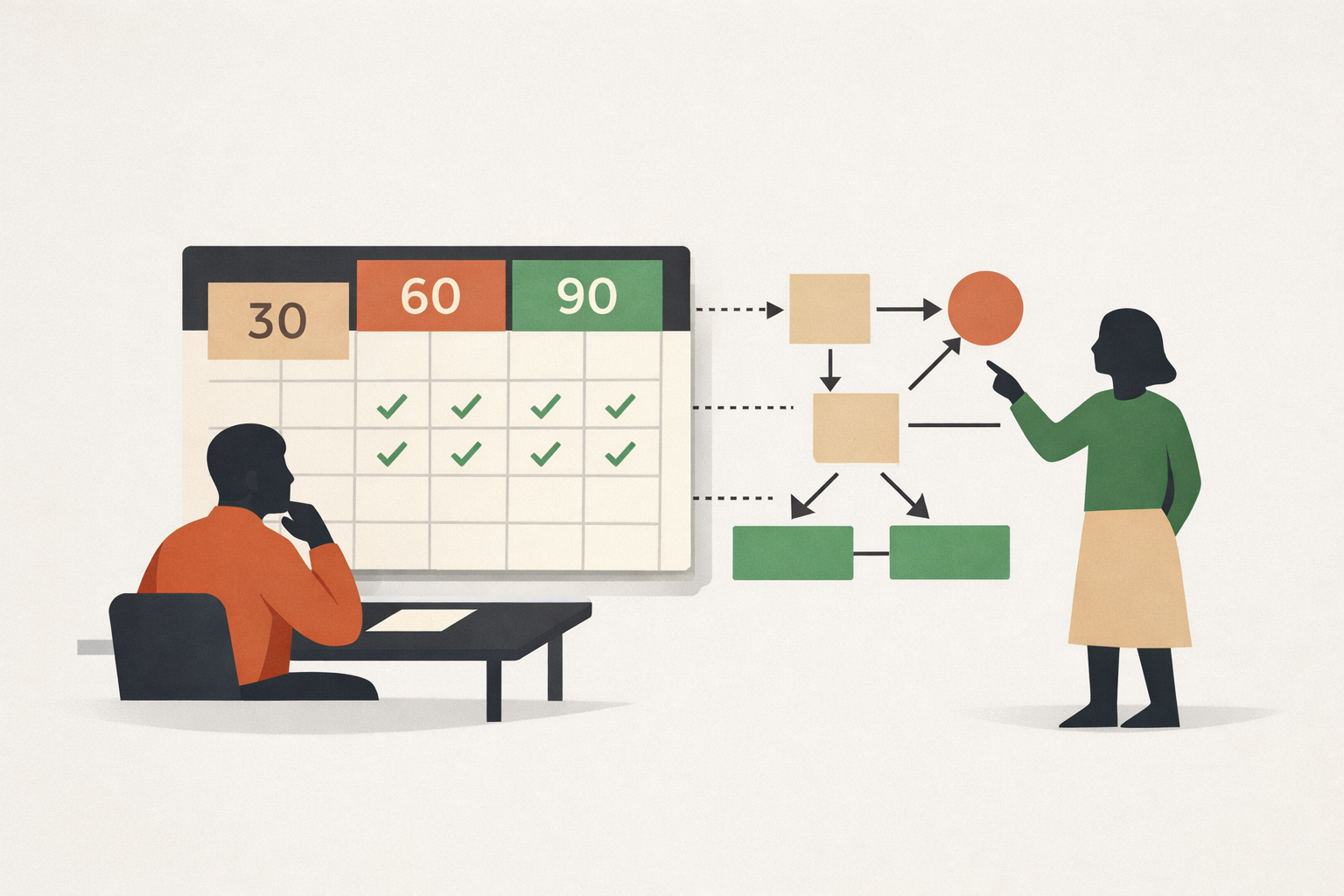
Theory is nice. Measurement is better. Here's a 90-day experiment structure that isolates the impact of internal linking changes from everything else you're doing to your site (which is probably too many things at once, but that's a different article).
Weeks 1-2: Run the full audit. Calculate Priority Scores. Identify your top 20 target pages (high commercial value, low inlink count) and top 10 source pages (highest Priority Scores).
Weeks 3-4: Add 2-3 contextual internal links from each source page to relevant target pages. That's 20-30 new internal links total. Document every change in your spreadsheet: source URL, target URL, anchor text, date added.
Weeks 5-8: Monitor. Check crawl frequency in GSC Coverage report. Pull URL Inspection timestamps for target pages. Watch for recrawl activity.
Weeks 9-12: Measure ranking and traffic deltas for target pages versus a control group of similar pages that received no new internal links.
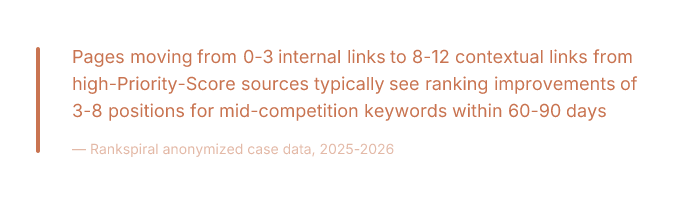 ranking improvements of 3-8 positions for mid-competition keywords within 60-90 days — Rankspiral anonymized case data, 2025-2026" data-visual-marker="W0NBTExPVVQ6IFBhZ2VzIG1vdmluZyBmcm9tIDAtMyBpbnRlcm5hbCBsaW5rcyB0byA4LTEyIGNvbnRleHR1YWwgbGlua3MgZnJvbSBoaWdoLVByaW9yaXR5LVNjb3JlIHNvdXJjZXMgdHlwaWNhbGx5IHNlZSByYW5raW5nIGltcHJvdmVtZW50cyBvZiAzLTggcG9zaXRpb25zIGZvciBtaWQtY29tcGV0aXRpb24ga2V5d29yZHMgd2l0aGluIDYwLTkwIGRheXMgfCBSYW5rc3BpcmFsIGFub255bWl6ZWQgY2FzZSBkYXRhLCAyMDI1LTIwMjZd" style="width:100%;max-width:680px;border-radius:10px;margin:20px 0;display:block;" />
Pages that were orphaned show the most dramatic changes. Moving from unindexed to page 1 within 30 days is not unusual when the target page has genuine relevance and the source pages have real authority.
These are ranges. Not guarantees. Your site is not my site. Variance is real.
But the direction is consistent.
Measuring What Actually Changed
KPIs to track across the 90 days:
- Crawl frequency (GSC Coverage report). Are target pages being crawled more often?
- Indexed page count. Did orphan pages enter the index?
- Average position for target pages (GSC Performance). Did rankings improve versus the control group?
- Organic sessions to target pages. Traffic is the outcome that matters.
- Conversion rate on target pages. Did the new traffic convert?
Attribution is imperfect. Internal linking changes rarely happen in isolation. You're also publishing content, earning backlinks, and probably changing your title tags because someone read a different article. The control group comparison is the only way to isolate the effect.
For ecommerce sites, add these KPIs:
- Category-to-product click-through rate. Are users following the new internal links from category pages to product pages?
- Cross-sell link click rate. Are "related product" links generating engagement?
- Revenue attributed to target pages. This is the number your ecommerce director needs to justify the work.
Almost no SEO guide includes ecommerce-specific KPIs for internal linking.
Which explains why almost no ecommerce team gets budget for internal linking work.
Frequently Asked Questions
These answers are designed to be self-contained, quotable, and more specific than whatever the other guides are saying. Which is usually "it depends."
It does depend. But we can be more helpful than that.
What is internal linking in SEO and why is it important?
Internal linking is the practice of connecting pages within the same website using hyperlinks. It controls three things that directly affect rankings: how Googlebot discovers and crawls your pages (crawlability), how link equity distributes across your site architecture (PageRank flow), and how Google understands topical relationships between your content (topic clusters and pillar pages). As of 2026, internal linking remains the only ranking factor you control entirely, costs nothing to implement, and takes effect as soon as Googlebot follows the link.
How many internal links should a page have?
For contextual body links, aim for 5-15 per content page. The total link count (including navigation, footer, and sidebar links) can reach 100-150 before equity dilution becomes a practical concern. There is no hard penalty for exceeding this, but every additional link on a page reduces the equity each individual link passes. Navigational links that appear site-wide pass less weight than contextual links embedded in relevant body content.
Do internal links help SEO or are they overrated?
Yes, internal links help SEO. They help most when they're contextual, placed on pages Googlebot visits frequently, and pointing to pages that need equity. Random links from low-traffic pages to other low-traffic pages accomplish approximately nothing. The effect is measurable: in anonymized case studies, pages moving from 0-3 internal links to 8-12 contextual links from high-authority source pages saw ranking improvements of 3-8 positions within 60-90 days. Orphan pages that received their first internal links moved from unindexed to page 1 within 30 days in some cases.
What is the best anchor text for internal links?
Descriptive, contextual anchor text that accurately describes the target page. Exact-match keyword anchors are safe for internal links. Google's over-optimization penalties apply to external backlink profiles, not internal linking. However, using identical anchor text across dozens of pages looks mechanical and should be varied with synonyms and natural phrases. Anchors should also satisfy WCAG link-purpose requirements by making sense out of context for screen reader users.
How do I find internal linking opportunities?
Run a Screaming Frog crawl and export the Internal Links report. Cross-reference with Google Search Console performance data and backlink data from any SEO tool. Calculate a Priority Score for each page using the formula: (Organic Sessions × 0.4) + (Referring Domains × 0.4) + (Conversion Rate × 0.2), normalized to 100. Pages with high Priority Scores and few outbound links to your target pages are your best opportunities. The free CSV template at rankspiral.com has this structure pre-built with scoring formulas included.
Start With the 20 Pages That Matter Most
Don't audit the entire site first. That's how internal linking projects die. In a spreadsheet. Quietly. With no one noticing for six months.
Run the Priority Score formula. Identify the top 20 target pages that need equity. Find the top 10 source pages with the highest scores. Add 2-3 contextual links from each source to each relevant target.
That's 20-30 new internal links. Do it this week. Measure in 30 days.
The sites that win at internal linking aren't doing anything clever. They're doing it systematically, repeatedly, and with a spreadsheet.
The spreadsheet is available for free at rankspiral.com.
The excuse is not.